Boost Efficiency with Sales and Operations Automation

In 2025, over 70% of growing businesses report revenue leakage, delayed decision-making, or customer dissatisfaction due to manual processes and disconnected systems. Sales teams chase leads in one tool, operations track execution in another, and finance reconciles everything in spreadsheets — often days or weeks later. As a result, leadership lacks real-time visibility, teams duplicate effort, and opportunities slip through the cracks. This is precisely where sales and operations automation becomes a strategic necessity rather than a technology upgrade. Automation connects people, processes, and data across the organization, ensuring work flows seamlessly from lead generation to delivery, billing, and reporting.

In this guide, you will learn the top automation processes that directly improve sales performance and operational efficiency, why they matter more than ever in 2025, and how a unified CRM platform like CrmLeaf enables end-to-end automation without complexity. By the end, you will have a practical framework to identify automation opportunities, avoid common mistakes, and drive measurable business outcomes.

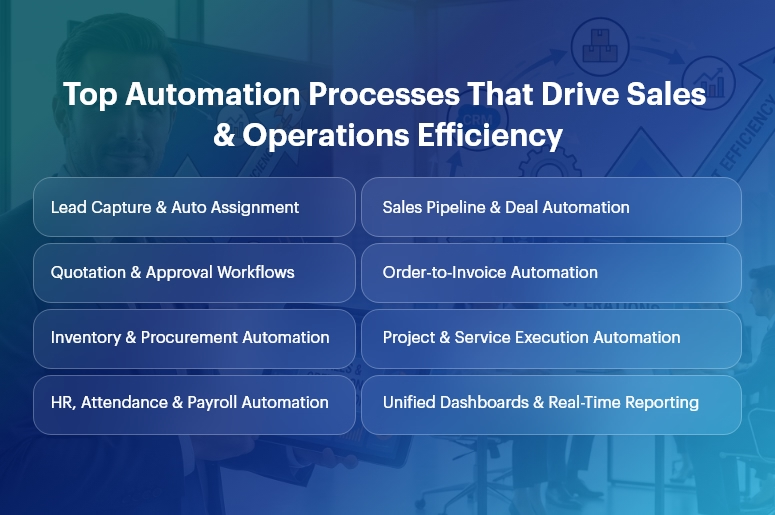
Top Automation Processes That Drive Sales & Operations Efficiency (1)

Business Need & Importance

Today’s small and mid-sized businesses operate in a high-pressure environment defined by shorter sales cycles, rising customer expectations, compliance demands, and margin sensitivity. However, many still rely on manual handoffs, spreadsheets, and siloed applications.

Why manual processes hurt growth

  • Delayed sales follow-ups and approvals reduce conversion rates and increase customer churn.
  • Disconnected operations and finance data lead to inaccurate forecasts and budget overruns.
  • Human-dependent workflows introduce errors, rework, and compliance risks.

This is why sales and operations automation has become mission-critical.

Industry examples

  • Manufacturing: Manual order processing and inventory updates cause production delays and excess stock. Automation synchronizes CRM orders with MRP, inventory, and invoicing.
  • Retail & Distribution: Disconnected sales, warehouse, and finance systems slow order fulfillment and distort margins. Automated workflows ensure real-time stock visibility and faster billing.
  • Professional Services: Project teams struggle with scope creep and delayed invoicing. Automation aligns sales commitments with project execution and revenue recognition.

Moreover, growing businesses can no longer afford spreadsheet-driven decision-making. As volumes scale, complexity increases exponentially. Sales and operations automation replaces guesswork with data-driven execution, ensuring speed, accuracy, and accountability across departments.

Best Practices, Frameworks & Actionable Tips

Core Automation Processes That Drive Impact

1. Lead-to-Opportunity Automation (CRM)

  • Automated lead capture, scoring, and routing ensure every inquiry is assigned instantly to the right salesperson based on rules, territory, or workload.
  • This eliminates response delays and improves conversion rates while giving managers pipeline transparency.

2. Sales Pipeline & Quotation Automation

  • Stage-based pipeline automation updates deal probability, expected revenue, and next actions automatically.
  • Integrated quotation workflows reduce pricing errors and speed up approvals using predefined discount and margin rules.

3. Order-to-Cash Automation

  • Once a deal closes, sales and operations automation triggers sales orders, delivery schedules, invoicing, and payment tracking automatically.
  • This removes manual handoffs between sales, operations, and finance, accelerating cash flow.

4. Inventory & Procurement Automation

  • Automated stock updates and reorder rules prevent stockouts and excess inventory.
  • Procurement workflows link demand forecasts with supplier orders, approvals, and GRNs.

5. Project & Service Delivery Automation

  • Sales commitments convert directly into projects, tasks, and resource plans.
  • Automated milestone tracking ensures timely delivery and accurate billing.

6. HR, Payroll & Attendance Automation

  • Employee onboarding, attendance, payroll, and compliance workflows run automatically.
  • This reduces administrative overhead and improves data accuracy across departments.

Implementation Best Practices

  • Start with high-impact, cross-functional workflows that involve multiple teams, such as lead-to-cash or order-to-invoice. These deliver faster ROI.
  • Standardize processes before automating. Automation amplifies efficiency — but it also amplifies inefficiencies if workflows are unclear.
  • Use role-based dashboards so sales, operations, and leadership see only what matters to them.
  • Automate approvals with guardrails, not bottlenecks. Define thresholds to balance speed and control.

Do’s and Don’ts

Do’s

  • Automate end-to-end, not in silos, to ensure continuity across CRM, ERP, HR, and finance.
  • Use real-time analytics to monitor performance and adjust workflows proactively.

Don’ts

  • Do not over-customize early, which increases maintenance and slows adoption.
  • Do not automate without change management — user adoption determines success.

Why Unified CRM Wins

Unlike point solutions, a unified CRM platform like CrmLeaf delivers true sales and operations automation by sharing a single data model across:

  • CRM: Leads, opportunities, and customer interactions
  • Projects & Manufacturing: Execution, delivery, and production planning
  • Inventory & Procurement: Stock, vendors, and logistics
  • HRMS & Payroll: Workforce and compliance
  • Finance: Invoicing, accounting, and reporting

This eliminates integrations, data duplication, and reconciliation delays—creating one source of truth.

Customer Success

For example, a mid-sized manufacturing company implemented sales and operations automation using CrmLeaf to address delayed order processing and poor forecast accuracy.

Their sales team struggled with manual quotations, while operations lacked visibility into confirmed demand.

Within 90 days, Apex automated lead-to-order workflows, synchronized CRM deals with production planning, and introduced real-time inventory updates.

As a result, they achieved 28% faster order fulfillment, 35% improvement in forecast accuracy, and 20% reduction in working capital tied to excess inventory.

More importantly, leadership gained unified dashboards spanning sales, operations, and finance — enabling faster, data-driven decisions and scalable growth.

Key Takeaways & Closing

Automation is no longer optional — it is the backbone of scalable growth. Businesses that embrace sales and operations automation gain speed, accuracy, and visibility across their entire value chain.

From lead management and order processing to delivery, payroll, and finance, automation removes friction and unlocks performance.

As competition intensifies in 2025, organizations that delay automation risk falling behind. Those that act now position themselves for sustainable, profitable growth powered by connected systems and real-time insights.

FAQs

1. What is sales and operations automation?

Sales and operations automation connects CRM, ERP, and business workflows to automate lead management, order processing, delivery, and reporting in real time.

2. How does sales and operations automation improve efficiency?

It eliminates manual handoffs, reduces errors, and accelerates workflows across sales, operations, and finance using shared data.

3. Is sales and operations automation only for large enterprises?

No. SMBs benefit even more, as automation helps them scale without adding operational overhead.

4. How long does it take to see ROI from sales and operations automation?

Most businesses see measurable improvements within 60–120 days when high-impact workflows are automated first.

5. Why choose a unified CRM for automation?

A unified platform ensures seamless sales and operations automation without integrations, data silos, or reconciliation delays.

6. Can automation adapt as my business grows?

Yes. Scalable platforms like CrmLeaf allow workflows, approvals, and analytics to evolve with your business needs.

7. Does automation replace human decision-making?

No. Sales and operations automation supports teams with real-time data, enabling faster and smarter decisions rather than replacing them.

Top 15 Workplace Automation Trends Shaping 2026

Did you know that 70% of organizations have adopted structured automation in 2025, up sharply from just 20% in 2021? Yet many small and mid-sized businesses still struggle with disconnected tools, manual processes, and inefficient workflows that eat away at profitability and agility. In today’s fast-changing business environment, workplace automation trends aren’t a buzzword, they are a necessity.

As operations become more complex across sales, HR, finance, manufacturing, and service functions, manual spreadsheets, disjointed tools, and siloed data no longer cut it. For 2026 and beyond, companies that fail to embrace automation risk falling behind, in speed, accuracy, and customer experience.

In this article, you’ll learn about 15 key workplace automation trends shaping 2026. You’ll discover why they matter, how they deliver real ROI, and more importantly, how a unified CRM + ERP platform like CrmLeaf can help you take advantage of them today. Whether you’re a sales leader, HR manager, operations head, finance professional or manufacturing lead, this guide is for you.
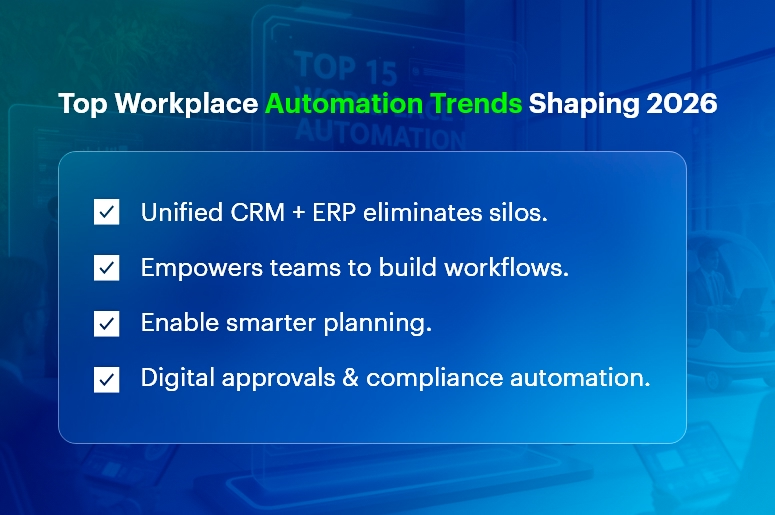
Top Workplace Automation Trends Shaping 2026

Business Need & Importance

Running a business in 2025 and beyond comes with rising expectations: faster decision-making, leaner operations, tighter compliance, better customer satisfaction, and scalable growth. For many small and mid-sized businesses, this means coping with mounting inefficiencies, cost leaks, and sluggish response times.

  • Cost and time overhead due to manual processes: Manual data entry, updating spreadsheets, reconciling information across teams, these tasks consume precious hours every week. As reported, automation can cut operating costs on average by 22% and significantly improve productivity.
  • Risk of errors and miscommunication in disconnected systems: When departments, sales, finance, HR, manufacturing, use separate tools, data duplication, misaligned records, and communication gaps become routine. This often leads to wrong orders, over-stocking, missed payments, compliance lapses, and poor customer experience.
  • Competitive pressure and demand for agility: In sectors like manufacturing, retail, distribution, services, logistics and HR, speed matters. A manufacturer can’t wait days to reconcile inventory and orders; a service firm can’t risk delays in payroll or project billing; a retailer can’t afford stockouts. Automated, real-time systems become critical.

For example:

  • A mid-sized manufacturer relying on spreadsheets for inventory and production scheduling may end up over-producing or underutilizing capacity, leading to higher costs and waste.
  • A retail or distribution company using separate sales, inventory, and accounting tools may promise a delivery it can’t fulfill because stock data isn’t synced — risking customer trust.
  • An HR or services firm juggling HR, payroll, project billing, and finance across tools may miss deadlines, commit compliance violations, or waste management time on low-value admin.

Growing businesses, spreadsheets and disconnected systems are no longer sustainable. They don’t scale. They don’t provide a “single source of truth.” And they don’t offer the real-time insight and automation needed to stay competitive.

That’s why workplace automation trends and adoption of unified CRM systems are becoming mission-critical for SMEs and mid-sized firms alike.

Top 15 Workplace Automation Trends Shaping 2026

Here are the 15 major automation trends that will shape how businesses operate in 2026, with clear implications for small and mid-sized businesses.

1. AI & Machine Learning Integration

Businesses increasingly embed AI and machine learning into core workflows, from lead scoring and customer segmentation to demand forecasting, predictive maintenance, and invoice processing. This doesn’t just automate routine tasks, it helps teams make smarter, data-driven decisions quickly.

2. Hyperautomation & Workflow Orchestration

Hyperautomation, combining automation tools, AI, APIs, and orchestration, enables end-to-end automation of complex business processes. Instead of isolated automation for one task, entire workflows across departments (e.g. sales → inventory → finance) get automated, driving efficiency and eliminating human bottlenecks.

3. No-Code/Low-Code Automation Tools

More tools now allow non-technical users to build automation workflows without coding. This “democratization” empowers sales, HR, operations, and finance teams to create custom automation, no developer required. This reduces dependence on IT and accelerates adoption.

4. Unified CRM + ERP Automation Platforms

Rather than maintaining multiple standalone tools, businesses increasingly turn to unified platforms combining CRM, HR, finance, inventory, manufacturing and more. This centralization ensures real-time visibility, better collaboration, and elimination of silos, a big win for mid-sized firms seeking scale and simplicity.

5. Real-Time Data & Analytics-Driven Workflows

Automation isn’t just about doing tasks, it’s about using data intelligently. Automated dashboards, real-time reporting, and analytics-driven alerts help teams respond quickly to sales trends, stockouts, cashflow issues, or workforce bottlenecks, rather than react after the fact.

6. Intelligent Document Processing & Digital Approvals

From invoices and purchase orders to HR forms and contracts, business thrives on documents. Automation now helps extract data, route approvals, flag exceptions, and archive records. This speeds up processes, reduces manual errors, and enables audit-ready compliance.

7. Automated HR & Payroll Management

HR and payroll workflows are increasingly automated, employee onboarding, attendance tracking, leave approvals, payroll disbursements, performance reviews, compliance reporting. This reduces admin burden and ensures compliance, freeing HR to focus on strategic functions.

8. Inventory, Supply Chain & Manufacturing Automation

For manufacturing, retail and distribution businesses, automation is extending to inventory tracking, stock replenishment, demand planning, production scheduling, supply-chain coordination, and quality control, reducing waste and improving predictability.

9. Project & Task Automation for Services and Projects Teams

Service companies and project-based businesses benefit from automation in project scheduling, task assignment, time tracking, billing, and resource allocation. Automating these helps deliver projects on time, track profitability, and manage resources efficiently.

10. Integrated Finance, Billing & Invoicing Automation

Automated invoicing, payment reminders, expense tracking, financial reporting and reconciliation help finance teams reduce errors, speed up billing cycles, improve cash flow visibility, and free time for strategic financial planning.

11. Demand Forecasting & Predictive Analytics

Automation powered by AI and analytics enables demand forecasting, whether for manufacturing output, inventory replenishment, or staffing needs, helping businesses stay prepared, avoid stockouts, and optimize resource allocation.

12. Self-Service Portals & Chatbots for Customer & Employee Support

Automation of customer support (via chatbots), internal HR support, and self-service portals for employees reduces repetitive queries and frees up staff bandwidth. It also improves customer satisfaction and internal responsiveness.

13. Compliance, Audit Trails & Automated Reporting

Automated systems maintain logs, track changes, archive records, and generate audit-ready reports. This helps companies stay compliant with financial regulations, labour laws, tax rules, especially needed for growing businesses operating across regions or industries.

14. Scalability & Modular Growth via Cloud Automation

As cloud-based SaaS automation platforms mature, businesses can adopt modules incrementally, CRM first, then inventory, then manufacturing, HR, finance, scaling automation as they grow, without overhauling everything at once.

15. Human + Digital Worker Collaboration (Augmented Workforce)

Rather than replacing people, many automation solutions now focus on augmentation, enabling employees to focus on higher-value work while robots, bots, or AI handle repetitive tasks. This increases job satisfaction, reduces burnout and enables teams to leverage creativity, judgment, and strategy.

Best Practices, Frameworks & Actionable Tips

Implementing automation effectively, especially across multiple departments, requires a thoughtful, strategic approach. Here’s a roadmap for small and mid-sized businesses ready to adopt these workplace automation trends with a unified platform like CrmLeaf.

Do’s

  • Start with a clear automation strategy.

Before automating everything, map out your core business processes, sales to cash, procurement to payables, HR onboarding, inventory to delivery, project to billing. Identify repetitive tasks, bottlenecks, and pain points. This ensures automation targets the highest value areas first.

  • Choose a unified CRM + ERP platform.

Rather than cobbling together disparate tools, choose a unified solution that integrates CRM, HRMS, inventory, finance, manufacturing and projects. This creates a single source of truth, eliminates silos, reduces duplication, and ensures data flows seamlessly across departments. For example, CrmLeaf modules (CRM, HRMS, Payroll, Inventory, Manufacturing, Projects, Finance) work together, so a sales order automatically reflects inventory, production, and finance.

  • Leverage no-code/low-code automation where possible.

Empower non-technical staff, sales, HR, operations, to build simple automations and workflows themselves without needing IT involvement. This speeds rollout and enhances adoption.

  • Automate end-to-end workflows (not just tasks).

Focus on full process automation: from lead capture to order fulfillment and invoicing, or from recruitment to onboarding and payroll. This holistic approach delivers maximum efficiency and eliminates manual hand-offs.

  • Enable real-time data & dashboards.

Set up real-time dashboards and alerts, for inventory stock, cash flow, project progress, overdue invoices, staffing shortfalls, to help managers make quick decisions instead of waiting for periodic reports.

  • Build strong change-management and training culture.

As automation grows, ensure employees understand new workflows, are trained properly, and know how to collaborate with automated systems. Include human oversight where needed, especially in complex tasks.

  • Measure ROI and track performance.

Define clear metrics, time saved, cost reduced, error rates, cash-flow improvement, cycle time decrease, and track them before and after automation. This helps demonstrate real value and refine automation over time.

Don’ts & Common Mistakes to Avoid

  • Don’t automate before documenting processes.

Automating messy or undefined processes simply magnifies inefficiencies. Always document workflows, steps, decision points, and exceptions before building automation.

  • Don’t implement multiple tools in silos.

Using a CRM for sales, a separate ERP for inventory, another for HR, leads to data fragmentation, duplication and misalignment. That defeats the purpose of automation.

  • Avoid over-automation without human oversight.

Some tasks require judgment, empathy, or human discretion (e.g. HR evaluations, complex customer queries). Automate what makes sense, but retain human control where needed.

  • Don’t ignore data quality and governance.

Automation is only as good as the data it works on. Poor data quality leads to wrong decisions, inaccurate forecasts, and compliance risks.

  • Don’t implement all automation at once.

A full-scale automation rollout can overwhelm teams and disrupt operations. Instead, take a modular, phased approach, automate one domain at a time (sales → inventory → finance → HR …), gather feedback, then expand.

Implementation Framework & Quick Wins

Phase What to Do Quick Wins / Results
Phase 1 – Discovery Map all business processes, identify repetitive tasks, bottlenecks, and high-impact areas Understand where automation delivers the highest ROI
Phase 2 – Choose Platform & Modules Select a unified CRM + ERP platform (like CrmLeaf), decide modules to start with (e.g. CRM + Inventory + Finance) Centralized data, elimination of silos, reduced manual data entry costs
Phase 3 – Pilot Automation Automate a small, high-value process (e.g. lead-to-order → invoice); build a no-code workflow or automation Immediate time savings, faster sales cycles, fewer errors
Phase 4 – Expand Gradually Add more modules (HRMS, Payroll, Projects, Manufacturing), integrate workflows end-to-end Better inter-department coordination, real-time visibility, streamlined operations
Phase 5 – Monitor & Optimize Set KPIs (time saved, cost reduction, error rate), track results, iterate workflows Clear ROI, continuous improvement, data-driven operations

Why Unified CRM + ERP is Superior

A unified CRM + ERP platform isn’t just “nice to have” it’s foundational in this automation era. Here’s why:

  • Single source of truth across departments — When sales, inventory, manufacturing, finance, HR, and projects are in one system, data stays consistent. No manual reconciliation, no duplicate entries, no conflicting records.
  • Seamless end-to-end workflows — A quote entered by sales immediately shows up in inventory, triggers stock checks, signals manufacturing (if needed), triggers billing, updates accounts receivable — all automated. That kind of end-to-end orchestration is impossible when systems are disconnected.
  • Real-time insight & decision-making — Leaders get live dashboards: real-time cash flow, inventory levels, project statuses, workforce utilization — enabling them to act proactively rather than reactively.
  • Scalable and modular growth — As your business grows, you can enable new modules (HRMS, Payroll, Manufacturing, Project Management) without migrating data or switching platforms — perfect for SMBs evolving into mid-sized firms.
  • Lower total cost of ownership and reduced IT overhead — Instead of managing multiple vendors, integrations, and maintenance, one unified platform simplifies IT, reduces errors, and delivers better ROI.

In short: unified CRM + ERP is not just a convenience — it’s the backbone of modern, automated, data-driven business operations.
Key Takeaways & Closing

Workplace automation trends for 2026 are not just about doing things faster, they’re about doing them smarter, with fewer errors, better visibility, and real scalability.

By embracing automation, especially through a unified CRM + ERP platform like CrmLeaf, small and mid-sized businesses can eliminate silos, cut costs, improve collaboration, speed up operations, and scale with confidence.

The time to act is now. The future of streamlined, efficient, data-driven business operations is here, and it’s powered by workplace automation trends.

With the right tools and mindset, you’ll be well-positioned to thrive in the decade ahead.

FAQs

Q: What are “workplace automation trends”?

Workplace automation trends refer to emerging patterns and technologies, like AI, hyperautomation, unified CRM + ERP platforms, that automate business processes, reduce manual work, and enable data-driven operations across departments.

Q: Why should small and mid-sized businesses care about these trends?

Because manual processes, disconnected tools, and data silos don’t scale. Automation brings cost savings, efficiency, accuracy, and real-time insight, helping growing businesses stay competitive.

Q: Can automation replace human teams?

Not entirely. Automation works best when it augments human efforts, handling repetitive tasks while people focus on strategic, creative, or judgment-based work. A unified platform ensures humans and digital workflows collaborate effectively.

Q: Is it expensive to implement automation and unified systems like CrmLeaf?

Not necessarily. Many modern unified platforms offer modular, scalable pricing, you can start small (CRM + one module) and gradually expand. Reductions in manual workload, errors, and admin overhead often pay for the investment quickly.

Q: How do I know which workflows to automate first?

Start with high-volume, repetitive, error-prone tasks, for example: lead-to-order processing, invoice generation, inventory updates, payroll, or project billing. Those deliver quick ROI and build confidence for broader automation.

Q: Will automation make compliance easier?

Yes. Automated systems maintain audit trails, track changes, archive records, and generate reports, which helps with financial compliance, tax reporting, payroll regulations, and audit readiness.

Q: Does using a unified CRM + ERP platform limit flexibility?

No, in fact, it increases flexibility. Unified platforms provide modular growth, real-time data access, cross-functional workflows, and the ability to adapt as your business evolves, without migrating data or juggling multiple tools.

Business KPIs Every SMB Should Track in Real-Time

In 2025, over 70% of small and mid-sized businesses fail to meet growth targets not because of lack of effort—but because of lack of visibility. Leaders often realize problems only after revenue drops, costs spike, or customers churn. By the time monthly reports are reviewed, the damage is already done.

This is the core challenge modern SMBs face: decisions are being made with outdated data. Spreadsheets, disconnected software, and manual reports simply cannot keep pace with today’s fast-moving operations. As markets become more competitive, businesses that rely on hindsight are being outperformed by those that operate in real time.

This is why real-time business KPIs have become non-negotiable. They give leaders instant clarity on what is working, what is failing, and where immediate action is required.

In this blog, you will learn which business KPIs every SMB should track in real time, why they matter across departments, and how a unified CRM + ERP platform like CrmLeaf helps you monitor, analyze, and act — without complexity.

Real-Time-Business-KPIs-Every-SMB-Must-Track

Business Need & Importance

Modern SMBs operate in an environment where speed, accuracy, and coordination directly impact profitability. However, many businesses still manage sales, HR, finance, projects, and inventory in silos. As a result, leaders lack a single source of truth.

Here is why tracking real-time business KPIs is critical today:

  • Rising operational complexity: As teams grow and processes scale, manual tracking becomes error-prone. Without real-time KPIs, inefficiencies remain hidden until they turn into financial losses.
  • Higher customer expectations: Customers expect faster responses, accurate billing, and consistent service. Therefore, delayed insights directly affect customer satisfaction and retention.
  • Cost pressure and margin volatility: Inflation, supply chain disruptions, and labor costs demand tighter financial control. Real-time KPIs enable proactive cost management instead of reactive firefighting.

Industry examples:

  • Manufacturing: Without real-time production, inventory, and rejection-rate KPIs, manufacturers face overstocking, stockouts, and quality issues that erode margins.
  • Retail & Distribution: Delayed visibility into sales velocity and inventory turnover leads to lost revenue and excess carrying costs.
  • Services & Projects: When utilization and project cost KPIs are not tracked in real time, businesses suffer from overruns, delayed billing, and reduced profitability.

This is why spreadsheets and disconnected tools no longer work. SMBs need automated, integrated systems where KPIs update instantly across departments. A unified CRM platform ensures every stakeholder sees the same numbers – at the same time.

Best Practices, Frameworks & Actionable Tips

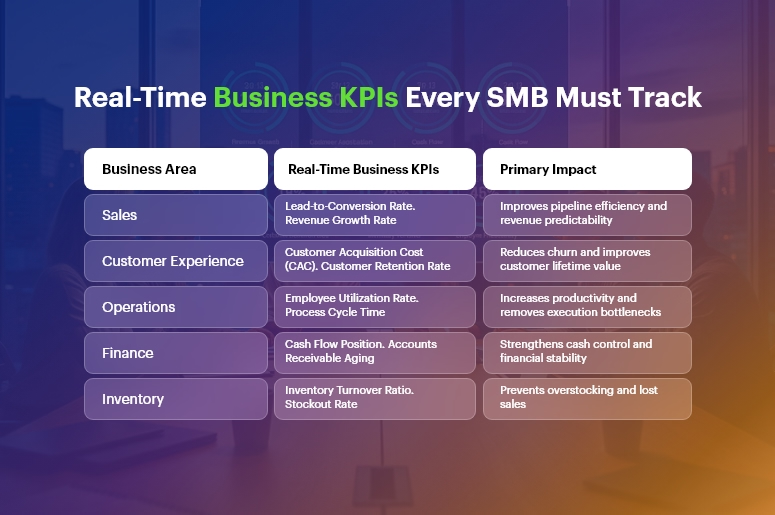
Core Real-Time Business KPIs Every SMB Must Track

1. Sales & Revenue KPIs

  • Lead-to-Conversion Rate: Tracks how efficiently leads turn into customers. Real-time visibility helps sales managers intervene early and optimize pipelines.
  • Revenue Growth Rate: Shows whether growth strategies are working. Monitoring this daily prevents surprises at month-end.
  • Average Deal Value: Highlights upselling and pricing effectiveness, especially when integrated with CRM opportunity data.

2. Customer Experience KPIs

  • Customer Acquisition Cost (CAC): Real-time CAC helps marketing teams control spend and improve ROI.
  • Customer Retention Rate: Indicates loyalty and service quality. Sudden drops signal operational or support issues.
  • Ticket Resolution Time: Ensures service teams meet SLAs and maintain customer trust.

3. Operations & Productivity KPIs

  • Employee Utilization Rate: Measures productive time vs. available time, crucial for service and project-based businesses.
  • Process Cycle Time: Tracks how long key workflows take, enabling continuous improvement.
  • Task Completion Rate: Provides managers visibility into execution discipline across teams.

4. Financial KPIs

  • Cash Flow Position: Real-time cash visibility protects SMBs from liquidity shocks.
  • Operating Margin: Reveals profitability after core expenses, helping leaders adjust quickly.
  • Accounts Receivable Aging: Prevents delayed collections from impacting working capital.

5. Inventory & Supply Chain KPIs

  • Inventory Turnover Ratio: Shows how efficiently stock moves, reducing carrying costs.
  • Stockout Rate: Helps prevent lost sales due to poor planning.
  • Order Fulfillment Time: Directly impacts customer satisfaction and repeat business.

Best Practices for Implementing Real-Time KPI Tracking

  • Define KPIs aligned with business goals: Avoid vanity metrics. Every KPI should influence decisions and outcomes.
  • Limit KPIs per role: Executives, managers, and teams need different dashboards for clarity and focus.
  • Automate data collection: Manual inputs delay insights and increase errors.
  • Review KPIs daily, not monthly: Real-time business KPIs are only valuable when acted upon quickly.

Do’s and Don’ts

Do:

  • Centralize data across CRM, HRMS, finance, and operations.
  • Set thresholds and alerts for critical KPIs.
  • Train teams to interpret KPI trends, not just numbers.

Don’t:

  • Track too many KPIs without accountability.
  • Rely on static reports.
  • Ignore cross-departmental dependencies.

Why a Unified CRM + ERP Is the Superior Solution

A unified platform like CrmLeaf eliminates data silos by connecting:

  • CRM: Real-time sales pipelines, conversions, and customer insights.
  • HRMS & Payroll: Live workforce costs, attendance, and productivity.
  • Manufacturing & Inventory: Production efficiency, stock levels, and quality metrics.
  • Projects: Utilization, timelines, and cost tracking.
  • Finance: Instant visibility into cash flow, margins, and receivables.

As a result, real-time business KPIs become actionable, accurate, and trusted across the organization.

Customer Success

A mid-sized manufacturing and distribution business, implemented real-time KPI dashboards using CrmLeaf to solve fragmented reporting and delayed decision-making.

Before CrmLeaf, their sales, production, inventory, and finance teams worked in separate systems. Monthly reports took days to compile, and inventory mismatches often caused missed deliveries.

Within 90 days of implementing CrmLeaf’s unified CRM platform, achieved measurable results:

  • 25% reduction in inventory carrying costs through real-time stock visibility
  • 18% improvement in on-time order fulfillment by tracking production KPIs live
  • 30% faster management decisions with real-time business KPI dashboards
  • Significant reduction in manual reporting effort, saving over 40 hours per month

By aligning sales forecasts, production planning, and financial KPIs in one system, the company transformed from reactive management to proactive control.

Key Takeaways & Closing

In today’s fast-paced environment, visibility equals control. SMBs that rely on delayed reports are constantly reacting, while those tracking real-time business KPIs stay ahead of problems and opportunities.

By monitoring sales, customer, operations, financial, and inventory KPIs in real time, businesses gain the clarity needed to scale confidently. More importantly, when these KPIs are connected across departments, leaders can make decisions that are faster, smarter, and more profitable.

As 2025 demands agility and accountability, unified platforms like CrmLeaf are no longer optional—they are foundational. The future belongs to businesses that can see, decide, and act in real time.

FAQs

1. What are real-time business KPIs?

Real-time business KPIs are performance metrics that update instantly as data changes, allowing SMBs to make immediate and informed decisions.

2. Why are real-time business KPIs important for SMBs?

They help SMBs detect issues early, improve efficiency, control costs, and respond faster to market changes.

3. How many KPIs should an SMB track?

Most SMBs should track 10–20 real-time business KPIs, tailored by role and department, to avoid information overload.

4. Can spreadsheets handle real-time KPI tracking?

Spreadsheets lack automation and integration, making them unsuitable for accurate real-time business KPI tracking at scale.

5. How does CrmLeaf support real-time KPI monitoring?

CrmLeaf unifies CRM, HR, finance, inventory, and projects into one platform, delivering live KPI dashboards without manual effort.

6. Are real-time KPIs expensive to implement?

With unified platforms like CrmLeaf, SMBs can implement real-time business KPIs without heavy IT costs or complexity.

7. Which KPI should SMBs prioritize first?

Cash flow, revenue pipeline, and customer retention KPIs are typically the most critical starting points for SMBs.

Top 10 Sales Automation Workflows Every Growing Business Needs

Did you know that businesses lose up to 30% of revenue every year due to inefficient processes and manual tasks? In fast-growing companies, sales teams spend more time entering data, tracking follow-ups, and updating spreadsheets than actually selling. That’s why Sales Automation is no longer optional — it’s a competitive necessity in 2025.

Customers expect immediate responses, accurate information, and frictionless experiences. Meanwhile, organizations require deep visibility into leads, performance, and conversion metrics.

That’s where CrmLeaf’s unified CRM + ERP ecosystem becomes a game-changer — it automates sales workflows across leads, quotes, approvals, finance, and inventory, while keeping customer experiences fast and consistent.

In this guide, you’ll learn the top 10 Sales Automation workflows that help unlock productivity, reduce costs, and accelerate growth — all future-ready with CrmLeaf.

Top 10 Sales Automation Workflows for Growth

Why Sales Automation Is Essential for Growing Businesses

As markets scale and competition intensifies, businesses face:

  • Slower revenue cycles due to manual handoffs between CRM, inventory, and finance
  • Data duplication and errors caused by siloed tools
  • Sales delays from approvals, verification, and compliance checks
  • High operational costs due to human-heavy processes
  • Poor customer experience, leading to lost opportunities

Moreover:

  • In manufacturing, quotation delays can lose deals worth lakhs.
  • In logistics, slow lead routing can push clients to competitors.
  • In retail and distribution, stock inaccuracies result in failed commitments.

Disconnected systems — like spreadsheets and isolated CRM tools — cannot support scalability.

Therefore, businesses need a single source of truth that unifies:

Function What Sales Needs from It CrmLeaf Connection
CRM Leads, opportunities, pipeline Fully native
Inventory Stock visibility before quoting Integrated ERP
Finance Pricing, tax, invoicing sync Automated & secure
Projects Customer delivery timelines Seamless transfer
HR Sales performance & commissions Built-in payroll link

With Sales Automation inside CrmLeaf:

  • Every lead gets tracked.
  • Every quote stays accurate.
  • Every approval happens faster.
  • Every customer gets a smooth buying experience.

The Top 10 Sales Automation Workflows Every Business Needs

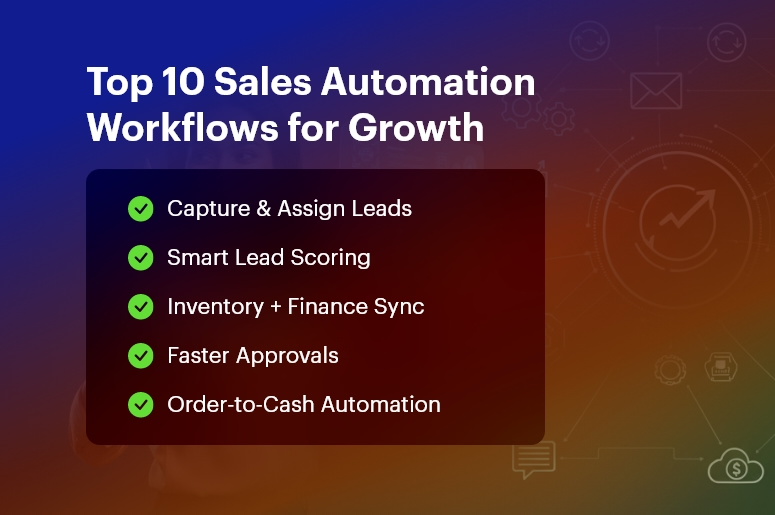
Automated Lead Capture & Assignment

Automatically pull leads from web forms, emails, social channels, and WhatsApp into CrmLeaf. Sales Automation assigns them to the right sales rep based on geography, product line, or workload, ensuring no missed opportunities.

Lead Qualification & Scoring

CrmLeaf evaluates leads based on behavior, interest, company data, and interactions. High-potential leads receive priority follow-ups, while irrelevant ones don’t drain resources — improving sales efficiency instantly.

Follow-Up Scheduling & Reminders

Never forget a follow-up again. CrmLeaf alerts reps with real-time task notifications, automated emails, and smart reminders. This ensures consistent engagement until leads convert.

Sales Pipeline Tracking & Forecasting

Visual pipeline boards update automatically as deals progress. Sales leaders get accurate forecasting dashboards to decide where to invest effort, improving win rates and planning.

Quote Generation with Real-Time Pricing

CrmLeaf links CRM + Inventory + Finance to ensure accurate pricing, taxes, and stock validation before sending quotes. This removes delays and prevents overselling or pricing errors.

Approval Workflows for Deals & Discounts

Requests like special pricing or payment terms automatically route to managers. Workflow automation shortens approval cycles from days to minutes and increases governance.

Proposal Follow-Ups & e-Signatures

CrmLeaf sends automated proposal reminders and enables digital signatures for instant closure. This accelerates decision-making and improves the customer experience drastically.

Order-to-Cash Automation

Once a deal is won → ERP triggers order creation, delivery planning, and invoice automation. Sales and finance align perfectly with zero re-entry effort.

Customer Onboarding Tasks

Sales Automation automatically hands off customer details to service or project teams. Customers experience fast, structured onboarding without repeated information sharing.

Customer Retention & Upsell Automation

CrmLeaf monitors buying behavior, renewal timelines, and support history. Trigger upsell campaigns, loyalty offers, and renewal reminders to maximize lifetime value.

Best Practices for Implementing Sales Automation Successfully

Here’s how to ensure automation drives real outcomes — not complexity.

Step-by-Step Adoption Framework

  • Map current workflows, including delays and handoffs
  • Connect CRM + ERP data for transparency
  • Automate high-value tasks first (follow-ups, approvals, quoting)
  • Upskill your teams to use automation confidently
  • Measure results using dashboards and iterate regularly

Do’s and Don’ts

Do Why It Matters
Automate repetitive, manual work Speeds up daily activities
Maintain clean, structured data Improves decision-making
Align sales with operations Inventory & finance stay accurate
Provide mobile access Sales stays fast in the field


Don’t Why It Hurts
Over-automate customer-first interactions It may feel robotic
Use disconnected tools Risks duplication and errors
Set and forget workflows Business conditions evolve

Quick Wins to Start With CrmLeaf

  • Automate lead imports from every channel
  • Use pipeline stage automation for reporting
  • Setup automated email sequences for follow-up
  • Enable smart approvals for discounts & quotations

Common Mistakes to Avoid

  • Assuming automation replaces people — it augments them
  • Lack of cross-department alignment
  • Using outdated data in workflows
  • Ignoring change management and training

Customer Success Story: Operational Transformation with CrmLeaf

For example, a leading manufacturing supplier in India implemented Sales Automation using CrmLeaf to eliminate delays in quoting and order approvals. They previously relied on spreadsheets and manual coordination between inventory and finance.

Within just 60 days, they achieved:

  • 40% faster quote approvals
  • 23% increase in conversions
  • 85+ hours saved per month in admin work
  • 100% visibility of product availability before commitment

Here’s how it transformed operations:

  • Sales reps now get real-time pricing and stock checks
  • Finance auto-generates invoices aligned to approved quotes
  • Inventory teams plan dispatch without coordination delays

This is how CrmLeaf powers revenue speed + process accuracy together.

Key Takeaways

To win in modern markets, sales teams must operate fast, accurate, and connected.

Sales Automation eliminates delays, boosts conversions, and improves customer experiences.

CrmLeaf gives you everything — CRM, ERP, Finance, Inventory, and Projects — in one system so your workforce stays productive and your business stays competitive.

In short: Sales Automation is your growth engine.

Frequently Asked Questions

  • What is Sales Automation and why do businesses need it?

Sales Automation uses technology to replace manual sales tasks like follow-ups, approvals, and quoting. It helps businesses work faster, reduce errors, and win more deals.

  • How does Sales Automation improve accuracy?

It keeps all data synchronized across CRM, inventory, and finance. With CrmLeaf, pricing, taxation, and stock updates are automated — ensuring Sales Automation supports correct commitments.

  • Will automation replace sales teams?

Not at all. It removes repetitive tasks so teams focus on high-value selling and customer relationships.

  • Can Sales Automation help customer experience?

Yes! Faster responses, accurate proposals, and seamless onboarding make customers feel valued — which increases loyalty and referrals.

  • Why is CRM + ERP integration important for Sales Automation?

Because sales impacts inventory, finance, delivery, and payroll. A unified platform like CrmLeaf prevents duplication and delays.

  • How quickly can companies see results?

Most CrmLeaf customers see productivity improvements and quicker deal cycles in 30–90 days, depending on scope.

  • Is Sales Automation expensive?

With CrmLeaf’s unified system, you remove multiple tools — making automation cost-efficient with a higher ROI.

10 CRM + ERP Solutions for Budget-Conscious Businesses

If you run a growing business on a tight budget, you probably juggle multiple tools: one for leads, another for invoices, a spreadsheet for payroll, and maybe a standalone project tool. Very quickly, that patchwork turns into chaos. That’s exactly where CRM ERP solutions help. They connect your customer data (CRM) with your operations and finance (ERP) so you can see the full picture: leads → deals → projects → invoices → payments → renewals — all in one place.

In this guide, you’ll explore 10 CRM ERP solutions for budget-conscious businesses, starting with CrmLeaf as #1, and then nine other strong contenders, including open-source and freemium options.

Why Budget-Conscious Businesses

Why budget-conscious businesses need CRM ERP solutions

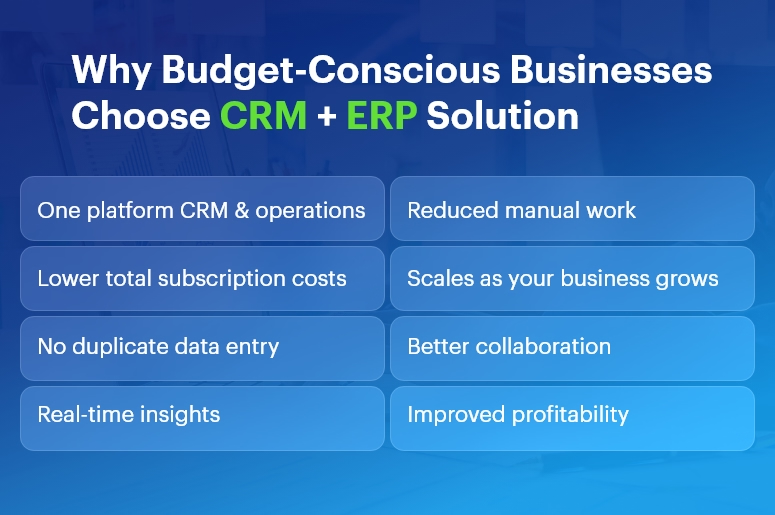
When margins are thin, every extra subscription hurts. An integrated platform lets you:

  • Replace 4–5 tools with one connected system
  • Reduce manual data entry and mistakes
  • Get real-time visibility into cash flow, projects, and sales
  • Automate repetitive tasks instead of hiring more admin staff
  • Scale without constantly retooling your tech stack

Because of this, CRM ERP solutions often end up cheaper than stitching together multiple “cheaper” tools that don’t talk to each other.

How to evaluate CRM ERP solutions when money matters

Before you pick a tool, look at these factors:

  • Total cost of ownership: Don’t just compare license prices. Also consider implementation, training, add-ons, and integration costs.
  • Modules you actually need: You may not need advanced manufacturing on day one. Choose a system where you can start small and add modules later.
  • Scalability: As your team grows, your CRM ERP solutions must handle more users, more data, and more automation — without a painful migration.
  • Ease of use & adoption: The cheapest ERP is still expensive if your team refuses to use it. Look for a clean UI, good onboarding, and strong support.
  • Customization & automation: Workflows, custom fields, approval rules, and integrations matter a lot when you want to save time instead of hiring more staff.
  • Localization & compliance: If you operate in India or specific regions, you need local tax formats, multi-currency, payroll options, and statutory compliance.

Now let’s walk through 10 CRM ERP solutions that fit tight budgets — with CrmLeaf at the very top.

CrmLeaf

Best for: Small and midsize businesses that want CRM, HR, finance, projects, and operations in a single, budget-friendly platform.

Why CrmLeaf is #1 on this list

CrmLeaf is an all-in-one business management platform that brings together CRM, HRMS, finance, project management, payroll, inventory, ticketing, and even specialized Solar CRM in one unified system.

Instead of juggling separate tools for leads, HR, invoices, and operations, you log in once and see everything in a single workspace.

Key modules that matter for budget-conscious teams

Core CRM

  • Lead and contact management
  • Sales pipeline and deal tracking
  • Follow-up reminders and tasks
  • Quotations & estimates

ERP-style operations

  • Project and task management
  • Service ticketing and support
  • Product & inventory lifecycle
  • Purchase and vendor management
  • Contract & asset management

Finance & billing

  • Invoice management
  • Payment tracking
  • Bank accounts & financial institutions
  • Expense management

HR & payroll

  • Employee directory and profiles
  • Attendance & leave management
  • Payroll processing
  • Recruitment & performance management

Pricing advantage

CrmLeaf offers multiple plans, starting with a Free Plan for a single user, and paid plans that scale with your team size. You get CRM, projects, HR, payroll, finance, and operations under one roof, which keeps your total cost of ownership low compared to buying individual tools.

Because of this, CrmLeaf stands out as one of the most budget-friendly CRM ERP solutions for SMBs that want serious functionality without enterprise-level pricing.

Why CrmLeaf works well as a CRM + ERP backbone

  • You avoid double entry because sales, projects, HR, and finance all share the same data.
  • You get real-time dashboards on sales, revenue, project status, and HR metrics.
  • You can adopt modules gradually: start with CRM + invoicing, then add HRMS, payroll, inventory, and ticketing later.
  • You benefit from domain-aware workflows (e.g., manufacturing, solar, and service industries).

If you want CRM ERP solutions that grow with you and keep costs under control, CrmLeaf is a very strong first choice.

Zoho One

Best for: Businesses that want a big ecosystem (45+ apps) with CRM, finance, HR, and operations at a per-user price.

Zoho One positions itself as an “Operating System for Business,” offering 45+ integrated apps covering CRM, finance, HR, helpdesk, marketing, and more.

Why it’s good for budgets

You pay a single subscription (with “All-Employee” or flexible user pricing models), and you get access to a wide range of tools: Zoho CRM, Books (accounting), Inventory, Projects, People (HR), Desk (support), and more.

This model turns Zoho One into one of the most popular CRM ERP solutions for teams that want breadth of functionality without buying separate products from different vendors.

Highlights

  • Powerful CRM tightly integrated with email, campaigns, and telephony
  • Finance apps for invoicing, expenses, and accounting
  • HR tools for attendance, leave, and onboarding
  • Built-in analytics and dashboards
  • Strong marketplace and integrations

Zoho One can feel overwhelming at first, but if you standardize on it early, you get a lot of value per rupee or dollar spent.

Odoo

Best for: Teams that want open-source, modular CRM ERP solutions with strong customization capabilities.

Odoo is a suite of open-source business apps that cover CRM, eCommerce, accounting, inventory, point of sale, project management, manufacturing, and more.

Budget benefits

  • Community Edition is open source and free to use, which can dramatically lower licensing costs if you have in-house or partner technical capabilities.
  • Enterprise Edition adds more features, cloud hosting, and official support, which you can move to as you grow.

Why Odoo fits CRM + ERP in one

  • CRM, sales, accounting, inventory, HR, and projects run in a unified database.
  • You enable only the modules you need and add others later.
  • The ecosystem of apps and partners helps you extend the system for specific industries.

Odoo suits companies that are comfortable with open-source ecosystems and want to shape their own CRM ERP solutions over time instead of buying a rigid off-the-shelf product.

ERPNext

Best for: SMEs that want a free, open-source ERP with full CRM, accounting, HR, and manufacturing capabilities.

ERPNext is a free and open-source ERP that includes modules for CRM, sales, accounting, inventory, HR, projects, website, e-commerce, POS, and manufacturing.

Budget angle

Because ERPNext is open source under the GPL license, you don’t pay per-user subscription fees. Instead, you may invest in hosting, implementation, and customization. For many budget-conscious companies, that trade-off is attractive.

Why it qualifies as a CRM + ERP solution

  • Integrated CRM for leads, opportunities, and customers
  • Core ERP modules for accounting, purchasing, warehouse, and manufacturing
  • HR module with employee records and basic HR processes
  • Project and task management within the same system

If you have access to technical expertise or a partner, ERPNext can become a powerful and affordable CRM ERP solution tailored exactly to your processes.

Bitrix24

Best for: Teams that want a generous free plan with CRM, collaboration, and light ERP capabilities.

Bitrix24 offers a free online workspace with CRM, tasks and projects, contact center, website builder, basic HR, and simple inventory features.

Budget-friendly strengths

  • Free plan with unlimited users and core CRM features, ideal for startups and very small businesses.
  • Paid plans still use a flat fee per organization, not strict per-user pricing, which can be cheaper at scale.

CRM + ERP angle

  • While Bitrix24 positions itself primarily as a CRM and collaboration platform, its project management, basic HR, and inventory tools make it a viable lightweight ERP for small teams.
  • This makes Bitrix24 one of the more accessible CRM ERP solutions if you need to start at zero cost and grow into paid tiers later.

Dolibarr

Best for: Small companies and freelancers who want a straightforward, open-source ERP + CRM without complexity.

Dolibarr is an open-source ERP & CRM designed for companies, foundations, and freelancers. It includes modules for CRM, invoicing, inventory, warehouse, orders, shipments, POS, bank accounts, and more.

Why budget-conscious businesses like Dolibarr

  • Free to use under the GPL license; you host it yourself or use a low-cost cloud offering.
  • You enable only the modules you need, which keeps the interface simple.
  • It covers both CRM (contacts, opportunities) and ERP (invoicing, stock, POS, basic HR) in a single application.

Dolibarr is ideal when you want CRM ERP solutions that are simple, lightweight, and don’t lock you into a vendor’s ecosystem.

Microsoft Dynamics 365 Business Central

Best for: Small and midsize businesses that want a modern, cloud ERP with deep integration into the Microsoft ecosystem.

Dynamics 365 Business Central is an ERP solution for SMBs that unifies finance, sales, service, supply chain, and manufacturing.

Where CRM comes in

You can integrate Business Central with Dynamics 365 Sales for CRM capabilities, creating a strong, unified CRM ERP solution:

  • Business Central handles accounting, inventory, purchasing, and manufacturing.
  • Dynamics 365 Sales manages leads, opportunities, and customer interactions.

Budget considerations

  • Licensing is not the cheapest on this list; however, for businesses already using Microsoft 365, the integration, security, and familiarity can offset costs.
  • You can start with a lean setup (finance + sales) and expand modules as you grow.

If your tech stack is heavily Microsoft-based and you want a future-proof ERP backbone, Business Central offers a robust option.

Metasfresh

Best for: SMEs seeking an actively maintained open-source ERP with CRM and MRP features.

Metasfresh is an open-source ERP designed for small and midsize businesses, with functionalities covering ERP, CRM, accounting, and MRP.

Budget and functionality

  • Free to use and modify under open-source licenses (GPLv2/GPLv3).
  • Modular architecture with both web and desktop clients.
  • Features for sales orders, procurement, inventory, and customer management.

Because of its open-source nature, Metasfresh can serve as a flexible CRM ERP solution if you’re ready to work with a partner or internal development team.

Compiere

Best for: Organizations that want a long-standing open-source ERP + CRM platform.

Compiere is an open-source ERP and CRM business solution for small and medium enterprises in distribution, retail, services, and manufacturing.

Why consider Compiere

  • It combines ERP and CRM in a single solution with a flexible Active Data Dictionary architecture.
  • You can adjust the information structures without heavy development, which helps when your processes evolve.

Although it’s older than some alternatives, Compiere still represents one of the earlier integrated CRM ERP solutions, especially for companies that appreciate its architecture and want something proven.

Zoho CRM + Zoho Finance Apps

Best for: Small teams that want to start with CRM and then add ERP-like finance and inventory step by step.

While Zoho One gives you the entire suite, you can also build a lean CRM ERP solution by combining:

  • Zoho CRM for leads, deals, and contact management
  • Zoho Books for accounting and invoicing
  • Zoho Inventory for stock and order management

Zoho CRM itself is priced sensibly with transparent per-user plans and free trials.

This modular approach lets you:

  • Start with Zoho CRM only
  • Add Books and Inventory when you need tighter financial and stock control
  • Eventually upgrade to Zoho One if you need HR, helpdesk, and more

For very budget-conscious businesses, this staged rollout can keep monthly costs low while still delivering the essentials of CRM ERP solutions.

How to choose the right CRM ERP solution for your business

Since every business is different, here’s a practical way to shortlist:

  • List your must-have modules
    • CRM: leads, deals, pipeline, email integration
    • ERP: accounting, inventory, projects, HR, payroll, manufacturing, etc.
  • Segment by budget model
    • Need zero-license cost? Look at ERPNext, Dolibarr, Metasfresh, Compiere.
    • Prefer SaaS with clear per-user pricing? Consider CrmLeaf, Zoho One, Zoho CRM stack, Bitrix24.
    • Want deep Microsoft integration? Evaluate Dynamics 365 Business Central.
  • Evaluate implementation effort
    • If you want fast go-live with minimal IT, pick a SaaS like CrmLeaf or Zoho One.
    • If you have strong technical resources, open-source tools can give you more control.
  • Run a small pilot
    • Start with one team (e.g., sales + finance).
    • Test core workflows: lead → quote → order → invoice → payment.
    • Validate reports and dashboards with real data.
  • Plan the rollout in phases
    • Phase 1: CRM + invoicing
    • Phase 2: Projects + HR
    • Phase 3: Inventory + advanced automation

By moving in phases, you control both risk and cost, which is crucial when you choose CRM ERP solutions under tight budgets.

Final thoughts: Start lean, grow smart

You don’t need the most expensive enterprise system to run a modern, data-driven business. Instead, you need:

  • A unified view of customers, finances, projects, and operations
  • A platform that fits your budget today and scales tomorrow
  • A system your team actually enjoys using

Among all the options, CrmLeaf stands out as a strong #1 for budget-conscious teams because it combines CRM, HRMS, finance, payroll, projects, inventory, and support into one integrated, affordable platform — reducing both subscription sprawl and operational chaos.

Choose one of these CRM ERP solutions, start with your most painful processes, and then expand as you see ROI. That way, you protect your budget while building a scalable foundation for growth.

CRM vs. Spreadsheet Chaos: Why Teams Must Switch Today?

What happens when your sales team updates one spreadsheet, finance updates another, and HR holds a completely different version?

The result is spreadsheet chaos — duplicated entries, wrong numbers, delayed responses, and confused customers.

Even today, many businesses rely heavily on Excel or Google Sheets to manage leads, quotes, payroll, and operations.

However, in a world where accuracy and agility drive growth, spreadsheets create bottlenecks. That’s why CRM vs. Spreadsheet Chaos is the biggest operational debate for modern organizations.

This blog reveals why spreadsheets fail growing businesses and how CrmLeaf empowers teams to streamline operations, boost productivity, and achieve real-time visibility with a unified CRM + ERP platform.

Why Businesses Choose CrmLeaf

Why Businesses Must Outgrow Spreadsheets

Spreadsheets were never built for scaling teams or complex business operations. They introduce challenges such as:

  • High Risk of Manual Errors

Data entry mistakes result in incorrect quotes, delayed deliveries, and compliance issues.

  • Siloed and Fragmented Information

Every department maintains separate files — sales, finance, inventory, payroll — none synchronized.

  • Zero Automation = Lost Productivity

Routine tasks such as approvals, reminders, invoicing, and follow-ups must be done manually.

  • No Accountability or Audit Trails

Anyone can overwrite formulas or delete data without traceability — a nightmare for audits.

  • Lack of Forecasting and Real-Time Insights

Reports take hours to compile and are usually outdated before decision-makers even see them.

As customer demands accelerate, spreadsheet-driven operations simply cannot keep up.

CRM vs. Spreadsheet Chaos: What Changes with CrmLeaf?

CrmLeaf replaces spreadsheet-driven inefficiencies with connected business intelligence.

Capability Spreadsheets CrmLeaf Unified Platform
Lead Tracking Manual Automated with pipeline visibility
Inventory & Production Offline logs Real-time shop floor updates
Finance & Payroll Complex formulas Smart workflows + compliance
Approvals Email reminders Built-in role-based approvals
Reporting Static sheets Interactive dashboards & forecasts
Data Security Basic password Encryption + access controls + logs

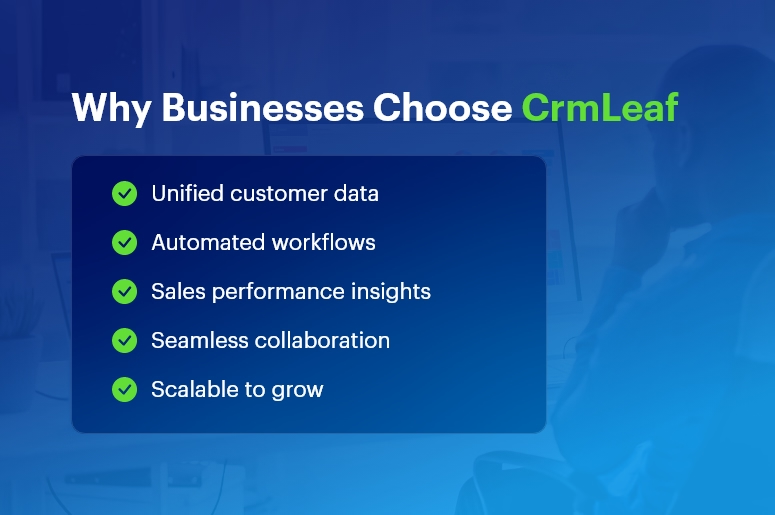
With CrmLeaf, every department works with the same accurate data, updated in real time.

Best Practices to Transition from Spreadsheet Chaos

Switching doesn’t have to be intimidating — CrmLeaf makes it simple.

  • Assess Current Spreadsheet Workflows

    • Identify bottlenecks and duplication
    • Map critical processes like Order-to-Cash and Hire-to-Retire
  • Set Clear KPIs

Examples:

    • “Reduce manual data entry by 60%”
    • “Improve inventory reporting accuracy to 99%”
  • Implement in Phases

    • Pilot with one team (ex: Sales)
    • Expand to Inventory, Projects, HRMS, and Finance
  • Automate Quick Wins

    • Auto reminders for overdue payments
    • Auto stock reorder triggers
    • HR auto leave approvals
  • Maintain Data Governance

    • Role-based access and field validation
    • Eliminate duplicates during migration
    • Regular data quality checks

Result: Faster adoption + immediate ROI

Case Study: How CrmLeaf Eliminated Spreadsheet Chaos

A mid-size manufacturing firm struggled with scattered production schedules and inaccurate inventory spreadsheets.

After implementing CrmLeaf:

  • 35% reduction in inventory carrying cost
  • 22% faster production cycle time
  • 8% procurement savings through timely approvals
  • Zero stockout occurrences reported in 90 days

Their teams now access a single source of truth across CRM, Inventory, Projects, HRMS, and Finance.

Key Takeaways: The Future Is Unified, Not Fragmented

  • Spreadsheets slow down scaling businesses
  • Automation boosts productivity, accuracy, and team collaboration
  • CrmLeaf eliminates spreadsheet chaos with real-time, end-to-end workflows
  • A unified CRM + ERP platform is now a strategic competitive advantage

In 2025 and beyond — speed wins.

Your competitors are already automating… are you still updating spreadsheets manually?

FAQs

1. Why should we move from spreadsheets to CRM solution?

CrmLeaf centralizes customer, financial, and operational data — eliminating manual errors and siloed workflows.

2. Can small businesses benefit from CRM?

Absolutely. Automation helps SMBs grow faster with lower operational costs.

3. Does CRM support industry-specific workflows?

Yes — manufacturing, distribution, and services can customize modules, approvals, and reports.

4. How secure is data in CRM?

Role-based access, encryption, audit logs, and compliance-driven controls provide advanced protection.

5. How quickly can teams transition?

Teams experience productivity improvements in 30–60 days with phased rollout support.