Connecting Inventory to Your Sales Pipeline: Why It Matters

In fast-paced industries, one of the most overlooked growth killers is disconnected inventory and sales processes. Imagine a sales team closing deals on products that are out of stock, or inventory managers overstocking items no one is selling. The result? Frustrated customers, missed revenue, and wasted capital. That’s exactly why connecting inventory to your sales pipeline matters more than ever. According to a recent Forrester report, companies that tightly align their sales and inventory processes see up to 25% faster revenue growth and 30% higher customer satisfaction.

In this blog, you’ll learn:

  • Why growing businesses can’t afford inventory/sales silos
  • How CRM + ERP platforms solve this disconnect
  • Actionable ways to improve your pipeline with integrated inventory visibility

Let’s dive in.
With CRMLeaf you get real-time insight into critical hiring metrics

Why Connecting Inventory to Your Sales Pipeline Matters for Business

Connecting inventory to your sales pipeline is no longer just “nice to have.” It’s a business necessity. When both systems work together, you get a full view of demand, supply, and fulfillment — in real time.

1. Sales Teams Need Real-Time Stock Visibility

Your sales reps are your front line. Without live inventory data, they’re selling blind.

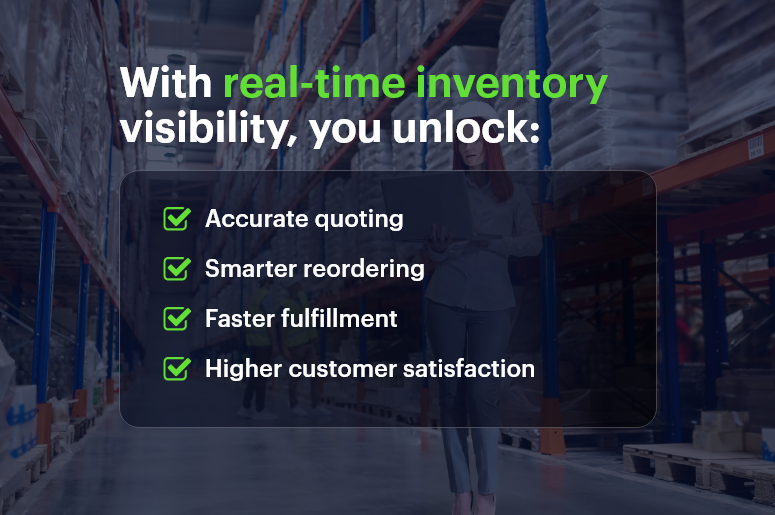
  • With real-time visibility, sales can instantly check stock levels before committing to a quote.
  • This avoids overpromising, backorders, and unhappy customers.
  • It also helps reps push available products, improving conversion rates.

2. Inventory Teams Gain Demand Forecasting Insights

Inventory managers are often guessing what to reorder. But when they’re plugged into the sales funnel:

  • They can see what products are in demand before orders even close.
  • This allows for data-driven purchasing and better stock planning.
  • Over time, it reduces excess inventory and boosts cash flow.

3. CX Leaders Can Fulfill Faster and Smarter

When CRM and ERP are connected:

  • Order fulfillment teams can prioritize fast-moving deals.
  • Customers get what they want, faster — improving loyalty.
  • Businesses reduce costly rush orders and emergency shipping.

Best Practices to Connect Inventory and Sales Seamlessly

If you’re serious about improving efficiency, you need a game plan. Here’s how to align your inventory and sales pipeline with smart strategies and the right tools.

1. Use an Integrated CRM + ERP Platform

The days of juggling multiple disconnected tools are over.

  • An all-in-one CRM + ERP system like CRMLeaf centralizes data for inventory, sales, purchase, and finance.
  • This ensures that all teams are looking at the same, real-time information.
  • No more manual updates or switching tabs to sync data.

2. Automate Stock Visibility in the Sales Process

Stop making your sales team guess stock levels.

  • Set up live inventory availability directly in quotes, proposals, and sales dashboards.
  • Add auto-alerts for low-stock or high-demand products.
  • This makes your pipeline proactive instead of reactive.

3. Sync Sales Forecasts with Inventory Planning

Forecasting isn’t just for finance.

  • Feed sales pipeline data into your inventory module to improve forecasting accuracy.
  • Run scenario planning to simulate different demand curves.
  • Let inventory managers plan for spikes, promotions, or seasonal fluctuations.

4. Define Business Rules for Order Commitment

What happens when a product has only 10 units left and two reps are closing at the same time?

  • Set smart allocation rules that reserve stock based on deal priority.
  • CRMLeaf allows custom rules for deal stages, priority customers, or territories.
  • This eliminates internal conflict and improves customer experience.

5. Create Real-Time Inventory Dashboards for Sales Teams

Don’t just show stock levels in ERP — bring them to the people who need it most.

  • Use custom dashboards in CRMLeaf that display inventory by location, product line, and fulfillment speed.
  • Let sales teams filter based on region, customer type, or delivery window.
  • These dashboards empower reps to act faster and sell smarter.

Case Study: How One Retailer Aligned Sales & Inventory for 40% Faster Fulfillment

For example, BrightCart, a consumer electronics retailer, used CRMLeaf’s CRM + ERP integration to streamline operations across their 12 warehouse locations.

  • They connected their inventory system with their sales pipeline, allowing reps to quote only in-stock items.
  • Their order team prioritized shipments based on live deal status, cutting fulfillment time by 40%.
  • Stockouts dropped by 35%, and customer satisfaction scores went up by 20% within 6 months.

This transformation happened not with more staff, but with better tools and data visibility.

Key Takeaways: What Happens When You Connect Inventory to Sales

To recap:

  • Connecting inventory to your sales pipeline is crucial for accurate forecasting, efficient selling, and faster fulfillment.
  • A unified CRM + ERP platform like CRMLeaf eliminates the silos that slow you down.
  • Real-time data empowers your sales, inventory, and fulfillment teams to act with confidence.
  • You’ll reduce stockouts, improve cash flow, and deliver better customer experiences.

How Car Dealers Use CRM Software to Personalize Customer Journey?

Today’s car buyers enter the dealership well-prepared. They already know the specs, prices, and performance details of the car they want. What they truly value now is a personalized car buying experience — one that reassures them they’re buying from the right dealership. Personalization has shifted from a nice-to-have to a must-have. Dealerships that harness CRM software stand out by offering tailored communication, smart recommendations, and seamless experiences from inquiry to post-sale.

Why Personalization Is the Future of Auto Sales

The car-buying journey is no longer about transactions; it’s about relationships. Customers want dealerships to remember their preferences, follow up on time, and speak their language.

However, many dealerships still struggle with:

  • Disconnected sales and service teams
  • Scattered customer data and no centralized view
  • Missed follow-ups or generic communication
  • Poor engagement after the sale

These gaps reduce customer trust and ultimately lead to lost revenue.

How CRM Software Solves These Challenges:

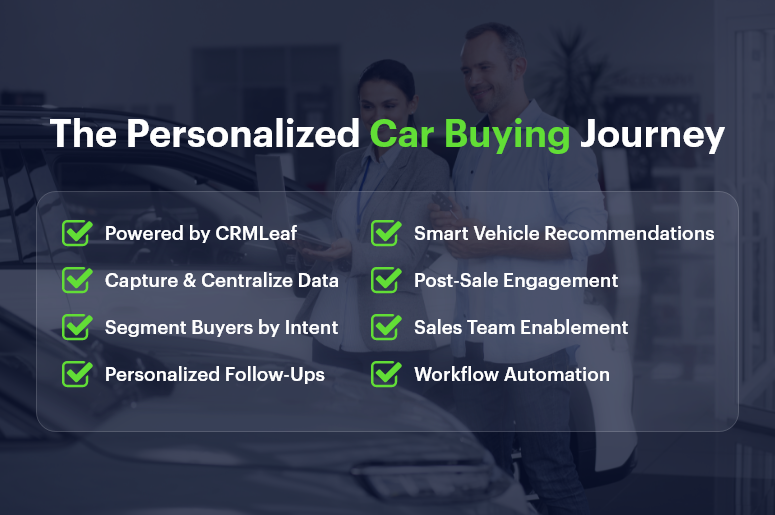
With an intelligent CRM platform like CRMLeaf, dealerships can:

  • Capture detailed customer profiles
  • Track all interactions across departments
  • Segment leads by purchase intent or vehicle type
  • Automate personalized follow-ups and service alerts
  • Deliver a consistent, personalized experience

The Personalized Car Buying Journey

Step-by-Step: Using CRM Software to Personalize the Buyer Journey

1. Capture and Centralize Customer Data

Why it matters: Every touchpoint—from a website visit to a test drive — holds insight into a buyer’s intent. If that information is scattered across systems, it’s lost.

With CRM software, you can:

  • Store all lead information in one centralized profile
  • Track data like financing preferences, trade-in interest, and car model choices
  • Capture data through chatbots, web forms, and showroom kiosks

🟢 CRMLeaf Tip: Use integrated data capture tools to build rich profiles from the first interaction.

2. Segment Buyers by Intent and Interest

Why it matters: Personalized outreach begins with smart segmentation. Not every customer is the same — so why send them the same message?

Use CRM software to segment buyers into groups like:

  • First-time buyers
  • SUV enthusiasts
  • Lease renewals
  • Luxury car prospects

🟢 CRMLeaf Tip: Match each segment with relevant offers, tips, and follow-up content.

3. Send Personalized Follow-Ups Automatically

Why it matters: Poor follow-ups lose more sales than high pricing ever will. Timely, relevant communication keeps the buyer engaged.

CRM software helps you:

  • Automate follow-ups after test drives
  • Share loan options or upgrade advice based on inquiries
  • Personalize messages by name, intent, and car interest

🟢 CRMLeaf Tip: Set up email sequences that feel personal — but are powered by automation.

4. Recommend Vehicles Based on Behavior

Why it matters: Customers expect suggestions that match their interests — not generic promotions.

CRMLeaf enables you to:

  • Track vehicle searches and viewed inventory
  • Suggest EVs or hybrids to eco-conscious buyers
  • Recommend similar models based on preferences

🟢 CRMLeaf Tip: Let data do the heavy lifting and match inventory to buyer profiles in real-time.

5. Build Loyalty with Post-Sale Engagement

Why it matters: The sale is just the beginning of the customer relationship. Personalized post-sale touchpoints show customers you value them.

Using CRM software, you can:

  • Schedule service reminders
  • Send loyalty rewards and referral offers
  • Offer upgrade suggestions on vehicle anniversaries

🟢 CRMLeaf Tip: Keep customers engaged with milestone-based emails and SMS.

6. Empower Sales Teams with Real-Time Insights

Why it matters: Salespeople need full visibility to make every interaction count. Walking into a conversation without context risks the deal.

CRM software gives your team:

  • Access to the buyer’s preferences, past visits, and questions
  • A complete timeline of interactions
  • Data to personalize every pitch

🟢 CRMLeaf Tip: Before every call or meeting, review the CRM timeline to tailor your pitch effectively.

7. Automate Tasks and Focus on Selling

Why it matters: Repetitive manual tasks waste valuable time. Automation allows your sales team to spend more time closing deals.

With CRMLeaf workflows, you can automate:

  • Appointment confirmations
  • Document checklists
  • Post-visit surveys

🟢 CRMLeaf Tip: Let your CRM handle the busywork while your team focuses on customers.

Customer Spotlight: MetroDrive Auto

Challenge:
MetroDrive Auto, a multi-location dealership in Hyderabad, relied on spreadsheets and WhatsApp for lead management. Follow-ups were missed, leads went cold, and sales cycles dragged.

Solution:
They adopted CRMLeaf to centralize lead tracking, automate workflows, and personalize follow-ups.

Results after CRM software implementation:

  • Follow-up speed improved by 45%
  • Email open rates on personalized offers increased by 3X
  • Repeat service visits grew by 38%
  • Sales productivity rose by 25%

Now, every lead is tracked, every follow-up is automated, and every message feels personalized—even with 10,000+ monthly leads.

Key Takeaways

  • Today’s customers want to be understood — not sold to.
  • A personalized car buying experience builds trust, confidence, and long-term loyalty.
  • CRM software allows car dealerships to unify data, automate touchpoints, and personalize every interaction.

With CRMLeaf, your team stays ahead of every lead, closes more deals, and keeps customers coming back.

Final Thoughts: Make Personalization Your Competitive Edge

The auto industry is evolving fast — and personalization is at the core of this transformation. If you’re not using CRM software yet, you’re already behind.

Start delivering an experience your customers will remember — because it’s built just for them.

Get started with CRMLeaf and personalize every buyer journey with precision.

The Future of Hospitality: IoT & CRM Integration Driving Guest Experiences

Imagine this: A guest walks into their hotel room, and it automatically adjusts the lighting, temperature, and TV channel to their preferences — before they touch a button.

This isn’t science fiction — it’s the power of IoT and CRM integration in the hospitality industry. According to Deloitte, hotels using IoT and CRM technologies report 20–30% improvements in operational efficiency and a significant rise in guest satisfaction.

Yet, most hospitality businesses still operate with siloed systems, making it hard to deliver these seamless experiences.

In this blog, we’ll explore:

  • Why IoT and CRM integration is the future of guest-centric service
  • How connected systems enhance personalization, efficiency, and decision-making
  • Best practices for hospitality teams to prepare for this digital shift

Let’s uncover how hotels, resorts, and service brands can lead the next wave of smart hospitality.

Business Need & Importance

The hospitality industry thrives on experience, convenience, and personalization — and today’s guests expect all three delivered instantly. With rising competition, fluctuating travel trends, and evolving guest preferences, hospitality businesses must innovate or fall behind.

That’s where IoT and CRM integration becomes a game-changer.

IoT (Internet of Things) devices like smart thermostats, occupancy sensors, mobile key cards, and voice-controlled assistants collect real-time data about guest behavior. When this data feeds directly into a CRM system, it enables hyper-personalized services — automatically.

Here’s how it benefits different roles and departments:

  • Operations Managers can reduce energy costs by tracking room occupancy data and automating heating/cooling based on guest presence.
  • Sales & Marketing Teams can use CRM-triggered data from IoT (e.g., minibar usage or gym visits) to offer personalized promotions.
  • HR Leaders can optimize staff scheduling using sensor data that indicates peak check-in/out times.
  • Finance Teams gain better forecasting and ROI tracking from integrated reports that combine operational data with guest preferences.

Whether you run a luxury resort, business hotel, or vacation rental chain, integrating CRM with IoT builds a foundation for smart, efficient, guest-first operations.

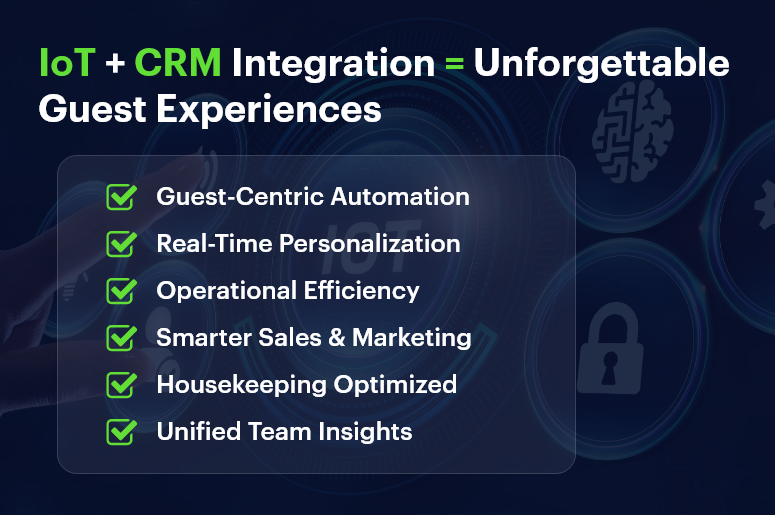
IoT + CRM Integration = Unforgettable Guest Experiences

Best Practices & Actionable Tips

How to Make the Most of IoT and CRM Integration in Hospitality

Bringing IoT and CRM together isn’t just about tech — it’s about creating smarter workflows, connected teams, and unforgettable guest experiences.

Here’s how to do it right.

🔹 1. Map Out the Guest Journey with Data Touchpoints

Start by identifying where IoT devices interact with guests. This could include smart check-ins, mobile keys, room controls, or feedback kiosks. Then connect each touchpoint to your CRM to automatically log preferences, usage, or behaviors.

🔹 2. Enable Real-Time Personalization

Use CRM data to trigger automated responses from IoT devices. For example, if a returning guest prefers cool rooms and watches sports channels, your system can auto-adjust settings when they check in — no human input needed.

🔹 3. Build Automated Maintenance Alerts

Connect IoT sensors with CRM workflows to reduce downtime. If a water heater shows signs of failure, an alert can create a ticket in the CRM for the maintenance team and notify management, minimizing guest disruptions.

🔹 4. Use Behavioral Insights for Upselling & Cross-Selling

Combine usage data from IoT with CRM profiles to offer timely upgrades. If a guest uses the in-room spa or minibar frequently, CRM can trigger a mid-stay massage discount or a loyalty offer — increasing revenue per guest.

🔹 5. Integrate with Housekeeping & Room Readiness

Streamline operations based on real-time room occupancy data. If motion sensors show that a room has been vacant for over an hour, your CRM can auto-assign it to housekeeping, speeding up turnover and improving efficiency.

🔹 6. Keep Data Secure and GDPR-Compliant

Data privacy is key when collecting personal and behavioral info. Ensure your CRM and IoT platforms support role-based access, encryption, and consent tracking. Guests should know how their data is used and have options to opt out.

🔹 7. Train Staff to Interpret and Act on Data

Technology is only as good as its users. Make sure staff across departments understand how CRM + IoT integration helps their roles. Provide ongoing training so they can use data to create exceptional guest moments.

🔹 8. Use a Unified CRM + ERP Platform Like CRMLeaf

Avoid managing separate tools that don’t talk to each other. CRMLeaf’s integrated CRM + ERP solution connects front desk, sales, operations, and finance — giving you full visibility into both guest preferences and business performance.

Customer Success

For example, Serenity Stays, a boutique hotel chain with 12 properties, struggled with energy waste, inconsistent guest experiences, and siloed operations.

By implementing CRMLeaf’s CRM + ERP platform integrated with IoT sensors:

  • They reduced HVAC energy costs by 30% using occupancy-based automation
  • Boosted guest satisfaction scores by 18%, thanks to personalized room settings
  • Cut maintenance response times by 40% using automated alerts from smart devices

Their staff now has real-time access to guest preferences, operational data, and service histories, all in one dashboard — transforming their approach from reactive to proactive.

Key Takeaways

The hospitality industry is moving toward a connected, intelligent future — where operations are efficient, guests feel understood, and businesses grow smarter every day.

With IoT and CRM integration, hotels and resorts can:

  • Automate personalized experiences
  • Streamline operations
  • Make data-driven decisions faster

Platforms like CRMLeaf are built for this future — helping hospitality businesses connect people, data, and devices in powerful ways.

It’s time to modernize your guest experience — and your back-end too.

Feature Release: Grouped Expense Views in CRMLeaf

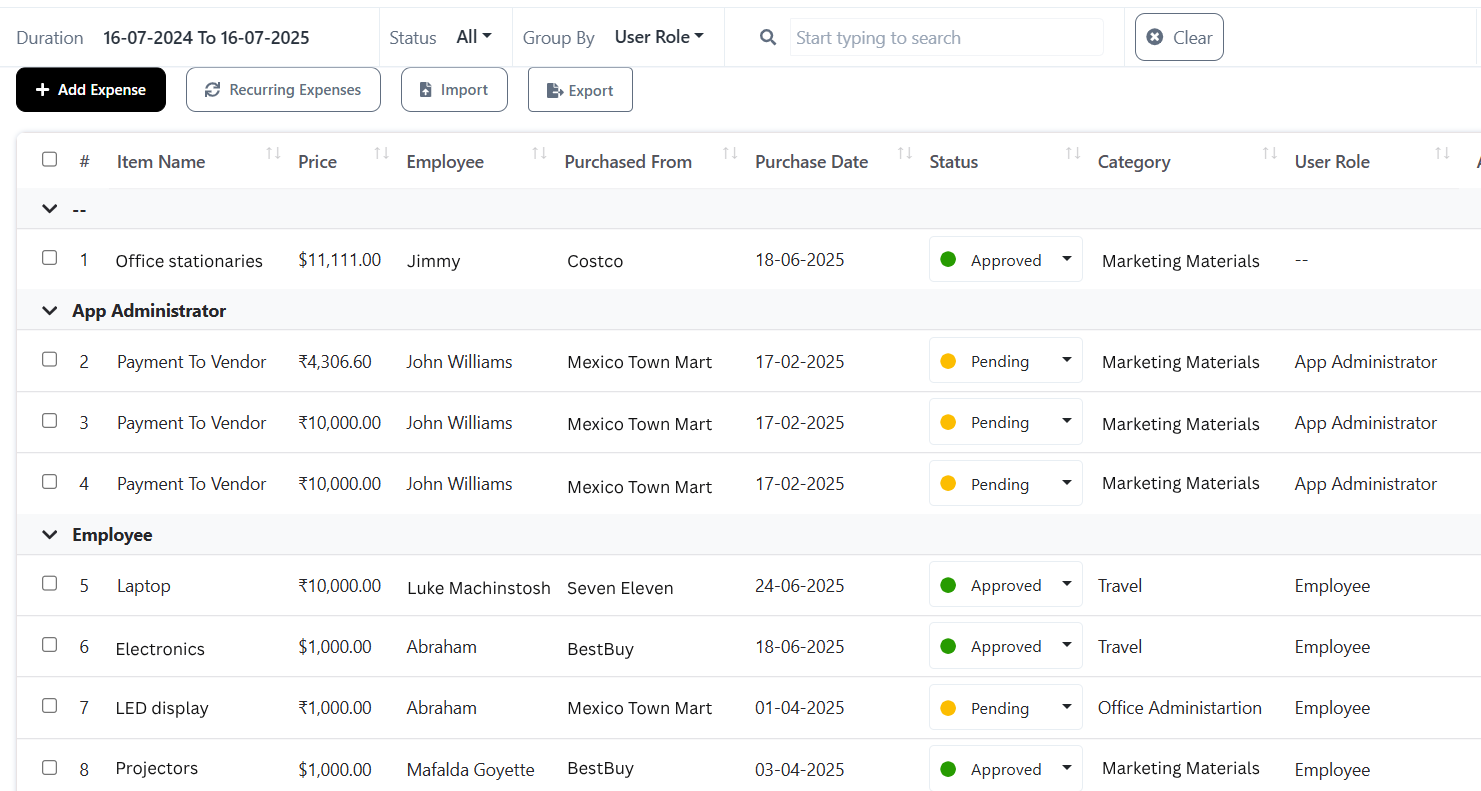
Every rupee your business spends tells a story. Maybe it’s a meal shared by your sales rep with a key client. A courier fee paid by your on-field executive. Or the return cost of a defective product. But until now, these expense entries inside CRMLeaf were listed individually — making it difficult to get the big picture of where your company’s money was going. With our latest release — grouped expense views in CRMLeaf — you get a clearer view of company spending. You can now group expenses by:

  • Category
  • Employee
  • Role

This gives you better control, more transparency, and actionable insights — all without needing spreadsheets or external analysis tools.

What’s New?

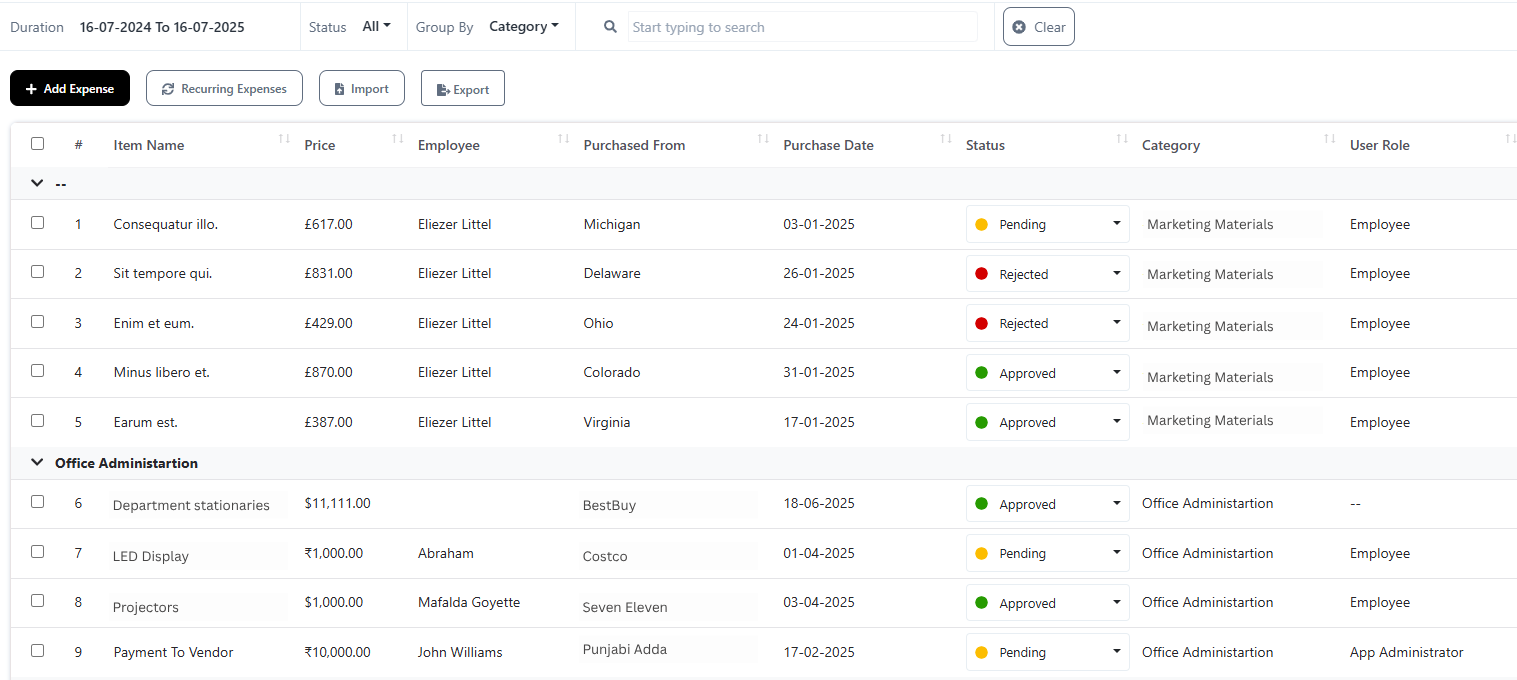
1. Group by Category

Group-by-Category-1

Categorize and review spending based on the purpose or nature of the expense.

Whether it’s:

  • In-store expenses (product displays, merchandising, POS support)
  • On-field expenses (travel, accommodation, client visits)
  • Product return costs (refunds, courier fees, processing)

You can now instantly group these expenses and see how much is being spent in each operational area.

Real-World Example:

Your retail operations head wants to understand if in-store merchandising is consuming too much of the monthly marketing budget. With just a few clicks, they can now group all “in-store” expenses and view the total, along with individual entries for deeper analysis.

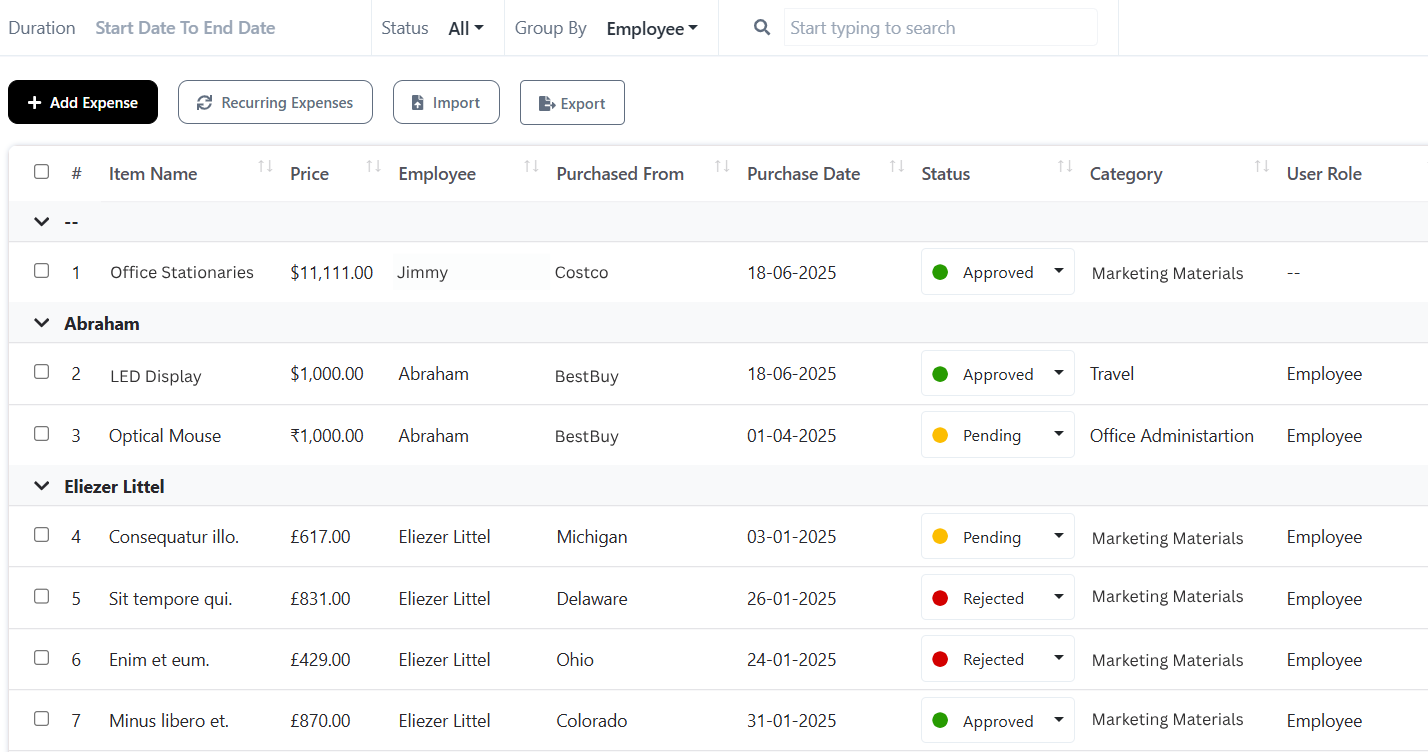
2. Group by Employee

Group-by-Employee-1

Track how much each individual employee is spending on behalf of the company. No more chasing down logs or emails to match names to transactions.

You can now:

  • Monitor expense habits
  • Identify high or low spenders
  • Compare spending against individual roles or responsibilities
  • Quickly respond to irregular or unexpected expenses

Real-World Example:

Let’s say you have 25 field sales executives submitting travel and hospitality expenses every week. With this feature, your finance team can quickly group expenses by each rep and spot if someone is consistently overspending — or needs support.

3. Group by Role

Group-by-User-Role-11

This is where team-wide expense visibility gets even better. Instead of just seeing who spent what, you can now view expenses by role type.

For example:

  • What’s the total spend from your Project Managers?
  • How much are on-field staff incurring in travel and logistics?
  • Are support staff reporting any unexpected operational costs?

This insight is crucial for budget planning, departmental reporting, and role-based spending control.

Real-World Example:

Your finance department is reviewing quarterly budgets. They need to know how much was spent collectively by the on-field team versus internal project managers. With grouped views by role, it takes seconds to generate that data — with full visibility into every underlying transaction.

How It Works: Expense Review & Approval Process

We know tracking is only useful if the data is reliable. That’s why grouped expense views comes with a built-in approval workflow.

Here’s the process:

  1. An employee logs an expense in CRMLeaf
  2. The entry is automatically routed to their assigned approver (e.g., team lead, project head, finance reviewer)
  3. Only approved expenses are included in grouped reports
  4. Rejected or flagged entries are sent back for revision or clarification

This ensures your reports are clean, accurate, and audit-ready, without manual filtering.

Why This Feature Matters

Here’s what grouped expense views unlock for your business:

Benefit Impact
Financial Transparency Understand where your money goes — by function, team, and person
Smarter Budgeting Allocate funds more accurately for each department or role
Accountability Track responsibility and spending discipline at every level
Operational Efficiency Eliminate manual analysis, reduce back-and-forth in finance approvals
Strategic Decision-Making Use real-time insights to guide policy changes, approvals, or spending limits

Who Will Benefit Most?

  • Founders & CEOs: See spending trends across the organization without diving into raw logs
  • Finance & Accounts Teams: Instantly validate, group, and analyze expense submissions
  • Department Heads: Monitor how their team members are spending across different activities
  • Project Managers: Stay accountable for budget limits assigned to their roles
  • On-field Teams: Submit expenses confidently knowing there’s visibility and structure

Grouped expense views in CRMLeaf isn’t just about better reports. It’s about clarity, control, and smarter decisions. Say goodbye to scattered data and hello to streamlined spending.

Start using grouped views today — and make every rupee count.

Missed our last update? Learn how CRMLeaf now lets you manage tasks directly inside deals and the CRM workspace — helping your sales teams stay organized, accountable, and faster than ever.

Feature Release: Task Management Now Integrated with Deals and CRM

Sales deals don’t close themselves. Behind every deal is a series of actions — follow-ups, documentation, internal collaboration, quote adjustments, proposal sharing, and client updates. Until now, these critical task management had to be done separately in another module. That meant switching contexts, losing time, or relying on memory to stay on track. But not anymore.

We’re excited to introduce two powerful updates that elevate your task management experience:

  • Tasks inside Deals
  • Task Lists inside the CRM section

Feature 1: Create Tasks Under Deals

Use Case: Real-World Deal Management

In modern sales teams, every deal involves several internal tasks before it closes:

  • A sales executive receives a request from a prospect and needs to schedule a product demo with the pre-sales team.
  • The deal progresses, and the finance team must review and approve custom pricing or discounts.
  • A marketing executive is asked to send a personalized brochure or case study.
  • The legal team is pulled in to draft NDAs or finalize terms.
  • Finally, a project manager needs to prepare a delivery roadmap for onboarding once the deal is won.

Previously, each of these steps had to be tracked manually, often using emails, sticky notes, spreadsheets, or separate tasks. This created gaps in communication, delays, and accountability issues — especially across cross-functional teams.

Now, with task management inside CRMLeaf, you can create, assign, and manage all of these micro-actions as tasks directly under the deal, keeping everything in context and moving forward.

How to view all the Tasks in a Deal?

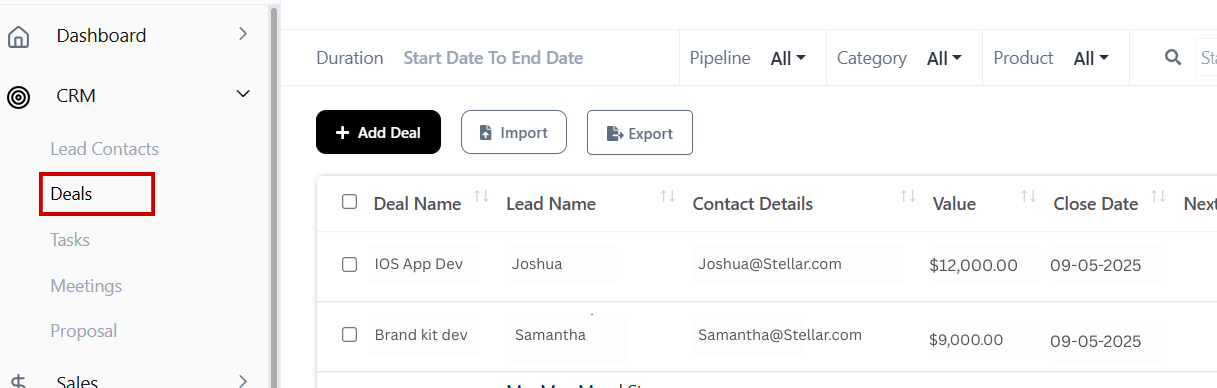
Navigate CRM → Deals

Deals under CRM

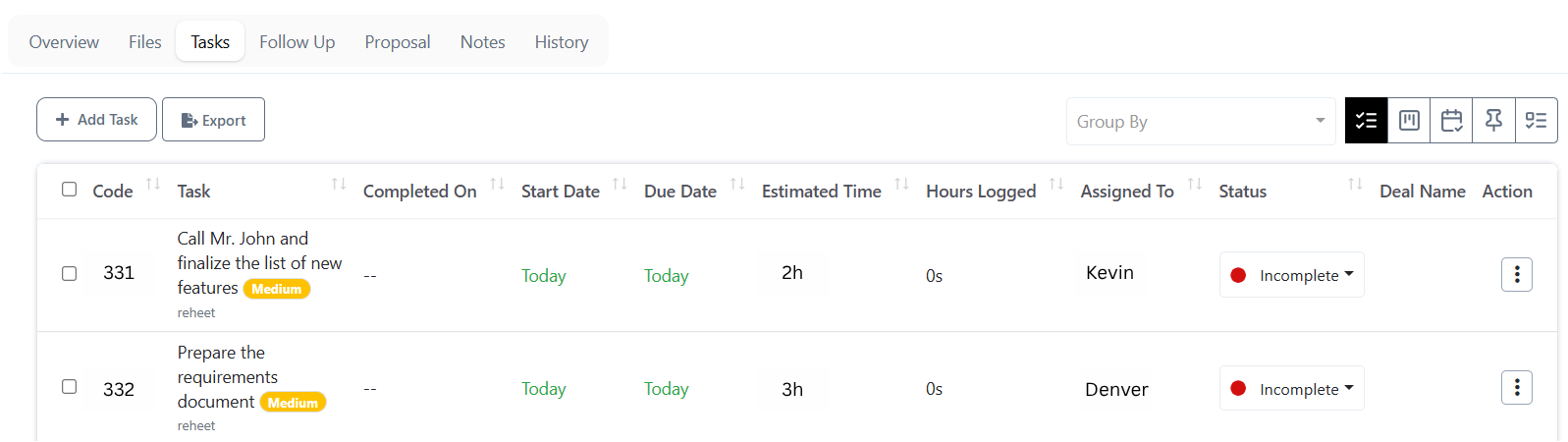
In the next page navigate to Tasks → then view all the tasks listed in the selected Deal. This creates a single, centralized task management dashboard inside your sales pipeline.

View tasks

What’s New:

You can now create and assign tasks within individual deals inside CRMLeaf. These tasks are deal-specific and stay associated with the deal through every stage of the pipeline – the essence of streamlined task management.

Benefits:

  • Keep all deal-related activities organized and visible
  • Assign responsibilities for each phase of the sales cycle
  • Eliminate missed tasks, follow-ups, or miscommunications
  • Reduce context switching between CRM and Work modules
  • Improve visibility for managers and sales heads
  • Speed up deal closures with better coordination and execution

CRMLeaf’s powerful task management ensures that no task slips through the cracks.

Feature 2: View Task Lists Under CRM Section

Use Case: All-In-One CRM Workspace for Sales Teams

Before this update, task creation and tracking were limited to the Work module. Sales reps had to:

  • Leave the CRM screen where they were managing leads, deals, and contacts
  • Navigate to the Work module
  • Create tasks separately, without context or link to a specific deal or contact

This disrupted workflow and created confusion, especially for teams juggling dozens of deals daily.

Now, with embedded task management, your team can manage tasks directly inside the CRM interface — making CRMLeaf a true single workspace for all sales activity.

Let’s say a rep is viewing a lead they just converted into a deal. They can immediately create tasks like:

  • “Schedule site visit”
  • “Send revised proposal”
  • “Follow up on financing documents”

— all without leaving the CRM tab.

How to Create Tasks in a Deal:

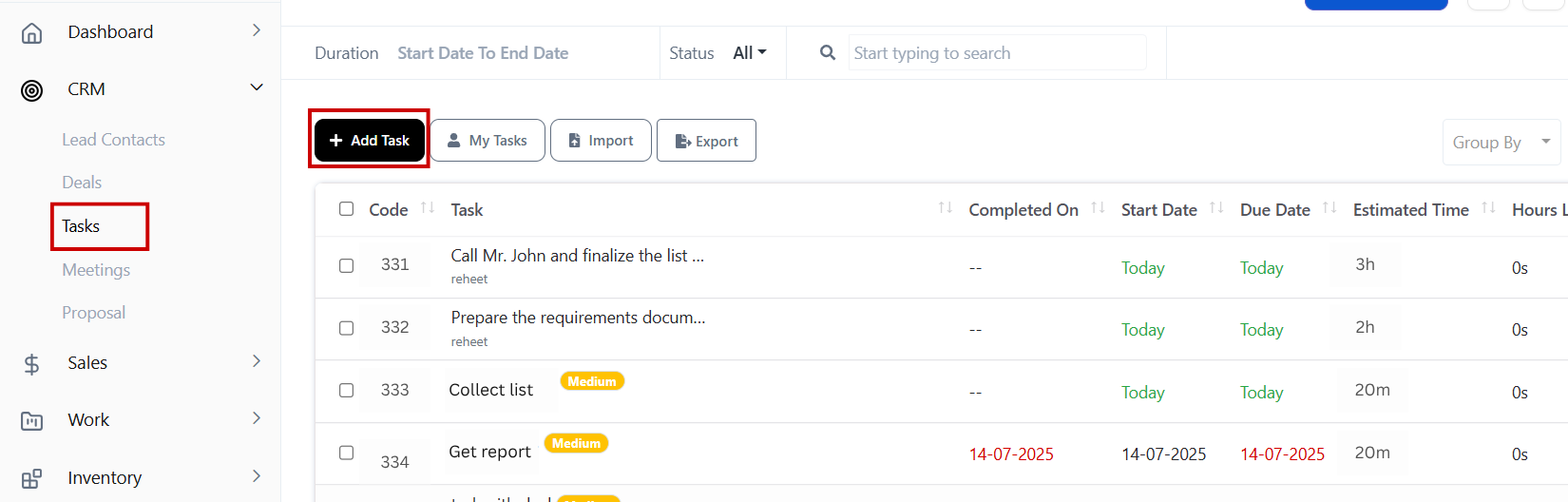
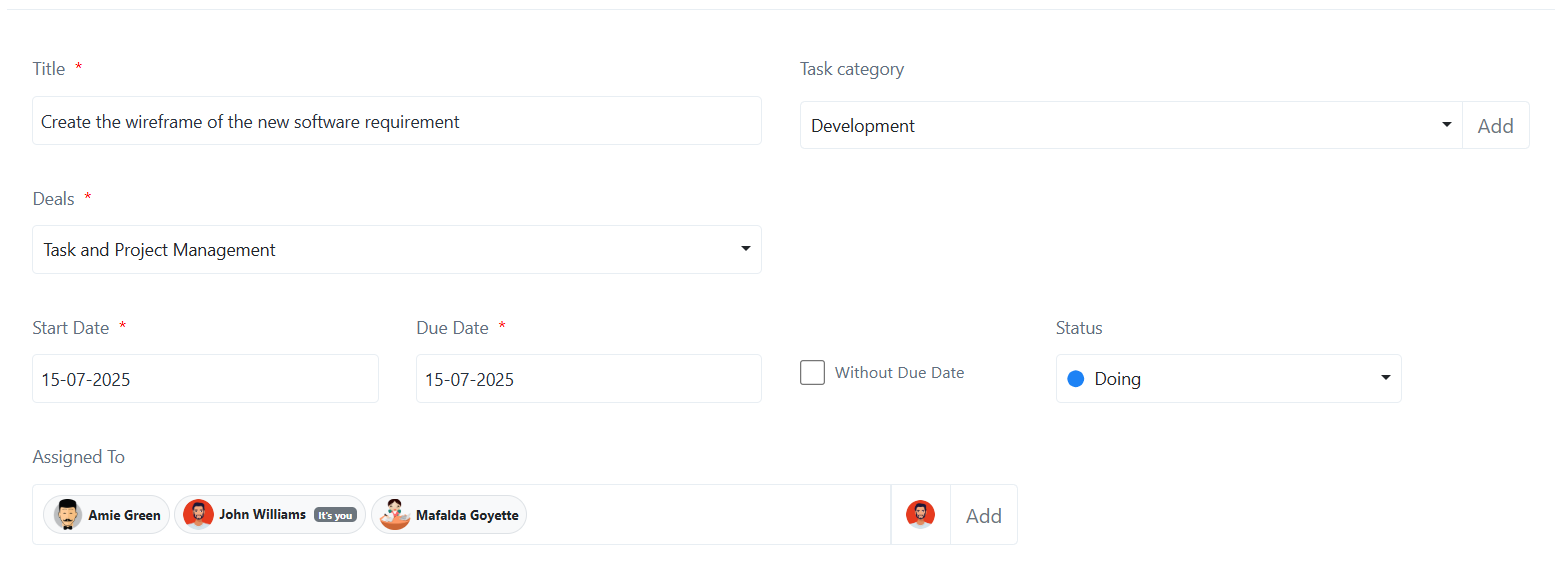
Navigate to CRMDeals+ Add Task

Add task

Next, give a task name, select the deal name, and fill-up other details

Create task under deals

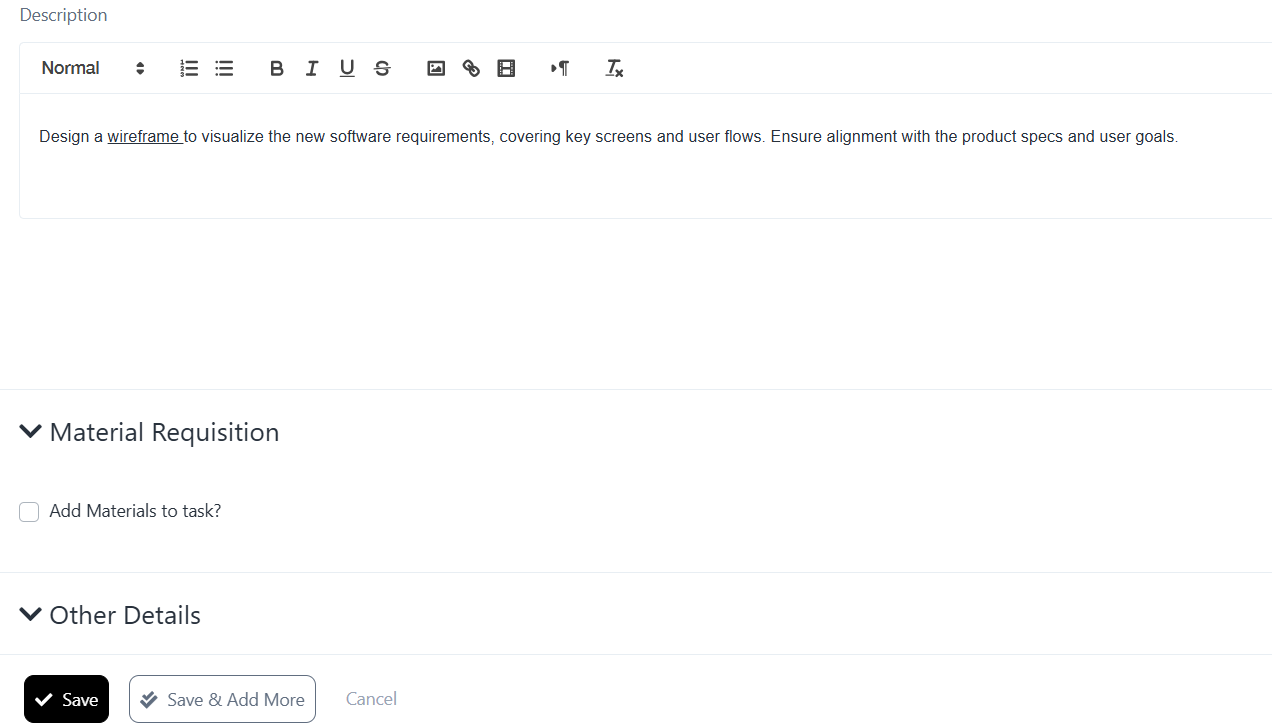
Next, fill in the task name, select the related deal, and enter details like:

  • Description
  • Due date
  • Priority
  • Tags (e.g., “documentation”, “finance”, “legal”)
  • Responsible team member

Click Save — and you’re done. With this intuitive process, task management becomes second nature to every rep.

Feature Release: Material requisition

What’s New:

You can now manage and assign tasks without switching modules. Tasks live inside the CRM section, where deals, leads, and contacts already exist — offering a seamless experience for your sales teams.

Benefits:

  • Centralize your workflow inside CRM
  • Increase productivity by eliminating back-and-forth navigation
  • Help sales reps stay focused and in flow
  • See the full picture of to-dos for every lead or deal
  • Enable faster onboarding of new reps with simplified UI
  • Strengthen alignment between sales, marketing, legal, and delivery teams

What’s Next: Smarter Expense Tracking for Sales Teams

Now that your sales team can manage tasks within deals and CRM itself, it’s time to level up your financial visibility too.

In our next update, we’ll show you how CRMLeaf makes it easier than ever to track and analyze expenses by category, employee, and role — giving sales heads and finance leaders actionable insights, while maintaining smooth task management alongside budget visibility.

Final Thoughts

These updates are more than new buttons — they bring task management into direct alignment with the customer journey.

By embedding tasks inside deals and leads, CRMLeaf now offers a deeper, more intuitive sales experience. Your team stays focused, accountable, and collaborative — with no more guessing what comes next or what’s pending.

This is just one of many steps we’re taking to make CRMLeaf the most seamless, all-in-one CRM + Work Management system for growing businesses.

How to Track Listings & Buyer Inquiries in One Place with Real Estate CRM

Whether you’re a real estate agent juggling dozens of listings or a property developer fielding buyer calls daily — staying organized is a challenge. A missed inquiry or lost document can mean a missed deal. And when listings are scattered across spreadsheets, emails, and WhatsApp chats, it’s easy for leads to slip through the cracks. The good news? A real estate CRM gives you one centralized place to manage listings, buyer inquiries, and all communications — from first touch to final close. In this blog, we’ll show you how to simplify your entire sales pipeline using a modern CRM built specifically for real estate workflows.

Why This Matters: The Business Case for a Real Estate CRM

In real estate, time is money, and so is timely follow-up. The longer it takes to respond to a buyer inquiry or match them with a suitable property, the higher the chance they move to a competitor.

Yet many real estate teams still rely on a patchwork of tools — Excel sheets for property info, Gmail for lead communication, and separate apps for scheduling and documentation.

This fragmentation causes:

  • Lost leads and delayed follow-ups
  • Poor visibility into team performance
  • Duplicate efforts between sales and back office

A real estate CRM solves this by giving you a single dashboard for:

  • Tracking every listing — its status, documents, price changes
  • Managing all buyer and renter inquiries in one inbox
  • Automatically assigning leads to the right agents
  • Logging calls, messages, and notes for every interaction

Industries that benefit:

  • Real estate agencies managing 20+ active listings at any time
  • Property developers selling or leasing large projects
  • Real estate investment firms with multiple stakeholders and high-value deals

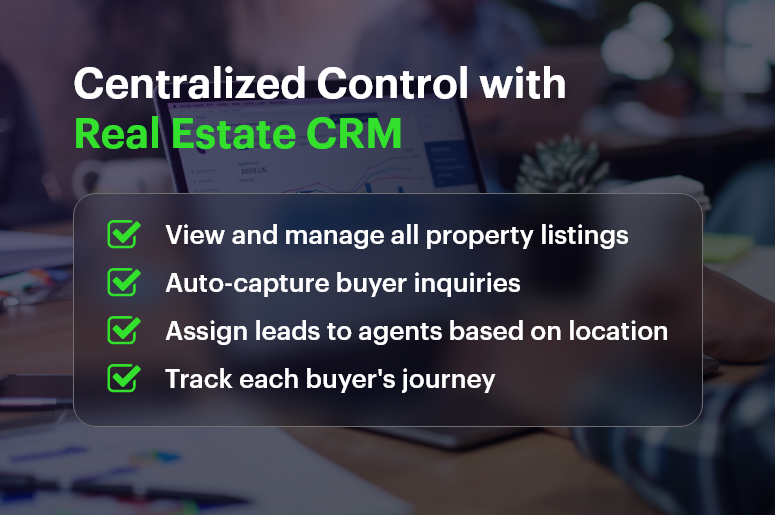
Centralized Control with Real Estate CRM

Best Practices: How to Streamline Listings & Inquiries with CRM

Let’s break down how a modern real estate CRM helps you stay in control of your sales pipeline:

Centralize All Property Listings

  • Upload and manage all your listings in one place with key details like location, pricing, square footage, images, and availability.
  • Group listings by project, type (commercial/residential), or status (available/sold) for quick filtering and search.

Capture and Track Inquiries Automatically

  • Use contact forms or integrations (WhatsApp, Facebook, website) to bring every buyer inquiry directly into the CRM.
  • Assign inquiries to agents based on geography, project, or availability — no manual routing required.

Log Every Interaction

  • Record calls, emails, SMS, and meeting notes under each inquiry or buyer contact.
  • Set reminders and follow-ups so no opportunity is forgotten — even if it takes months to convert.

Use Custom Statuses to Track Buyer Journey

  • Create your own sales pipeline stages such as: New InquiryToured PropertyPrice NegotiationFinalizing Deal
  • Visually track where each deal stands and what action is pending.

Store Important Files and Documents

  • Upload property brochures, legal documents, KYC forms, and price quotes right within the listing or lead profile.
  • Give your team secure access without endless email chains.

Automate Reminders and Follow-ups

  • Set automatic reminders for pending tasks like “call back tomorrow” or “send pricing update”.
  • CRM notifications ensure nothing slips through, even when team members are away.

Real-Life Example: Driving Conversions with CRMLeaf

For example, MaxSquare Realty, a fast-growing real estate agency in Pune, used CRMLeaf to consolidate their listing database and manage 100+ active buyer inquiries each month.

Results:

  • 40% faster response time to buyer queries
  • 25% increase in deal closure rates in just three months
  • Cut down back-and-forth between sales and admin teams by over 60%

By using CRMLeaf’s real estate CRM, the agency reduced missed opportunities and improved internal accountability — without hiring extra hands.

Key Takeaways

  • Managing listings and inquiries across different tools slows you down and introduces risk.
  • A real estate CRM lets you track, respond, and convert faster — with everything in one place.
  • From lead capture and listing management to follow-ups and document storage, a CRM streamlines every step of the property sales process.
  • Real estate firms that adopt CRM early see measurable improvements in lead response times, conversion rates, and internal collaboration.