How CRM Automation Saves Sales Reps Hours Every Week?

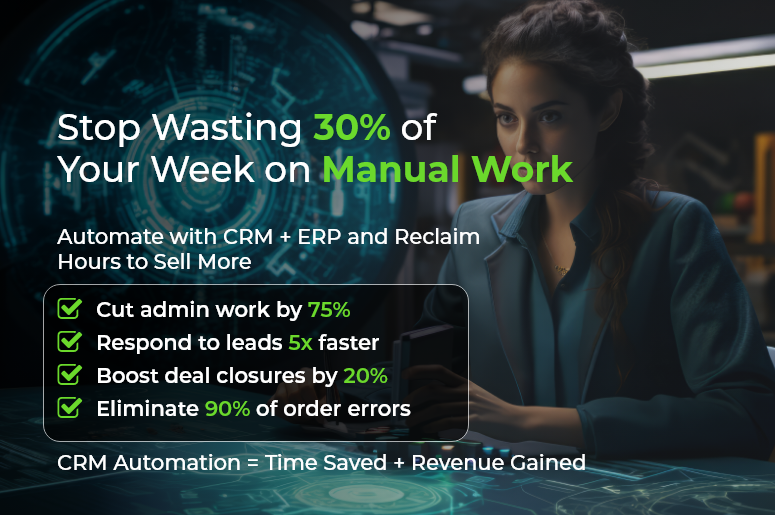
In today’s fast-paced world, CRM automation is no longer a luxury — it’s a business essential. Sales reps waste as much as 30% of their week on manual data entry, chasing emails, and updating spreadsheets. That’s nearly two days lost every week! With CRM automation, you can reclaim those hours to nurture leads, close deals, and build stronger customer relationships.

Automation transforms how businesses manage workflows by eliminating repetitive tasks. In this post, you’ll learn how automation built into an integrated CRM + ERP platform can streamline operations, reduce errors, and boost productivity. You’ll walk away with actionable tips, proven best practices, and a real-life success story — so you can start saving time and growing revenue immediately.

Business Need & Importance

Any growing business — whether it’s a technology startup, manufacturing firm, or professional services agency — faces the same challenge: scaling revenue without scaling costs. CRM systems help solve this challenge head-on.

Data Consistency and Visibility

In companies that lack integration between human resource management systems and CRM systems, information lives in silos. CRM automation breaks down those silos by syncing data across departments, ensuring that HR, sales, finance, and operations work from the same source of truth. This reduces missed follow-ups, improves forecast accuracy, and eliminates the need for manual spreadsheet reconciliations.

Customer Experience

Buyers today expect instant, personalized responses. CRM system delivers just that. From automated follow-up sequences to lead scoring and reminders, automation empowers your sales team to respond promptly, keeping prospects engaged and increasing your win rates.

Operational Scalability

As your company grows, manual processes can’t keep up. automation integrates all-in-one HR software, payroll services for small businesses, attendance software, and document management systems into your CRM, automating everything from onboarding to contract signatures. This allows HR and operations to scale without added headcount.

Consider a mid-sized distributor juggling inventory updates and manual order entry. Each sales rep spends hours updating stock levels, customer credit terms, and shipping dates. With CRM automation through CRMLeaf’s platform, real-time inventory sync and automated credit checks eliminate bottlenecks and free up time for selling.
Best Practices & Actionable Tips

Automation isn’t a one-click fix. Follow these best practices to ensure long-term success:

Define Your Key Processes

Start by identifying high-effort, low-impact tasks. Use automation to eliminate them. Whether it’s data entry, quote generation, or lead assignment, map each step and identify where automation can step in.

Leverage Lead Scoring & Routing

Use CRM automation to apply lead scoring frameworks like BANT. It can route high-quality leads to the right reps instantly, based on engagement, geography, or expertise. This reduces manual errors and ensures no lead is left behind.

Automate Routine Communications

Set up automation for follow-up emails, appointment confirmations, and invoice reminders. Trigger personalized messages based on prospect behavior — like downloading a brochure or visiting a pricing page. CRM automation ensures timely outreach without overwhelming your team.

Integrate CRM + ERP Workflows

Use CRM automation to sync sales activities with HR and finance. For instance, automate the flow of customer contracts into your document control system or sync invoice generation with your online payroll services. The automation removes friction and speeds up operations.

Utilize Mobile & Remote Tools

CRM automation isn’t just for the office. With mobile CRM apps, sales reps can log activities, capture signatures, and manage pipelines in the field. This automation integrates attendance software to track on-site visits and ensures remote visibility for managers.

Automate Sales Analytics & Reporting

Save hours every week by using automation to generate reports and dashboards. Schedule daily pipeline summaries or weekly performance snapshots to land in your inbox. Let this automation surface stalled deals, upsell opportunities, and urgent follow-ups automatically.

Maintain Data Hygiene

Good automation starts with clean data. Set rules for duplicates, validation, and enrichment. CRM automation tools can verify emails, standardize job titles, and pull firmographic data to ensure accuracy across all records.

Train & Iterate

Automation is a dynamic process. Train your sales, HR, and finance teams on how workflows operate. Collect feedback weekly to refine rules and improve adoption. As your processes evolve, your CRM automation should, too.

By adopting these practices, your team will spend less time managing tasks and more time driving results. This automation becomes the silent engine behind your success.

Customer Success Story

Let’s look at Acme Manufacturing, a mid-sized industrial supplier. Before CRM automation, sales reps spent six hours each week on manual data entry and quote generation.

After implementing CRMLeaf’s CRM + ERP platform:

  • Time Saved: Reps cut administrative work by 75% thanks to CRM automation.
  • Faster Quotes: CRM automation reduced quote time from 2 hours to 15 minutes.
  • Accuracy Boosted: Real-time inventory syncs via automation cut order errors by 90%.
  • Revenue Growth: With more time to sell, reps closed 20% more deals in one quarter.

Acme achieved this by setting up automation for lead assignment, follow-up reminders, document syncs, and automated reporting.

Key Takeaways

CRM automation isn’t just about saving time — it’s about scaling your business with confidence. With CRM automation, you can:

  • Slash manual data entry.
  • Accelerate response times.
  • Centralize customer, HR, and finance operations.
  • Gain real-time insights.
  • Empower remote teams.

By integrating CRM automation through a unified CRM + ERP platform like CRMLeaf, you create a streamlined, productive, and scalable business engine.

How to Build a Predictable Sales Pipeline: From Lead to Deal with CRM Platform

Did you know that 79% of sales leads never convert due to fragmented processes and poor visibility? For small and mid-sized businesses juggling customer relationship management, human resource management software, and attendance software, that statistic is a wake-up call.

If you’re an operations manager, sales leader, HR pro, or finance executive, you need a predictable sales pipeline that turns leads into loyal customers — without the chaos.

In this post, we’ll dive into why structured pipeline matters, share best practices and actionable tips, showcase a customer success story, and explain how CRMLeaf’s CRM systems — with integrated document management system, all in one HR software, and online payroll services for small business — can make every stage seamless.

Ready to transform your sales process and boost revenue predictability? Let’s get started.

Business Need & Importance

Building a predictable sales pipeline is not just a buzzword—it’s the backbone of sustainable growth. Here’s why:

Forecasting with Confidence

When your leads flow through clearly defined stages, you can project revenue accurately and allocate resources effectively. Gone are the days of last-minute surprises and frantic scramble to meet quotas.

Better Collaboration Across Teams

Integrating human resource management systems with customer relationship management software and document control software means marketing, sales, HR, and finance all work from the same playbook. No more conflicting spreadsheets or missed handoffs.

Scalable Processes for Fast Growth

Whether you’re in manufacturing, professional services, or retail, a repeatable pipeline helps you onboard new reps faster, scale operations, and avoid costly bottlenecks.

Real-world scenarios:

  • A retail business using attendance software to track in-store lead follow-ups.
  • A manufacturing firm leveraging document management in proposals to speed approval cycles.
  • A professional services agency automating online payroll services for one employee in their remote sales team to ensure seamless commission payouts.

With the right CRM + ERP platform, you eliminate silos, cut manual work, and keep every deal moving forward.

Best Practices & Actionable Tips

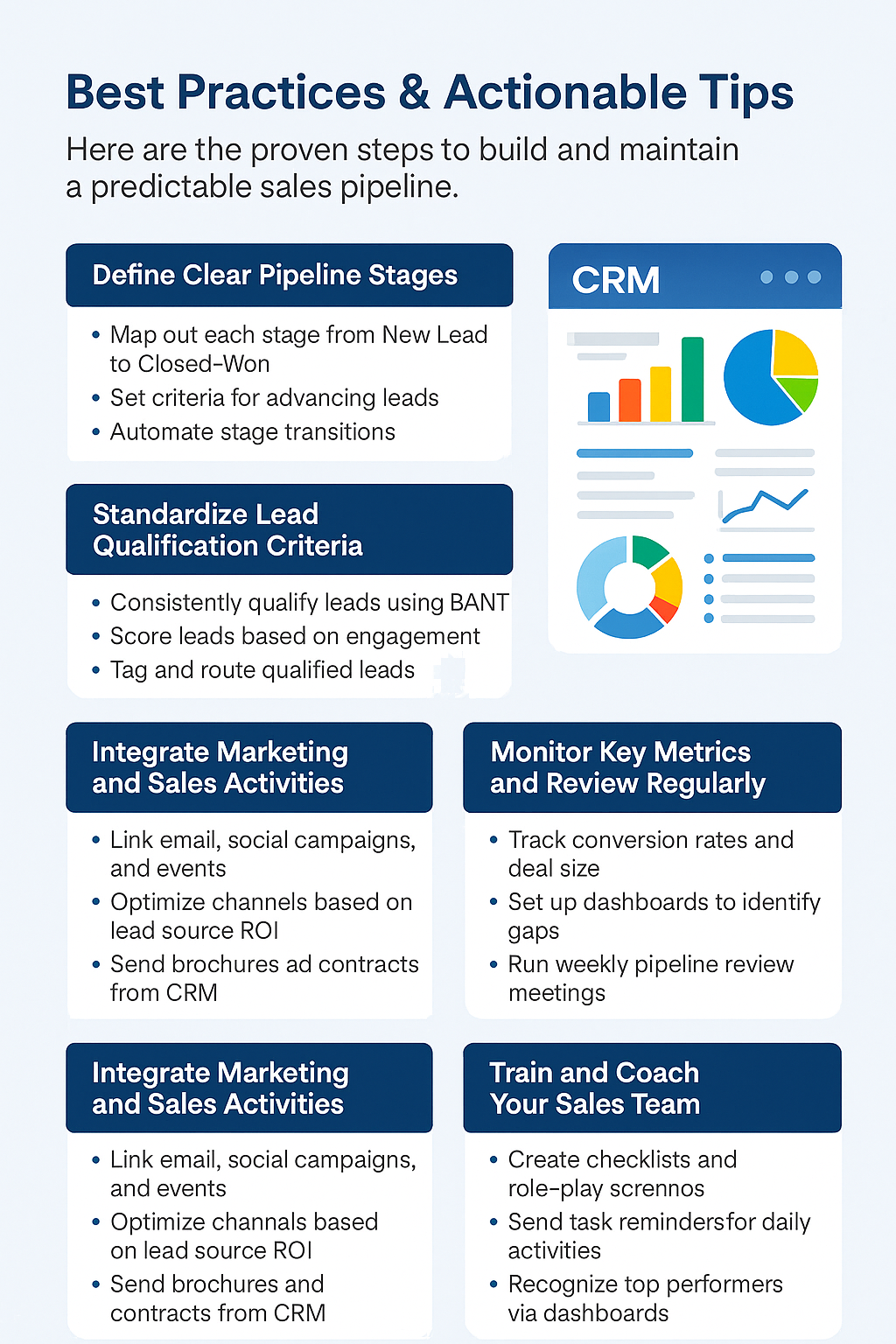
Here are the proven steps to build and maintain a predictable sales pipeline — powered by CRMLeaf’s end-to-end solution.

Best Practices and Actionable Tips

Define Clear Pipeline Stages

  • Start by mapping out each sales stage from “New Lead” to “Closed-Won.”
  • Assign specific criteria for when a lead moves forward — no more guessing.
  • Leverage CRMLeaf to automate stage transitions and reminders.

Standardize Lead Qualification Criteria

  • Use a consistent framework like BANT (Budget, Authority, Need, Timeline).
  • Scores are generated automatically based on firmographics, engagement, and intent.
  • Integrate with customer relationship management software to tag and route qualified leads.

Automate Lead Capture and Assignment

  • Connect your website forms, email inboxes, and chatbots directly to CRM systems.
  • Trigger instant follow-up tasks or emails so no lead falls through the cracks.
  • With CRMLeaf, assign leads to the right rep based on territory, expertise, or workload.

Integrate Marketing and Sales Activities

  • Link your email marketing, social campaigns, and events into the same customer relationship management dashboard.
  • Track lead source ROI and optimize channels that deliver top-quality leads.
  • Use a built-in document management system to send branded brochures, proposals, and contracts.

Monitor Key Metrics and Review Regularly

  • Focus on conversion rates at each stage, average deal size, and sales cycle length.
  • Set up visual dashboards to spot pipeline gaps or slow-moving deals.
  • Conduct weekly pipeline review meetings to recalibrate strategy.

Leverage Document Control and E-Signature

  • Store all sales collateral, legal document management software, and contracts in one secure location.
  • Send proposals for e-signature without leaving the CRM — speeding negotiations.
  • Track version history and approvals with robust document management features.

Align CRM with HR and Payroll Processes

  • Sync sales commissions directly into payroll services for small businesses or online payroll services modules.
  • Maintain accurate employee profiles for each rep including performance metrics.
  • Automate payroll runs via easy payroll for small business integrations to eliminate errors.

Train and Coach Your Sales Team

  • Implement best practices checklists and role-play scenarios.
  • Use CRMLeaf’s built-in task reminders to enforce daily activities — calls, emails, and demos.
  • Recognize top performers based on real-time dashboards.

By following these steps — and harnessing the power of human resource software, document control software, and payroll processing companies integrations within one platform — you’ll create a repeatable, reliable sales process that scales.

Customer Success Story

For example, VegaTech Solutions, a mid-sized manufacturing company, integrated CRMLeaf’s CRM systems with its existing all-in-one HR software and attendance software. Within three months:

  • Lead conversion rates jumped 25% thanks to automated lead scoring and follow-up reminders.
  • The average sales cycle shrank from 60 days to 45 days by standardizing pipeline stages and automating document approvals.
  • Payroll errors dropped 90% when payroll services near me integrations synced commissions directly into online payroll services for small businesses.

Here’s how they did it: VegaTech mapped their four-stage pipeline in CRMLeaf, created scoring rules for each lead source, rolled out standardized proposal templates with e-signature, and linked commission data into their best payroll service module.
The result? Predictable revenue growth and happier sales reps.

Key Takeaways

Building a predictable sales pipeline is not just about tracking deals — it’s about aligning your entire organization around a clear, repeatable process.

By defining stages, automating lead capture, integrating customer relationship management software with human resource management software, and leveraging built-in document management systems, you eliminate friction and accelerate deal velocity.

The result is more accurate forecasting, faster closures, and sustainable growth.

Next step: audit your current pipeline stages, identify automation gaps, and explore how CRMLeaf’s best customer relationship management software can put you on the path to predictable success.

Ready to see how CRMLeaf can help you build a predictable sales pipeline from lead to deal? Book your free demo today.
Book a Demo

5 Lead Qualification Frameworks Every Sales Team Should Use

Stop Guessing, Start Qualifying

Every sales team dreams of a full pipeline. But let’s be honest: a full pipeline of unqualified leads is worse than an empty one. It wastes your team’s time, stalls your forecasts, and frustrates everyone from sales to finance.

That’s where lead qualification frameworks come in.

These tried-and-tested systems help your team determine if a lead is worth the chase. When used with a CRM + ERP system like CRMLeaf, they become even more powerful, bringing structure, visibility, and revenue predictability.

In this blog, you’ll learn about five powerful frameworks that separate the tire-kickers from real buyers, and how to put them into action.

Why Lead Qualification Frameworks Matter

Lead qualification is more than just a checklist—it’s your frontline filter for revenue. With thousands of leads pouring in from ads, content, events, and referrals, it’s critical to know which ones to prioritize.

Why It Matters for Growing Businesses

  • Time is Money: Sales reps often spend 30-50% of their time on leads that never convert. A qualification framework reduces time wasted and improves focus on high-potential prospects.
  • Budget Efficiency: Marketing teams burn cash on unqualified MQLs. Qualification frameworks ensure alignment between marketing and sales, improving ROI.
  • Cross-Team Planning: Finance and operations can forecast accurately when sales aren’t chasing ghosts, creating better alignment on revenue targets and resourcing.

Industry Scenarios:

  • A tech startup uses qualification to zero in on enterprise leads with urgent pain points, focusing on long-term contracts.
  • A manufacturing company applies scoring based on production capacity and purchase readiness, ensuring they’re speaking to procurement decision-makers.
  • A consulting firm filters clients by budget, timeline, and stakeholder authority to avoid long sales cycles with unqualified leads.

Bottom line: qualification frameworks empower smarter selling and sustainable growth.

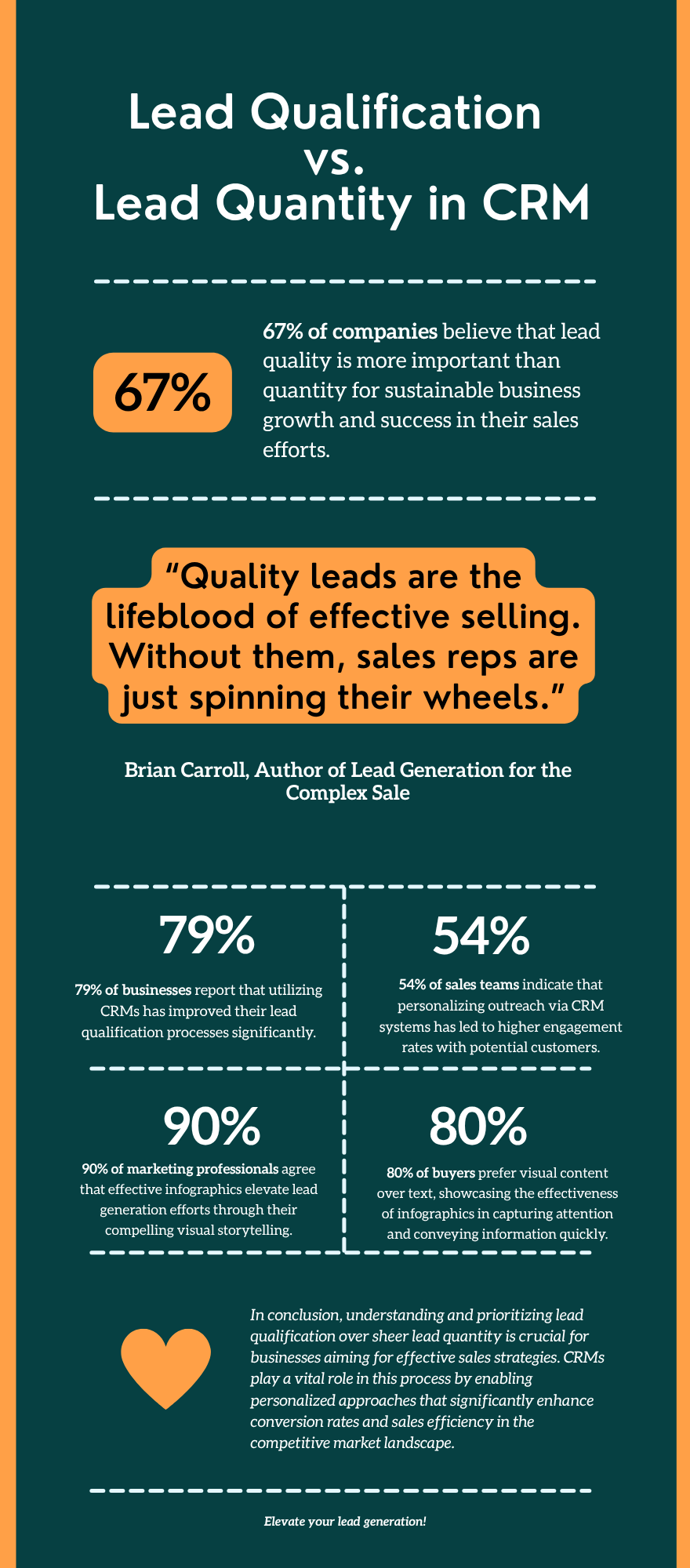
Lead Qualification vs. Lead Quantity in CRM

5 Lead Qualification Frameworks to Use Today

BANT: Budget, Authority, Need, Timeline

Best For: Fast-moving sales teams that need clarity before engaging deeply.

  • Budget: Determine if the prospect has allocated funds or the willingness to invest. This ensures your solution aligns with their financial capacity.
  • Authority: Confirm whether the person you’re speaking to can make or influence the purchasing decision. This helps avoid stalled deals.
  • Need: Identify if the lead has a real business problem your product can solve. This reveals solution fit.
  • Timeline: Understand when the buyer intends to purchase. A lead ready to decide in 30 days ranks higher than one evaluating options for next year.

Use with CRMLeaf: Automatically tag or score leads based on survey responses or discovery call inputs that reflect each of these BANT elements.

CHAMP: Challenges, Authority, Money, Prioritization

Best For: Solution-focused teams that want to build value first.

  • Challenges: Start the conversation around their biggest pain points. Solving a key challenge builds trust and urgency.
  • Authority: Clarify who signs off on decisions and ensure you’re engaging the right person early in the cycle.
  • Money: Ask about budget expectations tactfully. This helps prevent chasing leads who can’t afford your solution.
  • Prioritization: Determine if solving the challenge is a top priority. If it’s not urgent, the deal may stall despite a good fit.

Use with CRMLeaf: Attach custom fields in lead records to track each of these values and trigger follow-up sequences based on urgency and priority.

MEDDIC: Metrics, Economic Buyer, Decision Criteria, Decision Process, Identify Pain, Champion

Best For: Complex B2B sales cycles involving multiple stakeholders.

  • Metrics: Identify the measurable KPIs the buyer wants to improve. Knowing these helps you tailor your pitch around real business outcomes.
  • Economic Buyer: Pinpoint the budget holder. Engaging this person early ensures buy-in and smoother procurement.
  • Decision Criteria: Understand what features or outcomes are most important to the buyer. It helps position your solution effectively.
  • Decision Process: Clarify the steps, committees, or evaluations involved. This prevents delays from unexpected roadblocks.
  • Identify Pain: Go deep into what challenges are causing friction in their business. Pain drives action.
  • Champion: Find someone inside the organization who advocates for your solution. They provide insights and help you navigate internal dynamics.

Use with CRMLeaf: Create opportunity stages with checklists for each MEDDIC component. Link to ERP data for budget validation and opportunity scoring.

GPCTBA/C&I: Goals, Plans, Challenges, Timeline, Budget, Authority/Consequences & Implications

Best For: In-depth consultative selling, especially in high-ticket environments.

  • Goals: Uncover what the client aims to achieve. Goals drive the motivation for change.
  • Plans: Explore what strategies or solutions they are currently using to achieve these goals. Identify gaps your product fills.
  • Challenges: Diagnose what’s preventing success. The clearer the challenge, the stronger your case.
  • Timeline: Determine when the client wants to implement a solution. Timing affects resource planning and urgency.
  • Budget: Evaluate the financial resources committed to solving the issue. A mismatch can disqualify leads early.
  • Authority: Confirm decision-making roles. It avoids misaligned communication and wasted follow-ups.
  • Consequences & Implications: Highlight what happens if the issue is resolved—or left unresolved. This reinforces urgency and ROI.

Use with CRMLeaf: Build a custom qualification form that sales fills out after discovery, which auto-populates reporting dashboards and syncs with opportunity records.

ANUM: Authority, Need, Urgency, Money

Best For: Sales teams who want to qualify quickly and efficiently.

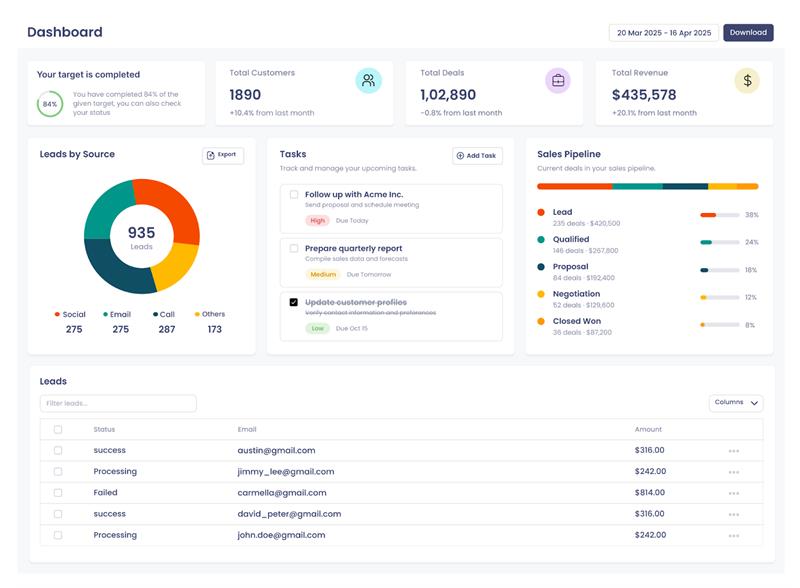
Dashboard

  • Authority: Start by identifying the decision-maker. This saves time by ensuring you pitch to the right contact.
  • Need: Quickly confirm that the lead has a tangible problem your product addresses. Without a need, there’s no deal.
  • Urgency: Determine if the need is pressing. Urgent problems are more likely to convert fast.
  • Money: Assess if there is a budget or appetite to spend. This qualifies whether a solution is feasible.

Use with CRMLeaf: Use automation to prompt reps to enter ANUM answers immediately after the first contact. Filter out low-fit leads early.

Customer Success Snapshot

“NexEdge Logistics, a growing transportation tech company, was overwhelmed by inconsistent lead quality. Reps were chasing conversations instead of conversions.”

After implementing the BANT and CHAMP frameworks in CRMLeaf:

  • Sales productivity improved by 35% in 60 days.
  • Lead-to-opportunity conversion rates jumped 22%.
  • Sales and finance aligned on high-value targets using CRMLeaf’s real-time dashboards.

They now operate with clarity, qualifying leads faster and spending more time where it counts.

Key Takeaways

Using the right lead qualification framework transforms your sales process from reactive to intentional.

  • Frameworks like BANT, CHAMP, and MEDDIC help structure your conversations and improve targeting.
  • CRM + ERP tools like CRMLeaf bring automation, visibility, and alignment across teams for smarter decisions.
  • Customization is key — pick the framework (or hybrid) that fits your sales motion, customer profile, and buying cycle.

Your best deals aren’t hidden — they’re just buried under noise. Qualification helps you find them.

Want to qualify faster and close smarter? Book your CRMLeaf demo to implement these frameworks today.

5 Must-Have Features in a Modern Recruitment CRM

A Complete Guide for HR Consultants, Staffing Agencies, and Recruitment Startups

In today’s fast-paced hiring landscape, recruiters juggle high candidate volumes, multiple job roles, and ever-evolving client expectations. Traditional spreadsheets and disjointed workflows no longer suffice. This is where a Recruitment CRM (Customer Relationship Management) platform transforms the game.

Much like how a standard CRM supports sales and customer engagement, Recruitment CRM is purpose-built to manage relationships, not with customers, but with candidates, clients, and hiring teams.

Why Recruitment CRM Matters

Recruitment CRM software enables agencies and hiring professionals to build, nurture, and manage relationships across the entire talent acquisition lifecycle. It centralizes candidate data, automates repetitive tasks, and provides actionable insights—all in one platform.

For HR consultants, staffing agencies, and growing recruitment startups, it’s not just a tool. It’s a strategic advantage.

Top 5 Features of Modern Recruitment CRM 

Recruitment CRM not only streamlines candidate management but also ensures real-time collaboration, performance tracking, and data security. However, not all recruitment CRMs are built alike. The most impactful solutions include specific modules that align with key hiring processes.

Below, we explore the five must-have modules every modern recruitment CRM should offer—modules that CRMLeaf delivers with precision and scalability.

1. Candidate Database

CRMLeaf’s Candidate Database gives recruiters a powerful and organized view of all talent profiles, ready for quick access and easy tracking.

Key Highlights:

  • Centralized Profiles: View resumes, skills, contact details, and job history in one place.
  • Advanced Filters: Search by name, skill, location, experience, or job role.
  • Status & Stage Tracking: Monitor candidate progress—from new entry to hired.
  • Bulk Actions: Tag, shortlist, or assign candidates to jobs with a few clicks.
  • Activity Logs: Keep track of every interaction and update.

This module ensures every candidate is searchable, actionable, and always ready for the next hiring opportunity.

2. Jobs – Centralized Job Management

CRMLeaf’s Jobs module simplifies the way recruiters handle job openings. With a clean interface and structured workflows, you can create, track, and manage job posts effortlessly.

Key Highlights:

  • Quick Job Creation: Add titles, locations, job types, and skill requirements in seconds.
  • Status Tracking: Monitor job stages—Open, On Hold, Filled, or Closed.
  • Ownership Assignment: Allocate recruiters to manage roles and track accountability.
  • Real-Time Filters: Sort jobs by department, status, or location.
  • Seamless Integration: Direct links to applications, interviews, and offer stages.

With CRMLeaf, recruiters get complete visibility into every job post, improving efficiency and hiring speed.

3. Job Applications – Organized Application Tracking

CRMLeaf’s Job Applications module offers a clear, structured way to manage and track all applicant data linked to job openings.

Key Highlights:

  • Role-Based Listings: View applications tied to specific job posts in real time.
  • Application Status: Track stages like New, In Review, Shortlisted, Rejected, or Hired.
  • Quick Filters & Search: Locate applicants instantly using filters like job title, status, or name.
  • Bulk Actions: Shortlist, reject, or move applicants across stages effortlessly.
  • Linked Candidate Profiles: Access full candidate details and resume from within the application view.

This module helps recruiters stay on top of every applicant’s journey, making hiring decisions faster and more informed.

4. Interview Schedule

CRMLeaf’s Interview Schedule module simplifies the process of planning, tracking, and managing candidate interviews across teams.

Key Highlights:

  • Structured Scheduling: Set up interviews by date, time, job role, and assigned recruiter.
  • Candidate & Job Mapping: Link interviews to specific candidates and job openings.
  • Real-Time Status Tracking: View upcoming, completed, or rescheduled interviews at a glance.
  • Quick Access: Click directly into candidate profiles or job details from the interview list.
  • Centralized View: Manage all interview schedules in one dashboard—no spreadsheet needed.

With CRMLeaf, interview coordination becomes seamless, saving time and enhancing the candidate experience.

5. Reports – Data-Driven Recruitment Insights

CRMLeaf’s Reports module provides real-time visibility into recruitment performance, helping teams make faster, smarter decisions.

Key Highlights:

  • Job-Wise Report Dashboard: Track application counts, interview progress, and hiring outcomes per job.
  • Candidate Status Overview: View how many candidates are shortlisted, rejected, selected, or hired.
  • Filter by Job or Date: Generate targeted reports based on specific roles or periods.
  • Visual Insights: Quickly assess recruitment funnel health and bottlenecks.
  • Export Options: Download reports for review or sharing with stakeholders.

With CRMLeaf, recruiters get clear, actionable metrics to optimize hiring strategy and improve team performance.

Additional Noteworthy Modules in CRMLeaf

While the above five are mission-critical, CRMLeaf also includes other valuable modules that enhance recruitment operations:

  • Offer Letters: Generate, send, and manage digital offer letters in a compliant and trackable format.
  • Skills Management: Tag and track candidate skills for precise role matching and future upskilling needs.
  • Career Site: A seamless bridge between your CRM and branded career page, improving candidate experience.

Together, these features make CRMLeaf an end-to-end recruitment CRM that scales with your business needs.

Why These 5 Modules Matter Most

Recruitment is more than filling positions; it’s about creating structured, predictable, and candidate-friendly processes. The five modules discussed above, Candidate Database, Jobs, Job Applications, Interview Schedule, and Reports, form the foundation for a modern, digital-first recruitment strategy.

They enable:

  • Better collaboration across recruitment teams
  • Faster decision-making with real-time insights
  • Enhanced candidate experiences with timely communication and clarity
  • Reduced operational inefficiencies through automation and integration

CRMLeaf brings all of this together in one intuitive platform, designed specifically for the needs of recruitment firms, HR departments, and staffing agencies.

Final Thoughts

The recruitment landscape is evolving rapidly. As organizations seek top talent in increasingly competitive markets, they must rely on smarter systems to manage their hiring efforts. A Recruitment CRM is no longer a “nice to have”—it’s a strategic necessity.

By choosing a platform like CRMLeaf, equipped with the five essential modules highlighted above, your team can improve hiring speed, candidate quality, and overall efficiency. From managing job posts to evaluating recruiter performance, CRMLeaf ensures your recruitment operations remain modern, agile, and results-driven.

Explore CRMLeaf today and transform the way you recruit.

Why CRMLeaf is the Best Attendance Tracking Application for Businesses

In today’s competitive business environment, maintaining accurate attendance records is more than a necessity it’s a strategic advantage. Effective attendance tracking is crucial in day-to-day operations, from improving workforce productivity to ensuring compliance. While several tools are available, CRMLeaf stands out as the best attendance tracking application for businesses of all sizes and across industries.

In this blog, we’ll explore why CRMLeaf offers unmatched capabilities for attendance management and how it empowers organizations to track, manage, and optimize their workforce more effectively.

1. Centralized and Automated Attendance Management

Manual attendance tracking methods, such as spreadsheets or paper registers, are not only time-consuming but also prone to errors. CRMLeaf eliminates these inefficiencies with a centralized platform that automates attendance logging in real-time.

Key Benefits:

  • Employees can check in and out using web or mobile devices.
  • Real-time data synchronization reduces the risk of manual entry errors.
  • Central dashboard for HR or managers to monitor attendance at a glance.

This automation saves valuable administrative time and ensures data consistency across departments.

2. Geolocation-Based Check-In/Check-Out

For companies managing remote teams or on-site field staff, geolocation tracking is essential. CRMLeaf incorporates GPS-enabled attendance features, enabling employers to verify where their employees are during check-in and check-out.

Geolocation-Based Check-In-Check-Out

Why It Matters:

  • Prevents time theft and buddy punching.
  • Enhances accountability for field teams and mobile workers.
  • Provides location-based insights for optimizing travel time and resource allocation.

CRMLeaf makes sure that your teams are where they need to be—when they need to be there.

3. Seamless Integration with Payroll and HR Systems

Tracking attendance is only the first step. Businesses need to align it with payroll, leave, and performance systems for holistic workforce management. CRMLeaf provides native integration capabilities that connect attendance data directly with payroll and HR modules.

Seamless Integration with Payroll and HR Systems

Advantages Include:

  • Accurate salary computation based on actual working hours.
  • Automated leave deductions for absenteeism.
  • Transparent record-keeping for audits and compliance.

By integrating attendance tracking with broader business processes, CRMLeaf ensures efficiency and operational transparency.

4. Customizable Attendance Rules and Policies

Every organization has unique attendance policies. CRMLeaf allows businesses to configure custom rules, grace periods, shift timings, and break schedules based on their internal guidelines.

Features:

  • Set flexible, fixed, or rotational shifts.
  • Define late coming, early leaving, and overtime rules.
  • Apply different policies for departments, roles, or locations.

This flexibility ensures that CRMLeaf aligns with your business’s structure, not the other way around.

5. Real-Time Reports and Analytics

Decision-making improves when it’s backed by data. CRMLeaf offers dynamic reporting tools that provide detailed attendance analytics in real time.

You Can Track:

  • Daily, weekly, and monthly attendance trends.
  • Absenteeism and leave patterns.
  • Employee punctuality and working hours.

These insights help HR professionals make informed decisions about workforce planning, staffing, and compliance.

6. Mobile-First and User-Friendly Interface

Modern employees demand mobile accessibility. CRMLeaf offers an intuitive mobile application that simplifies attendance marking, even for users with minimal technical experience.

Mobile-First and User-Friendly Interface

Highlights:

  • One-tap check-in/check-out.
  • View attendance history, leave balances, and upcoming holidays.
  • Push notifications for reminders and alerts.

A simple and mobile-friendly interface boosts employee adoption rates and minimizes training requirements.

7. Security and Data Privacy

With increasing data regulation norms like GDPR, ensuring the confidentiality of employee data is crucial. CRMLeaf ensures robust data security and compliance through advanced encryption and role-based access controls.

Security Features:

  • Encrypted storage of employee logs.
  • Controlled data access for HR, managers, and employees.
  • Secure cloud infrastructure with regular backups.

This makes CRMLeaf a reliable solution that businesses can trust with sensitive attendance information.

8. Scalability for Growing Businesses

Whether you have 10 employees or 10,000, CRMLeaf scales effortlessly. Its cloud-based architecture and modular design mean that it can grow alongside your organization.

It Supports:

  • Multi-branch or multi-location management.
  • Different time zones and shift structures.
  • Unlimited employee onboarding with no performance lag.

CRMLeaf is built for scale, ensuring long-term reliability as your business expands.

9. Enhanced Employee Engagement

Attendance tracking doesn’t have to be a top-down process. CRMLeaf encourages employee participation through self-service features that let them view attendance records, apply for corrections, and request time off.

Benefits:

  • Greater transparency fosters trust.
  • Reduces HR workload through automation.
  • Improves employee morale and satisfaction.

With CRMLeaf, attendance tracking becomes a collaborative and transparent process.

10. Dedicated Support and Training

Adopting a new system often requires support. CRMLeaf offers dedicated onboarding assistance, training resources, and 24/7 customer support to ensure a smooth experience for both managers and employees.

From initial setup to ongoing optimization, CRMLeaf provides the support your business needs to maximize value from the platform.

Final Thoughts

As businesses strive to become more agile and data-driven, choosing the right attendance tracking application becomes critical. CRMLeaf goes beyond basic check-ins and offers a complete ecosystem for attendance, compliance, performance, and engagement.

Its powerful features, combined with scalability and user-centric design, make CRMLeaf the best attendance tracking application for businesses looking to improve accuracy, accountability, and efficiency.

Whether you’re a growing startup or a large enterprise, CRMLeaf is the ideal partner for streamlining workforce management and boosting productivity.

Ready to transform your attendance process?

Explore CRMLeaf’s smart attendance tracking capabilities and empower your team to work smarter, not harder.

How CRMLeaf Streamlined UTNT’s Global Distribution Workflow

In the fast-evolving landscape of IoT and automation, speed and structure are everything. UTNT, a growing player in the industrial automation and IoT solutions space, knew this well. They had the innovation. They had the market. What they didn’t have—until recently—was a system to keep up with it all. From scattered spreadsheets and disconnected sales processes to global distribution bottlenecks, UTNT was facing growing pains that many scale-ups encounter. That is, until they integrated CRMLeaf into their workflow.

This isn’t a story about adopting software. It’s about solving real problems—human problems—with the right tools.

The Growing Chaos of IoT and Automation Sales

Let’s rewind to when UTNT’s sales process was still running on fragmented tools.

Each sales lead was tracked manually. Product catalogs lived in outdated folders. Follow-ups? Often slipped through the cracks. Sales reps would juggle emails, WhatsApp threads, and PDFs to quote a single customer. For a company selling complex IoT solutions and automation hardware, this wasn’t just inefficient—it was risky.

Every deal had layers: configuration options, integration needs, price negotiations, and region-specific compliances. There was no visibility into where a prospect stood in the pipeline. No way to see if a quote had been sent, approved, or delayed. And worse, no centralized platform to bring sales, technical, and operations teams together.

CRMLeaf changed that.

Digitizing the Sales Journey with CRMLeaf

When UTNT onboarded CRMLeaf, their first goal was simple: digitize the entire sales journey—from lead to invoice.

Here’s how it played out:

1. Centralized Lead Management

No more spreadsheets. No more digging through inboxes. CRMLeaf brought every lead, whether from their website, trade shows, or partner referrals, into one streamlined dashboard. Each lead was tagged by region, vertical, and product interest.

Sales reps could now see exactly where each customer stood. From first inquiry to final proposal, it was all visible at a glance.

2. Smart Product Configuration

IoT and automation aren’t one-size-fits-all. CRMLeaf’s custom product catalog allowed UTNT to create smart combinations of sensors, controllers, and software, based on customer needs. Reps could generate proposals in minutes instead of hours, with built-in logic that reduced configuration errors by nearly 40%.

3. Seamless Quote-to-Close Workflow

Once proposals were sent, CRMLeaf tracked customer interactions—viewed, opened, and responded. Follow-up reminders were automated. And when a deal was ready to close, contract templates and e-signature tools kicked in instantly.

The result? A 25% faster sales cycle. And a lot less stress on the sales team.

The Bigger Challenge: Global Distribution

While CRMLeaf was working wonders for UTNT’s sales, another challenge loomed large: distribution.

With partners and clients across Europe, Southeast Asia, and the Middle East, UTNT’s logistics had become a maze. Each region had its own inventory management style, currency, delivery timelines, and compliance paperwork. Coordination was a nightmare.

Some distribution partners overstocked. Others understocked. Communication delays led to missed shipments, and tracking a product from the warehouse to the end customer was harder than it should’ve been.

UTNT needed more than ERP. They needed a real-time coordination layer between HQ, warehouses, and distribution partners.

CRMLeaf delivered.

Streamlining Global Distribution with CRMLeaf

Here’s how CRMLeaf brought order to UTNT’s global distribution chaos:

1. Unified Inventory and Order View

Whether the product was in a Singapore warehouse or awaiting dispatch in Munich, CRMLeaf showed UTNT’s logistics team a real-time status. Stock alerts, pending dispatches, and backorders were updated live. No more guesswork.

2. Automated Partner Communication

Each distributor was added to CRMLeaf with controlled access. Purchase orders, shipping instructions, and payment terms were shared through the platform, automatically triggering the next steps. This reduced back-and-forth emails by nearly 60%.

3. Intelligent Routing and Timeline Management

CRMLeaf lets UTNT assign distribution tasks based on proximity, stock levels, and delivery deadlines. If a shipment delay occurred in one region, the system instantly suggested alternate routing options, minimizing customer impact.

4. Documentation and Compliance

For international shipping, documents like customs forms, invoices, and certificates are critical. CRMLeaf ensured that each shipment had the right paperwork, uploaded and attached to the system. Partners could access it anytime, reducing holdups at borders.

Real Results that Hit Home

The real impact? Tangible and transformative.

  • Order fulfillment accuracy rose to 97%.
  • Average delivery time dropped by 2.5 days per shipment.
  • Sales reps gained back 30% of their time previously lost to admin tasks.
  • Partner satisfaction improved because the process worked, not just the product.

UTNT’s CEO summed it up best during a quarterly review:

CRMLeaf didn’t just give us software. It gave us control over our chaos. It gave us confidence.

Final Thoughts

Every growing business reaches a point where what used to work… stops working. For UTNT, that moment came when sales became more complex and global logistics more layered. CRMLeaf didn’t replace their people—it empowered them. It gave sales teams tools that fit how they work. It gave operations a dashboard instead of a headache.

And most importantly, it gave UTNT a foundation to scale, without losing their edge.

If your business is facing similar hurdles—disconnected sales, distribution delays, or information overload—CRMLeaf could be your game-changer too.

The future isn’t just about automation. It’s about clarity. And CRMLeaf brings that clarity where it matters most.