CRM Tips for Handling Guest Feedback & Reviews

In today’s review-driven world, customer feedback can make or break your business. Whether you run a boutique hotel, salon, wellness center, or local restaurant, one thing is clear — guest feedback isn’t optional. It’s powerful, public, and permanent.

The good news? With the right tools and CRM strategy, you can turn even negative reviews into positive outcomes. This blog will show you how to leverage CRM tips for handling guest feedback & reviews that protect your brand and strengthen customer relationships.

You’ll learn why managing feedback matters, how to do it right, and how a CRM + ERP system like CRMLeaf can make the process smooth, actionable, and growth-focused.

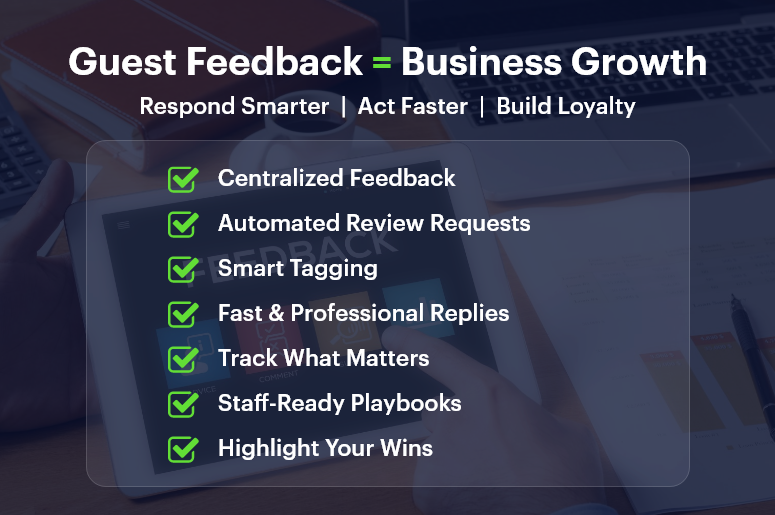
Guest Feedback = Business Growth

Why Guest Feedback Matters for Growing Businesses

Guest feedback isn’t just noise — it’s free business intelligence. Here’s why businesses must take reviews seriously:

1. Reviews Influence Purchasing Decisions

Most customers read online reviews before making a purchase or booking. A steady stream of positive feedback can boost conversion rates dramatically, while unresolved negative reviews can drive prospects away.

2. Feedback Helps You Fix What’s Broken

Constructive criticism reveals gaps in service, product quality, or communication. Listening to your guests lets you prioritize improvements based on real-world issues, not guesswork.

3. Happy Customers Become Repeat Customers

When guests feel heard, they’re more likely to return and refer others. A solid feedback loop builds brand trust, customer loyalty, and long-term revenue.

4. Industry Spotlight

  • Hospitality: Room cleanliness, check-in process, and staff behavior.
  • Health & Wellness: Wait times, consultation quality, therapist communication.
  • Retail & Services: Staff responsiveness, post-sale follow-up, pricing clarity.

In every case, managing guest feedback efficiently is a competitive advantage.

Best Practices: CRM Tips for Handling Guest Feedback & Reviews

1. Centralize Feedback Channels

Use CRMLeaf to consolidate all feedback from Google, Facebook, email surveys, and third-party review sites. Having a single dashboard avoids missed comments and lets you act fast.

2. Automate Feedback Collection

Set up automated post-visit messages asking guests for reviews or satisfaction ratings. CRMLeaf allows you to schedule personalized messages that encourage genuine responses.

3. Create Feedback Categories

Organize reviews into buckets — service, product, cleanliness, support, etc. This helps you spot patterns, assign accountability, and take targeted action.

4. Use Tags and Notes

Add internal tags to feedback based on sentiment (positive, neutral, negative) or urgency. CRMLeaf lets you tag contacts and assign follow-up tasks to specific team members.

5. Respond Quickly and Professionally

Whether the feedback is good or bad, respond within 24 hours. Thank happy customers and offer solutions or apologies to unsatisfied ones. Timely replies show you care.

6. Trigger Internal Workflows for Critical Reviews

Use CRMLeaf’s automation engine to route negative feedback to team leaders. You can create workflows that automatically escalate certain reviews for manager response.

7. Monitor Response Effectiveness

Use CRM dashboards to track how many reviews were addressed, how quickly, and how satisfied the guest was after follow-up. Measure, improve, repeat.

8. Train Your Staff

Ensure every team member who interacts with customers knows how to log feedback and respond appropriately. CRMLeaf can house scripts, response templates, and escalation policies.

9. Showcase Positive Feedback

Don’t let good reviews go to waste! Feed top reviews into your website, newsletters, or booking page. CRMLeaf can help sync top-rated reviews with your marketing campaigns.

10. Close the Loop

Send follow-up messages to guests whose complaints were resolved. This final touch leaves a lasting impression and can often turn a critic into a brand ambassador.

Customer Success Snapshot

For example, Revive Wellness Spa, a regional spa chain, used CRMLeaf’s feedback automation and smart tagging system to reduce negative online reviews by 38% in 3 months. By automating review requests post-appointment and routing negative feedback to floor managers, they improved their guest satisfaction rating from 3.8 to 4.6 stars on Google.

Key Takeaways: Guest Feedback Isn’t a Chore — It’s a Growth Engine

  • Managing guest feedback effectively improves customer satisfaction, online reputation, and operational performance.
  • A robust CRM + ERP system like CRMLeaf streamlines the entire process from collection to resolution.
  • Focus on automation, team training, and measurable insights for long-term gains.

Guest feedback is your business’s mirror — use it to refine, reflect, and grow.

Manage Leads from Site Visits to Installation: A Solar CRM Playbook

In the solar energy business, a single missed follow-up or delayed site visit can mean the loss of a high-value customer. From capturing leads to quoting, site inspections, approvals, installations, and after-sales service — solar sales cycles are long and complex. That’s why top-performing solar companies use a dedicated solar CRM to manage every step seamlessly.

This playbook will walk you through how a modern CRM system built for solar companies can help you streamline the process from initial interest to final installation.

Whether you’re a growing solar startup or an established installer scaling operations, you’ll learn how to eliminate bottlenecks, reduce manual work, and close deals faster—all while offering a personalized customer experience.

Why Solar Businesses Need a Specialized CRM

Selling and installing solar panels isn’t like selling SaaS or furniture. It’s a project-based business that includes technical assessments, documentation, financing, regulatory approvals, and field operations.

Here’s what solar businesses often struggle with:

  • Leads get lost between marketing and field teams
  • Site surveys are delayed due to lack of coordination
  • Proposal generation takes too long
  • Customers are left in the dark during long installation cycles
  • Sales reps have no visibility into post-sale updates

All of this leads to slower growth, frustrated teams, and lost deals.

A solar CRM solves this by turning your sales pipeline into a well-oiled machine. With CRMLeaf, you can:

  • Capture and nurture leads across web, phone, email, or field visits
  • Schedule and track site surveys with field technicians
  • Auto-generate solar quotes based on customer preferences and site data
  • Manage documentation, permits, and installation timelines in one place
  • Keep customers in the loop through status updates and reminders

By unifying the customer journey from interest to installation, CRMLeaf helps you scale operations without sacrificing service quality.

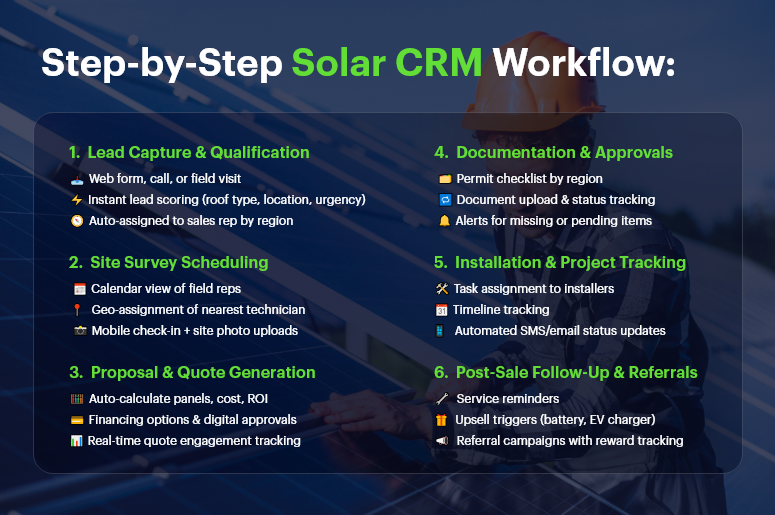
Step-by-Step Solar CRM Workflow

Best Practices & Actionable Tips

Capture & Qualify Leads Instantly

Why it matters:
Speed is everything in sales. If you’re not the first to follow up, someone else will be.

Best Practices:

  • Use web forms, landing pages, and chatbots to auto-capture leads
  • Assign leads automatically based on territory or availability
  • Score leads based on roof type, location, budget, and urgency

CRMLeaf Tip: Connect your marketing forms to CRMLeaf to trigger instant alerts to sales reps and start qualification workflows automatically.

Schedule and Track Site Surveys

Why it matters:
Site visits are critical for assessing roof conditions, energy needs, and panel placement.

Best Practices:

  • Allow survey teams to schedule visits directly through the CRM
  • Assign tasks and routes to field reps with built-in calendars
  • Enable mobile check-in and note-taking during visits

CRMLeaf Tip: Use geo-tagging to assign the nearest field team and attach photos or notes to each lead for smoother transitions.

Generate Accurate Proposals and Quotes

Why it matters:
Delays in proposal delivery = lower conversion rates. Speed and accuracy are key.

Best Practices:

  • Auto-calculate system size, panels required, and estimated ROI
  • Include multiple financing options and payment schedules
  • Track when a quote is viewed, accepted, or revised

CRMLeaf Tip: Use CRMLeaf’s proposal module to version control quotes and trigger approval workflows for fast client sign-offs.

Manage Documentation and Regulatory Approvals

Why it matters:
Solar installations often require local permits, grid approvals, and financing paperwork. Losing track of documents leads to delays.

Best Practices:

  • Centralize all paperwork in the CRM linked to each deal
  • Track approval status for each required permit
  • Set automated alerts for missing or pending documents

CRMLeaf Tip: Create custom checklists for different regions or installation types so your team never skips a step.

Oversee Installation and Post-Sale Service

Why it matters:
The installation is where customer expectations are at their highest. Communication and coordination are crucial.

Best Practices:

  • Assign installers with project timelines and tasks
  • Send automated updates to customers via email or SMS
  • Collect post-installation feedback and reviews

CRMLeaf Tip: Use the CRM’s project tracker to manage installation timelines, assign roles, and ensure accountability across the team.

Nurture and Retain Customers for Upgrades & Referrals

Why it matters:
Happy solar customers are your best marketers. Don’t let the relationship end at installation.

Best Practices:

  • Automate follow-ups for annual maintenance or warranty checks
  • Offer battery upgrade or EV charger deals
  • Launch referral campaigns with trackable rewards

CRMLeaf Tip: Segment customers based on installation date or system type and send personalized offers at the right time.

Customer Success

For example, SunGrid Energy, a solar provider operating in three states, used to juggle spreadsheets, emails, and phone calls to track leads and installations. The result? Missed follow-ups, delayed site surveys, and overwhelmed teams.

After implementing CRMLeaf’s solar CRM solution:

  • Lead response time dropped by 60%
  • Quote-to-installation cycle shortened from 28 days to 15 days
  • Installations per month increased by 35%
  • Customer satisfaction scores improved by 40%

Now, every team — from sales to field techs — is aligned on one platform. SunGrid Energy is scaling confidently, knowing that no lead or task falls through the cracks.

Key Takeaways

Managing a solar business is complex — but it doesn’t have to be chaotic. A specialized solar CRM like CRMLeaf brings visibility, efficiency, and structure to your entire operation.

From lead capture to installation and beyond, every team gets the tools they need to collaborate, and every customer gets a seamless experience.

Whether you’re chasing residential installs or large-scale commercial projects, this playbook equips you with a smarter, scalable way to win deals and delight customers. It’s time to stop managing leads manually and start powering your growth with CRMLeaf.

How to Connect Your CRM and Production Line for Better Forecasting

Ever had your sales team close a major deal — only to find out the production team can’t deliver on time? It’s a common disconnect. Sales teams track demand and customer behavior in the CRM. Production teams work on what’s already scheduled. But without a real-time connection between both, forecasting becomes guesswork. That’s why forward-thinking manufacturers and product-based businesses are integrating their CRM and production forecasting systems.

The result? A unified workflow that predicts demand more accurately, streamlines inventory planning, and boosts customer satisfaction.
In this blog, we’ll explore how to connect your CRM to the production line — so your teams stop working in silos and start delivering together.

Why Sales and Production Must Talk to Each Other

In today’s fast-paced business environment, operational efficiency starts with visibility.

When CRM data — like leads, expected deals, customer preferences, and sales trends — is shared with your production or ERP system, it enables proactive forecasting instead of reactive planning.

But when those systems remain isolated, here’s what happens:

  • Sales over-promises without knowing inventory capacity
  • Production over- or under-manufactures based on outdated forecasts
  • Customers face delivery delays or unfulfilled expectations
  • The business loses trust, margins, and repeat orders

By integrating CRM and production forecasting, companies can:

  • Predict which products will be in demand based on real-time pipeline data
  • Plan production schedules with greater accuracy
  • Align raw material procurement with future needs
  • Reduce overproduction and waste
  • Improve on-time delivery and customer satisfaction

Whether you’re managing a small manufacturing unit or an enterprise-level operation, connected data drives smarter decisions.

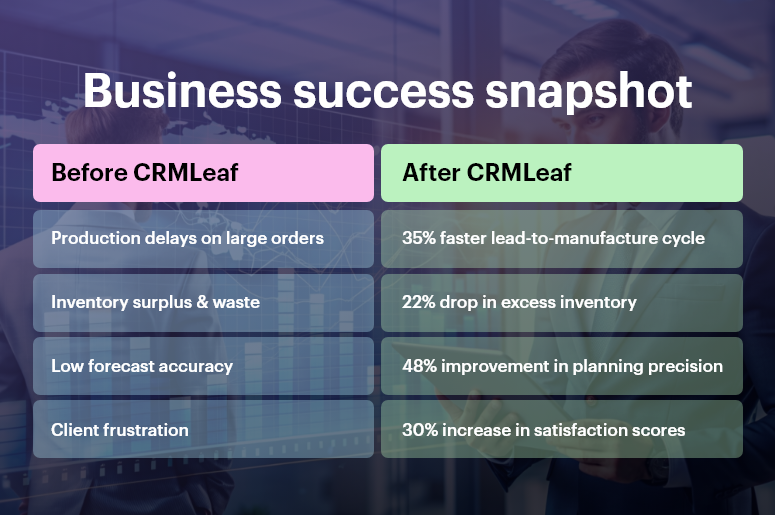
Business success snapshot

Choose CRM and ERP Systems That Talk to Each Other

Why it matters: Integration is the foundation. Your CRM and ERP (or production management software) need to share data seamlessly —either natively or through APIs.

Best Practice: Use a unified platform like CRMLeaf, or connect your existing systems using middleware like Zapier, Make, or custom APIs.

Tip: Choose platforms that support two-way sync, so both sales and production stay updated in real time.

Align Sales Stages with Production Planning

Why it matters: Not every lead becomes an order — but the ones nearing conversion should be on the production team’s radar.

Best Practice: Map CRM deal stages to production planning statuses:

  • Proposal Sent” = Tentative Forecast
  • Negotiation” = Forecast (Medium Certainty)
  • Won” = Immediate Production Trigger

Tip: Add probability percentages to each stage and feed that into your forecasting formula.

Track Product Demand from CRM Data

Why it matters: Sales insights are gold for forecasting. Track which products, models, or configurations are most in demand.

Best Practice: Use CRMLeaf’s product-level reporting to spot trends: e.g., 60% of Q3 leads are asking for Model X. Feed this into your production capacity plan.

Tip: Filter demand by region or sales rep to localize your production forecasts.

Automate Workflows Between Sales and Production

Why it matters: Manual handoffs slow things down and cause errors.

Best Practice: When a deal is marked “Won” in the CRM, trigger:

  • Bill of materials creation
  • Production job scheduling
  • Inventory reservation
  • Delivery estimation for the client

Tip: Set up CRMLeaf automations to push won deals into your production dashboard instantly.

Monitor Real-Time Inventory to Inform Sales

Why it matters: Sales shouldn’t sell what you can’t deliver.

Best Practice: Let your CRM show real-time inventory levels, estimated production timelines, and backorder status. This helps reps set expectations and close deals more confidently.

Tip: Use dashboard widgets in CRMLeaf to show “In Stock,” “In Production,” and “Lead Time” on each product page.

Conduct Weekly Sync Between Sales & Ops Teams

Why it matters: Even with automation, human coordination matters.

Best Practice: Run a weekly forecasting review with sales, ops, and finance using CRM dashboards and production metrics to:

  • Adjust priorities
  • Reallocate resources
  • Plan for spikes or dips

Tip: Create a shared report in CRMLeaf with custom filters like “Deals Likely to Close in 14 Days” or “High-Volume Orders by Region.

Customer Success

For example, BrightVolt Electronics, a mid-sized manufacturer of smart home devices, struggled with production delays. Sales would land large deals, but production couldn’t respond fast enough—leading to backlog, poor reviews, and lost clients.

By connecting CRMLeaf to their production planning system:

  • Lead-to-manufacture cycle time reduced by 35%
  • Inventory waste dropped by 22%
  • Forecast accuracy improved by 48%
  • Customer satisfaction scores rose by 30%

Now, sales and production teams work in sync—forecasting based on real sales signals, not assumptions.

Key Takeaways

The gap between your sales floor and production floor can cost you—both in dollars and reputation.

But by integrating your CRM and production forecasting, you unlock visibility, coordination, and control. Forecasts become more accurate. Sales becomes more confident. And customers get what they want—when they want it.

CRMLeaf bridges that gap, helping you connect sales data to production planning effortlessly. Whether you’re scaling up or optimizing operations, now’s the time to unify your tools and your teams.

Customer Relationship Management Platform for Automotive Lifecycles

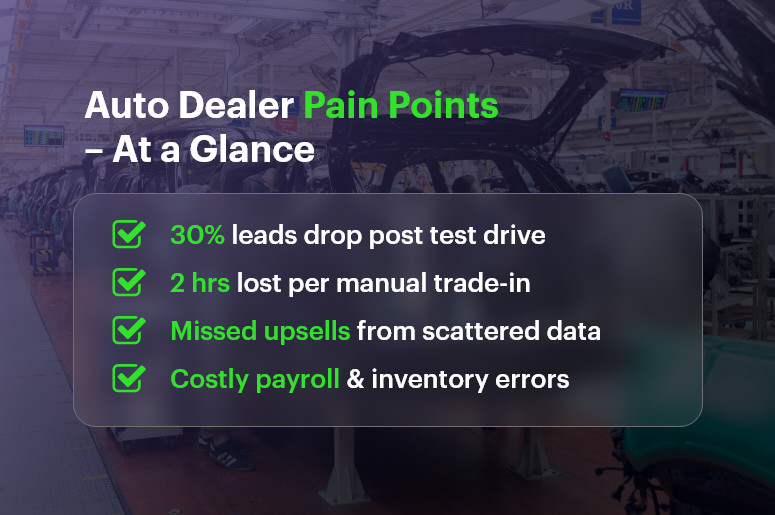
Did you know that dealerships lose up to 30% of potential buyers between the test drive and trade-in phases. It is mostly due to fractured processes and missing data? In today’s hyper-competitive automotive market, every touchpoint matters — from the moment a lead books a test drive. Without a unified customer relationship management platform, sales teams juggle spreadsheets, finance leaders wrestle with outdated payroll numbers, and service teams scramble to find a customer’s maintenance history. In this post, you’ll discover how CRMLeaf’s integrated CRM + ERP platform unifies sales, service, HR, and finance — transforming disconnected steps into a seamless lifecycle.

Read on for actionable strategies, best practices, and real-world examples that will help your dealership accelerate sales, boost retention, and streamline back-office operations.

Business Need & Importance

Why is managing the end-to-end automotive lifecycle critical for growing dealerships and used-car retailers? Because customers expect a personalized, frictionless experience at every phase. A single silo can cost you a sale, damage loyalty, or inflate operational costs. Here’s what’s at stake:

Disconnected Data, Disjointed Experience

When customer information lives in separate spreadsheets or disparate CRM systems, sales reps lack visibility into service history, finance crews can’t see outstanding maintenance, and HR teams struggle to manage employee profiles effectively. The result? Missed upsell opportunities and frustrated customers.

Lost Revenue in the Test Drive Phase

A smooth test drive scheduling process can boost conversion rates by up to 15%. But if a lead’s preferences or contact history aren’t readily accessible, follow-ups get delayed or generic. That’s where integrated customer relationship management software steps in to automate reminders, capture feedback, and route hot leads to top-performing reps.

Inefficient Trade-In & Resale Processes

Determining accurate trade-in values requires real-time access to inventory data, market analytics, and a customer’s service records. With manual processes, finance teams spend hours cross-referencing sources, delaying quotes and increasing the risk of losing deals to competitors.

In industries from luxury auto franchises to independent used-car lots or tire and auto-service centers, a combined CRM + ERP solution like CRMLeaf brings everything under one roof:

Document management system for title and contract filing
– Payroll services for small business integrated with finance workflows for accurate commission tracking
– Human resource management software modules — including attendance software, all in one HR software, and employee profiles —to keep your team aligned and productive

By unifying sales, service, HR, and finance, automotive businesses can reduce admin overhead by 25%, shorten customer response times by 40%, and ultimately drive higher trade-in valuations and loyalty.

Auto Dealer Pain Points – At a Glance

Best Practices & Actionable Tips

Transitioning from isolated tools to an integrated customer relationship management + ERP platform is a journey. Here are practical steps and do’s & don’ts to guide your dealership:

Audit Your Current Workflow

  • Map Every Step: Begin by documenting how a lead moves from initial inquiry to test drive, purchase, and eventual trade-in.
    This exercise highlights friction points — whether it’s manual data entry, lost emails, or duplicate records.
  • Identify Siloed Systems: List every tool your teams use — online payroll services, document control software, stand-alone CRMs, spreadsheets — and note overlaps or gaps.

Centralize Data for a 360° View

  • Leverage Integrated Document Management: Store service records, finance contracts, and trade-in appraisals in a single document management system.
  • This ensures that any authorized staff member can retrieve essential paperwork in seconds — no more digging through filing cabinets
  • Build Rich Employee Profiles: Combine HR data from your all in one HR software — including attendance software and training certifications — so managers can allocate the right sales reps or technicians to high-value clients.

Automate Customer Engagement

  • Automate Test Drive Follow-Ups: Use built-in workflow tools in your customer relationship management platfrom to trigger SMS or email reminders.
  • These timely prompts not only reduce no-shows but also capture feedback for continuous improvement.
  • Personalize Service Offers: When a test drive is complete, automatically recommend complementary services — like tire rotations or oil changes — based on the vehicle’s mileage and service history stored in CRMLeaf.

Streamline Trade-In & Resale

  • Real-Time Market Data Feeds: Integrate third-party valuation APIs directly into CRMLeaf so your sales and finance teams get updated trade-in estimates instantly.
  • This speeds up quote generation and builds trust with prospects.
  • Standardize Inspection Checklists: Digitize your trade-in appraisal process with mobile inspection forms linked to each customer record — avoiding lost notes and ensuring consistent criteria.

Optimize Finance & Payroll Processes

  • Consolidate Payroll Services for Small Business: Replace fragmented online payroll services for small business and payroll processing companies with CRMLeaf’s unified payroll engine.
  • Automatic commission calculations, tax filings, and integration with finance ledgers. You will get fewer errors and more time to focus on sales strategies.
  • Simplify Compliance: Use CRMLeaf’s legal document management software features to track title transfers, lien releases, and inspection certificates — reducing the risk of regulatory fines.

Leverage Analytics for Continuous Improvement

  • Monitor Key Metrics: Build dashboards to track test-drive conversion rates, average days in inventory, and trade-in profit margins in real time.
  • Predictive Forecasting: Harness historical data from your CRM + ERP to forecast service demand peaks, staffing needs, and seasonal promotions.

Do’s & Don’ts for a Smooth Rollout

  • Do involve cross-functional stakeholders early — sales, service, HR, and finance leaders must all agree on success metrics.
  • Do invest in training sessions and hands-on workshops to drive user adoption, especially for human resource management systems features like time-off requests and appraisal workflows.
  • Don’t underestimate data cleansing — dedicate time to merge duplicate records and standardize fields before migration.
  • Don’t ignore change management — provide ongoing support, feedback channels, and quick reference guides to ease the transition.

Customer Success

For example, Millennium Auto Group, a multi-location dealership specializing in SUVs and crossovers, implemented CRMLeaf’s customer relationship management software. Before CRMLeaf, their sales teams used standalone CRMs. Finance managers relied on separate payroll services near me vendors, thereby leading to redundant data entry and frequent commission disputes.

Here’s how CRMLeaf transformed their operations:

  • 20% Increase in Test-Drive Conversions: Automated follow-ups and personalized offers reduced no-shows by 35%.
  • 30% Faster Trade-In Appraisals: Real-time valuation APIs and digital inspection checklists cut appraisal time from 2 hours to under 45 minutes.
  • 25% Reduction in Payroll Errors: Unified payroll processing for one to 50 employees—complete with tax filings and compliance checks — eliminated manual adjustments and late filings.

Millennium Auto Group now enjoys smoother handoffs between sales, service, and finance. It also gets higher customer satisfaction scores, and increased revenue per vehicle.

Key Takeaways

Managing the automotive lifecycle — from first test drive to final trade-in — demands an end-to-end perspective. Disconnected CRM systems, separate HRM systems, and ad hoc online payroll services for small businesses create friction and lost opportunities. By adopting CRMLeaf’s all-in-one CRM + ERP platform, you can:

  • Unify data across sales, service, HR, and finance for seamless customer experiences
  • Automate engagement, valuation, and back-office workflows to reduce manual work
  • Leverage analytics to continuously optimize conversion rates and profitability

Ready to elevate your dealership’s performance? Discover how a single integrated system can drive revenue, streamline operations, and delight customers at every touchpoint.

How to Win More Deals with a Streamlined Proposal Workflow

Proposals are the bridge between opportunity and revenue. Yet many businesses lose deals not because of pricing or product — but because of a clunky, delayed, or inconsistent proposal workflow.

According to a recent study by Proposify, 50% of sales proposals are won by the first vendor to send them. If your team is stuck juggling spreadsheets, email threads, or disconnected quote documents, you’re not just losing time — you’re losing deals.

In this post, we’ll break down how a streamlined proposal workflow can improve your win rate, speed up the sales cycle, and remove costly friction. Plus, you’ll discover how CRMLeaf makes proposal creation, approval, and tracking effortless — all inside your CRM + ERP system.

The Proposal Bottleneck Is Real

For many small and mid-sized businesses, especially in construction, software, real estate, consulting, and B2B services, sending proposals is a major time sink.

Here’s what often happens:

  • The sales rep emails the manager to get pricing approvals.
  • The finance team manually edits a Word doc.
  • Another department adds missing information.
  • Days pass. The customer waits… and often moves on.

This fragmented approach is risky. Not only does it create delays, but it also increases the chance of errors, outdated pricing, inconsistent formats, and lost opportunities.

And in today’s competitive environment, that just won’t cut it.

What you need is a streamlined, automated proposal workflow where your team can:

  • Create professional, accurate proposals in minutes
  • Route proposals for approval without leaving your CRM
  • Track proposal status in real-time
  • Maintain version control and eliminate back-and-forth confusion

That’s exactly what a smart CRM + ERP solution like CRMLeaf is built to handle.

How to Win More Deals with a Streamlined Proposal Workflow

Best Practices & Actionable Tips

Want to build a proposal workflow that actually wins more business? Here are six best practices to help you go from chaos to conversion.

1. Use Templates to Standardize Proposals

Why it matters:
Creating each proposal from scratch is inefficient and inconsistent. Using templates ensures that your proposals always follow brand, structure, and pricing guidelines — no matter who’s sending them.

With CRMLeaf:
You can create pre-approved templates with dynamic placeholders for project scope, pricing, timelines, and terms. This minimizes errors and saves time.

2. Automate Internal Approvals

Why it matters:
Waiting for manager or finance approvals can stall the sales cycle. Automated approval workflows reduce bottlenecks by routing proposals to the right people at the right time.

With CRMLeaf:
You can define multi-level approval chains based on deal size or department — and track the approval status in real-time, without emails or Excel files.

3. Sync Proposals with CRM Data

Why it matters:
Proposal accuracy depends on updated customer, product, and pricing data. By syncing your proposal tool with your CRM, you eliminate duplication and ensure consistency.

With CRMLeaf:
Your proposal fields automatically pull data from deal records — like contact info, product SKUs, terms, or payment milestones — ensuring speed and accuracy.

4. Enable Version Control & Audit Trails

Why it matters:
When multiple people are involved, versioning issues are inevitable. Without clear tracking, you risk sending outdated or incorrect proposals.

With CRMLeaf:
Every revision is tracked, timestamped, and saved — making it easy to see who changed what and when. You maintain full control and compliance.

5. Track Proposal Status in Real-Time

Why it matters:
If you don’t know whether a proposal has been sent, viewed, or approved, it’s impossible to follow up effectively. Real-time visibility helps teams take action faster.

With CRMLeaf:
You can track the entire proposal lifecycle — created, sent, opened, accepted — all from your CRM dashboard. No more guessing.

6. Integrate Proposal Workflow with ERP Functions

Why it matters:
Proposals are just the beginning. They often lead to purchase orders, invoicing, and project execution. A disconnected system causes delays and data loss.

With CRMLeaf’s CRM + ERP:
Once a proposal is accepted, it flows directly into your ERP system for delivery scheduling, billing, and execution — with zero duplication.

Customer Success

For example, BlueBrick Constructions, a mid-sized infrastructure company in Bangalore, struggled with inconsistent proposal formats and approval delays. Their sales reps were spending 3–4 hours per proposal, often chasing multiple departments for updates.

After switching to CRMLeaf, they:

  • Created standardized proposal templates
  • Automated multi-level approval workflows
  • Integrated proposals with customer records and ERP billing modules

In just two months, BlueBrick saw a 35% improvement in proposal turnaround time and a 22% increase in win rates. Their sales team now sends out proposals in under 15 minutes — and closes deals faster with fewer errors.

Key Takeaways

If you’re looking to win more deals, don’t just focus on what you’re selling — improve how you propose it. A well-organized, efficient proposal workflow saves time, reduces errors, and accelerates revenue.

CRMLeaf brings together your sales, finance, and project teams into one unified platform so you can:

  • Create faster, smarter proposals
  • Automate approvals
  • Track everything in real-time
  • Seamlessly connect proposals to billing and execution

It’s time to stop losing deals to delay — and start converting with confidence.