Boost Efficiency with Sales and Operations Automation

In 2025, over 70% of growing businesses report revenue leakage, delayed decision-making, or customer dissatisfaction due to manual processes and disconnected systems. Sales teams chase leads in one tool, operations track execution in another, and finance reconciles everything in spreadsheets — often days or weeks later. As a result, leadership lacks real-time visibility, teams duplicate effort, and opportunities slip through the cracks. This is precisely where sales and operations automation becomes a strategic necessity rather than a technology upgrade. Automation connects people, processes, and data across the organization, ensuring work flows seamlessly from lead generation to delivery, billing, and reporting.

In this guide, you will learn the top automation processes that directly improve sales performance and operational efficiency, why they matter more than ever in 2025, and how a unified CRM platform like CrmLeaf enables end-to-end automation without complexity. By the end, you will have a practical framework to identify automation opportunities, avoid common mistakes, and drive measurable business outcomes.
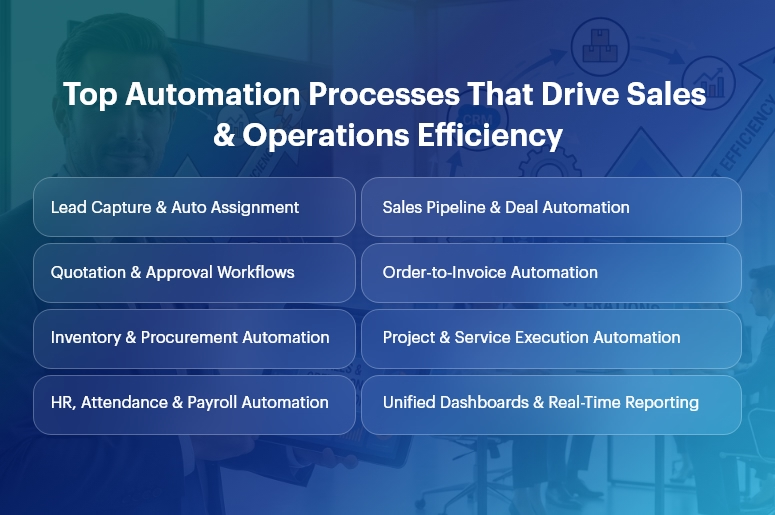
Top Automation Processes That Drive Sales & Operations Efficiency (1)

Business Need & Importance

Today’s small and mid-sized businesses operate in a high-pressure environment defined by shorter sales cycles, rising customer expectations, compliance demands, and margin sensitivity. However, many still rely on manual handoffs, spreadsheets, and siloed applications.

Why manual processes hurt growth

  • Delayed sales follow-ups and approvals reduce conversion rates and increase customer churn.
  • Disconnected operations and finance data lead to inaccurate forecasts and budget overruns.
  • Human-dependent workflows introduce errors, rework, and compliance risks.

This is why sales and operations automation has become mission-critical.

Industry examples

  • Manufacturing: Manual order processing and inventory updates cause production delays and excess stock. Automation synchronizes CRM orders with MRP, inventory, and invoicing.
  • Retail & Distribution: Disconnected sales, warehouse, and finance systems slow order fulfillment and distort margins. Automated workflows ensure real-time stock visibility and faster billing.
  • Professional Services: Project teams struggle with scope creep and delayed invoicing. Automation aligns sales commitments with project execution and revenue recognition.

Moreover, growing businesses can no longer afford spreadsheet-driven decision-making. As volumes scale, complexity increases exponentially. Sales and operations automation replaces guesswork with data-driven execution, ensuring speed, accuracy, and accountability across departments.

Best Practices, Frameworks & Actionable Tips

Core Automation Processes That Drive Impact

1. Lead-to-Opportunity Automation (CRM)

  • Automated lead capture, scoring, and routing ensure every inquiry is assigned instantly to the right salesperson based on rules, territory, or workload.
  • This eliminates response delays and improves conversion rates while giving managers pipeline transparency.

2. Sales Pipeline & Quotation Automation

  • Stage-based pipeline automation updates deal probability, expected revenue, and next actions automatically.
  • Integrated quotation workflows reduce pricing errors and speed up approvals using predefined discount and margin rules.

3. Order-to-Cash Automation

  • Once a deal closes, sales and operations automation triggers sales orders, delivery schedules, invoicing, and payment tracking automatically.
  • This removes manual handoffs between sales, operations, and finance, accelerating cash flow.

4. Inventory & Procurement Automation

  • Automated stock updates and reorder rules prevent stockouts and excess inventory.
  • Procurement workflows link demand forecasts with supplier orders, approvals, and GRNs.

5. Project & Service Delivery Automation

  • Sales commitments convert directly into projects, tasks, and resource plans.
  • Automated milestone tracking ensures timely delivery and accurate billing.

6. HR, Payroll & Attendance Automation

  • Employee onboarding, attendance, payroll, and compliance workflows run automatically.
  • This reduces administrative overhead and improves data accuracy across departments.

Implementation Best Practices

  • Start with high-impact, cross-functional workflows that involve multiple teams, such as lead-to-cash or order-to-invoice. These deliver faster ROI.
  • Standardize processes before automating. Automation amplifies efficiency — but it also amplifies inefficiencies if workflows are unclear.
  • Use role-based dashboards so sales, operations, and leadership see only what matters to them.
  • Automate approvals with guardrails, not bottlenecks. Define thresholds to balance speed and control.

Do’s and Don’ts

Do’s

  • Automate end-to-end, not in silos, to ensure continuity across CRM, ERP, HR, and finance.
  • Use real-time analytics to monitor performance and adjust workflows proactively.

Don’ts

  • Do not over-customize early, which increases maintenance and slows adoption.
  • Do not automate without change management — user adoption determines success.

Why Unified CRM Wins

Unlike point solutions, a unified CRM platform like CrmLeaf delivers true sales and operations automation by sharing a single data model across:

  • CRM: Leads, opportunities, and customer interactions
  • Projects & Manufacturing: Execution, delivery, and production planning
  • Inventory & Procurement: Stock, vendors, and logistics
  • HRMS & Payroll: Workforce and compliance
  • Finance: Invoicing, accounting, and reporting

This eliminates integrations, data duplication, and reconciliation delays—creating one source of truth.

Customer Success

For example, a mid-sized manufacturing company implemented sales and operations automation using CrmLeaf to address delayed order processing and poor forecast accuracy.

Their sales team struggled with manual quotations, while operations lacked visibility into confirmed demand.

Within 90 days, Apex automated lead-to-order workflows, synchronized CRM deals with production planning, and introduced real-time inventory updates.

As a result, they achieved 28% faster order fulfillment, 35% improvement in forecast accuracy, and 20% reduction in working capital tied to excess inventory.

More importantly, leadership gained unified dashboards spanning sales, operations, and finance — enabling faster, data-driven decisions and scalable growth.

Key Takeaways & Closing

Automation is no longer optional — it is the backbone of scalable growth. Businesses that embrace sales and operations automation gain speed, accuracy, and visibility across their entire value chain.

From lead management and order processing to delivery, payroll, and finance, automation removes friction and unlocks performance.

As competition intensifies in 2025, organizations that delay automation risk falling behind. Those that act now position themselves for sustainable, profitable growth powered by connected systems and real-time insights.

FAQs

1. What is sales and operations automation?

Sales and operations automation connects CRM, ERP, and business workflows to automate lead management, order processing, delivery, and reporting in real time.

2. How does sales and operations automation improve efficiency?

It eliminates manual handoffs, reduces errors, and accelerates workflows across sales, operations, and finance using shared data.

3. Is sales and operations automation only for large enterprises?

No. SMBs benefit even more, as automation helps them scale without adding operational overhead.

4. How long does it take to see ROI from sales and operations automation?

Most businesses see measurable improvements within 60–120 days when high-impact workflows are automated first.

5. Why choose a unified CRM for automation?

A unified platform ensures seamless sales and operations automation without integrations, data silos, or reconciliation delays.

6. Can automation adapt as my business grows?

Yes. Scalable platforms like CrmLeaf allow workflows, approvals, and analytics to evolve with your business needs.

7. Does automation replace human decision-making?

No. Sales and operations automation supports teams with real-time data, enabling faster and smarter decisions rather than replacing them.

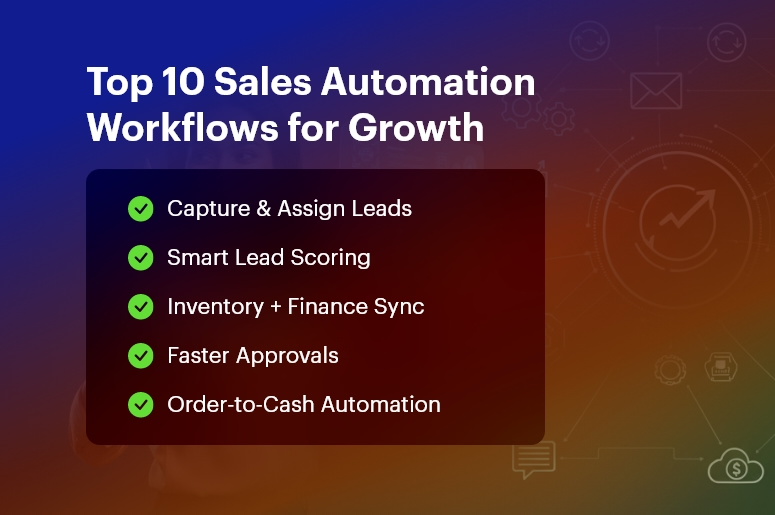
Top 10 Sales Automation Workflows Every Growing Business Needs

Did you know that businesses lose up to 30% of revenue every year due to inefficient processes and manual tasks? In fast-growing companies, sales teams spend more time entering data, tracking follow-ups, and updating spreadsheets than actually selling. That’s why Sales Automation is no longer optional — it’s a competitive necessity in 2025.

Customers expect immediate responses, accurate information, and frictionless experiences. Meanwhile, organizations require deep visibility into leads, performance, and conversion metrics.

That’s where CrmLeaf’s unified CRM + ERP ecosystem becomes a game-changer — it automates sales workflows across leads, quotes, approvals, finance, and inventory, while keeping customer experiences fast and consistent.

In this guide, you’ll learn the top 10 Sales Automation workflows that help unlock productivity, reduce costs, and accelerate growth — all future-ready with CrmLeaf.

Top 10 Sales Automation Workflows for Growth

Why Sales Automation Is Essential for Growing Businesses

As markets scale and competition intensifies, businesses face:

  • Slower revenue cycles due to manual handoffs between CRM, inventory, and finance
  • Data duplication and errors caused by siloed tools
  • Sales delays from approvals, verification, and compliance checks
  • High operational costs due to human-heavy processes
  • Poor customer experience, leading to lost opportunities

Moreover:

  • In manufacturing, quotation delays can lose deals worth lakhs.
  • In logistics, slow lead routing can push clients to competitors.
  • In retail and distribution, stock inaccuracies result in failed commitments.

Disconnected systems — like spreadsheets and isolated CRM tools — cannot support scalability.

Therefore, businesses need a single source of truth that unifies:

Function What Sales Needs from It CrmLeaf Connection
CRM Leads, opportunities, pipeline Fully native
Inventory Stock visibility before quoting Integrated ERP
Finance Pricing, tax, invoicing sync Automated & secure
Projects Customer delivery timelines Seamless transfer
HR Sales performance & commissions Built-in payroll link

With Sales Automation inside CrmLeaf:

  • Every lead gets tracked.
  • Every quote stays accurate.
  • Every approval happens faster.
  • Every customer gets a smooth buying experience.

The Top 10 Sales Automation Workflows Every Business Needs

Automated Lead Capture & Assignment

Automatically pull leads from web forms, emails, social channels, and WhatsApp into CrmLeaf. Sales Automation assigns them to the right sales rep based on geography, product line, or workload, ensuring no missed opportunities.

Lead Qualification & Scoring

CrmLeaf evaluates leads based on behavior, interest, company data, and interactions. High-potential leads receive priority follow-ups, while irrelevant ones don’t drain resources — improving sales efficiency instantly.

Follow-Up Scheduling & Reminders

Never forget a follow-up again. CrmLeaf alerts reps with real-time task notifications, automated emails, and smart reminders. This ensures consistent engagement until leads convert.

Sales Pipeline Tracking & Forecasting

Visual pipeline boards update automatically as deals progress. Sales leaders get accurate forecasting dashboards to decide where to invest effort, improving win rates and planning.

Quote Generation with Real-Time Pricing

CrmLeaf links CRM + Inventory + Finance to ensure accurate pricing, taxes, and stock validation before sending quotes. This removes delays and prevents overselling or pricing errors.

Approval Workflows for Deals & Discounts

Requests like special pricing or payment terms automatically route to managers. Workflow automation shortens approval cycles from days to minutes and increases governance.

Proposal Follow-Ups & e-Signatures

CrmLeaf sends automated proposal reminders and enables digital signatures for instant closure. This accelerates decision-making and improves the customer experience drastically.

Order-to-Cash Automation

Once a deal is won → ERP triggers order creation, delivery planning, and invoice automation. Sales and finance align perfectly with zero re-entry effort.

Customer Onboarding Tasks

Sales Automation automatically hands off customer details to service or project teams. Customers experience fast, structured onboarding without repeated information sharing.

Customer Retention & Upsell Automation

CrmLeaf monitors buying behavior, renewal timelines, and support history. Trigger upsell campaigns, loyalty offers, and renewal reminders to maximize lifetime value.

Best Practices for Implementing Sales Automation Successfully

Here’s how to ensure automation drives real outcomes — not complexity.

Step-by-Step Adoption Framework

  • Map current workflows, including delays and handoffs
  • Connect CRM + ERP data for transparency
  • Automate high-value tasks first (follow-ups, approvals, quoting)
  • Upskill your teams to use automation confidently
  • Measure results using dashboards and iterate regularly

Do’s and Don’ts

Do Why It Matters
Automate repetitive, manual work Speeds up daily activities
Maintain clean, structured data Improves decision-making
Align sales with operations Inventory & finance stay accurate
Provide mobile access Sales stays fast in the field


Don’t Why It Hurts
Over-automate customer-first interactions It may feel robotic
Use disconnected tools Risks duplication and errors
Set and forget workflows Business conditions evolve

Quick Wins to Start With CrmLeaf

  • Automate lead imports from every channel
  • Use pipeline stage automation for reporting
  • Setup automated email sequences for follow-up
  • Enable smart approvals for discounts & quotations

Common Mistakes to Avoid

  • Assuming automation replaces people — it augments them
  • Lack of cross-department alignment
  • Using outdated data in workflows
  • Ignoring change management and training

Customer Success Story: Operational Transformation with CrmLeaf

For example, a leading manufacturing supplier in India implemented Sales Automation using CrmLeaf to eliminate delays in quoting and order approvals. They previously relied on spreadsheets and manual coordination between inventory and finance.

Within just 60 days, they achieved:

  • 40% faster quote approvals
  • 23% increase in conversions
  • 85+ hours saved per month in admin work
  • 100% visibility of product availability before commitment

Here’s how it transformed operations:

  • Sales reps now get real-time pricing and stock checks
  • Finance auto-generates invoices aligned to approved quotes
  • Inventory teams plan dispatch without coordination delays

This is how CrmLeaf powers revenue speed + process accuracy together.

Key Takeaways

To win in modern markets, sales teams must operate fast, accurate, and connected.

Sales Automation eliminates delays, boosts conversions, and improves customer experiences.

CrmLeaf gives you everything — CRM, ERP, Finance, Inventory, and Projects — in one system so your workforce stays productive and your business stays competitive.

In short: Sales Automation is your growth engine.

Frequently Asked Questions

  • What is Sales Automation and why do businesses need it?

Sales Automation uses technology to replace manual sales tasks like follow-ups, approvals, and quoting. It helps businesses work faster, reduce errors, and win more deals.

  • How does Sales Automation improve accuracy?

It keeps all data synchronized across CRM, inventory, and finance. With CrmLeaf, pricing, taxation, and stock updates are automated — ensuring Sales Automation supports correct commitments.

  • Will automation replace sales teams?

Not at all. It removes repetitive tasks so teams focus on high-value selling and customer relationships.

  • Can Sales Automation help customer experience?

Yes! Faster responses, accurate proposals, and seamless onboarding make customers feel valued — which increases loyalty and referrals.

  • Why is CRM + ERP integration important for Sales Automation?

Because sales impacts inventory, finance, delivery, and payroll. A unified platform like CrmLeaf prevents duplication and delays.

  • How quickly can companies see results?

Most CrmLeaf customers see productivity improvements and quicker deal cycles in 30–90 days, depending on scope.

  • Is Sales Automation expensive?

With CrmLeaf’s unified system, you remove multiple tools — making automation cost-efficient with a higher ROI.

From Inquiry to Signed — Mapping Your Sales Funnel

Every sale begins with a simple inquiry — a form fill, a demo request, or a phone call. But how does that inquiry turn into a signed contract?

That journey is the sales funnel — a visual map of how leads move from initial interest to final purchase. Mapping this funnel helps businesses understand where leads drop off, which touchpoints drive engagement, and how to optimize every step for higher conversions.

Without a mapped funnel, you’re flying blind. With one, you can measure, forecast, and scale your sales process systematically.

What Is a Sales Funnel?

A sales funnel represents the stages a potential customer goes through before making a purchase. It visualizes the buyer’s journey from awareness to decision, allowing sales and marketing teams to align strategies and messaging at each step.

Think of it as a roadmap:

  • Top of Funnel (ToFu): Generating awareness and inquiries.
  • Middle of Funnel (MoFu): Nurturing leads and building trust.
  • Bottom of Funnel (BoFu): Closing deals and driving retention.

By understanding each phase, businesses can craft targeted communication, automate follow-ups, and ensure no lead is lost along the way.

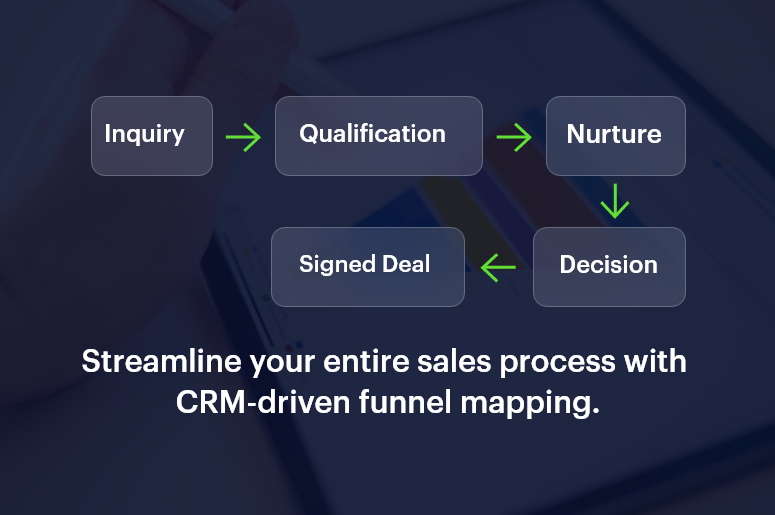
Streamline your entire sales process

The 5 Stages of a Sales Funnel

1. Awareness: Capturing the Inquiry

At this stage, potential customers discover your business through marketing channels like ads, SEO, social media, or referrals.

  • Goal: Generate awareness and attract interest.
  • Tools: Landing pages, lead magnets, webinars, and forms integrated with your CRM.
  • Tip: Use automation to capture every inquiry instantly — no manual entry, no missed leads.

2. Interest: Qualifying the Lead

Once leads enter your CRM, the next step is qualification — determining if they fit your ideal customer profile.

Key Actions:

  • Assign lead scores based on behavior and demographics.
  • Segment leads by source, region, or interest.
  • Trigger personalized emails or follow-ups.

A strong CRM sales funnel like CrmLeaf automates this process, ranking leads so your sales reps focus on the most promising prospects first.

3. Consideration: Nurturing the Relationship

Now it’s about education and trust-building. Prospects are comparing options, evaluating pricing, and researching competitors.

Strategies:

  • Send product demos or free trials.
  • Share case studies and testimonials.
  • Schedule personalized consultations.

Automation tools help deliver timely, relevant content that keeps your brand top of mind throughout the decision process.

4. Decision: The Closing Stage

This is where deals are won or lost. Sales reps should have full visibility into lead behavior, objections, and communication history.

Key Tactics:

  • Offer limited-time discounts or proposals.
  • Use CRM reminders for follow-ups.
  • Track proposal opens and contract views in real time.

With a mapped funnel, your team can identify what accelerates closure — such as faster response times or personalized demos — and replicate it consistently.

5. Action: Signed & Onboarded

Once the deal is signed, the funnel doesn’t end — it evolves into retention and referral stages.

Post-Sale Focus:

  • Automate onboarding sequences.
  • Gather feedback and reviews.
  • Offer loyalty rewards or upsell opportunities.

Mapping these final stages ensures repeat business and long-term customer relationships.

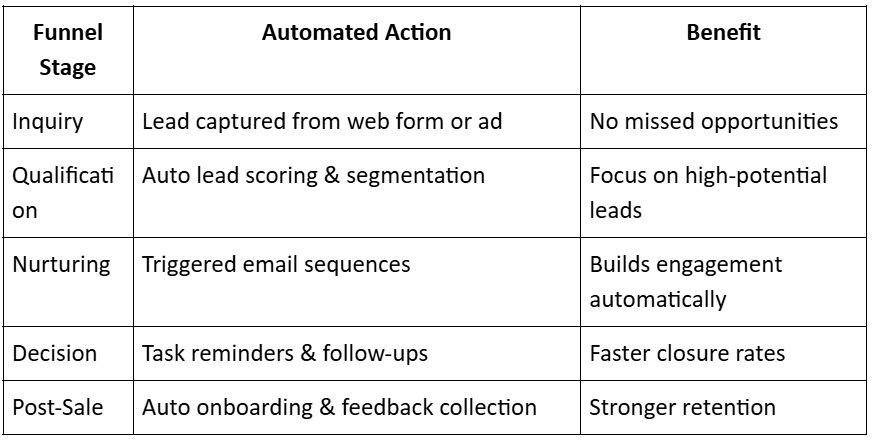
How CRM Automation Transforms Funnel Management

Manually tracking leads across funnel stages is error-prone and inefficient. That’s where CRM automation comes in.

Here’s how modern CRM systems streamline your funnel:

From-Inquiry-to-Signed

CrmLeaf, for instance, allows complete visibility into your funnel performance — from inquiry to invoice — in real time.

Key Metrics to Track in Your Sales Funnel

To make your funnel data-driven, monitor these essential KPIs:

  • Lead Conversion Rate: Percentage of inquiries that become customers.
  • Average Deal Velocity: Time taken for a lead to move from first contact to close.
  • Stage Drop-Off Rate: Points where leads disengage or exit.
  • Customer Acquisition Cost (CAC): Total spend per converted lead.
  • Lifetime Value (LTV): Total revenue per customer relationship.

These insights help refine strategies and predict future sales performance.

From Inquiry to Signed with CrmLeaf

Let’s say a construction firm uses CrmLeaf to manage its sales process.

  • A lead fills out a form for a “Project Cost Estimation Tool.
  • CrmLeaf instantly captures the inquiry, tags it as “Commercial Construction,” and assigns it to a regional sales rep.
  • The CRM triggers an automated thank-you email and schedules a follow-up call.
  • When the lead downloads a project case study, their score increases by 20 points.
  • The rep receives a real-time alert, conducts a demo, and closes the deal.

Result:

Response time drops from 1 day to 10 minutes. Conversion rate improves by 45% in a month.

Best Practices for Effective Sales Funnel Mapping

  • Visualize Every Stage: Use a CRM pipeline view to see lead progression clearly.
  • Define Exit Criteria: Know what qualifies a lead to move to the next stage.
  • Automate Repetitive Tasks: Free your sales team to focus on closing, not updating spreadsheets.
  • Align Marketing & Sales: Share funnel data to ensure consistent messaging.
  • Review Weekly: Analyze bottlenecks and refine the process continuously.

The Future: AI-Driven Sales Funnel Optimization

AI-powered CRMs are transforming funnel management by:

  • Predicting which leads will convert next.
  • Suggesting optimal follow-up times.
  • Automating pipeline prioritization.
  • Recommending personalized engagement tactics.

With predictive insights, sales teams no longer chase — they anticipate.

Conclusion: Map It, Measure It, Master It

Your sales funnel is more than a diagram — it’s the heartbeat of your business. When mapped correctly and supported by CRM automation, it delivers clarity, efficiency, and predictable growth.

From the first inquiry to the signed contract, every touchpoint matters.

The businesses that map, measure, and master their funnels are the ones that scale sustainably.

FAQs on Sales Funnel Mapping

1. What is sales funnel mapping?

It’s the process of visualizing and tracking each stage of your sales process, from lead generation to deal closure.

2. Why is sales funnel mapping important?

It helps identify bottlenecks, improve conversions, and align marketing and sales teams.

3. What tools are used for mapping?

CRMs like CrmLeaf provide visual funnel dashboards and automation workflows.

4. How often should I review my sales funnel?

Weekly or monthly — depending on deal volume and sales cycle length.

5. Can automation improve funnel conversion?

Yes. Automation ensures instant responses, reduces human error, and keeps leads engaged throughout their journey.

Understanding the Sales Pipeline: Stages & Best Practices

Sales isn’t just about closing deals — it’s about building a repeatable, predictable process that turns leads into revenue. That process is your sales pipeline.

But here’s the catch: Without clear stages and disciplined tracking, your pipeline quickly becomes a black hole — full of leads but short on clarity. Many businesses don’t lose deals due to poor offerings but due to poor pipeline management.

In this post, you’ll learn how a well-structured sales pipeline helps your team stay focused, your forecasts become accurate, and your revenue engine runs smoothly. We’ll break down the core stages, share proven best practices, and show you how CRMLeaf’s CRM + ERP system can help you manage it all in one place — efficiently and effectively.

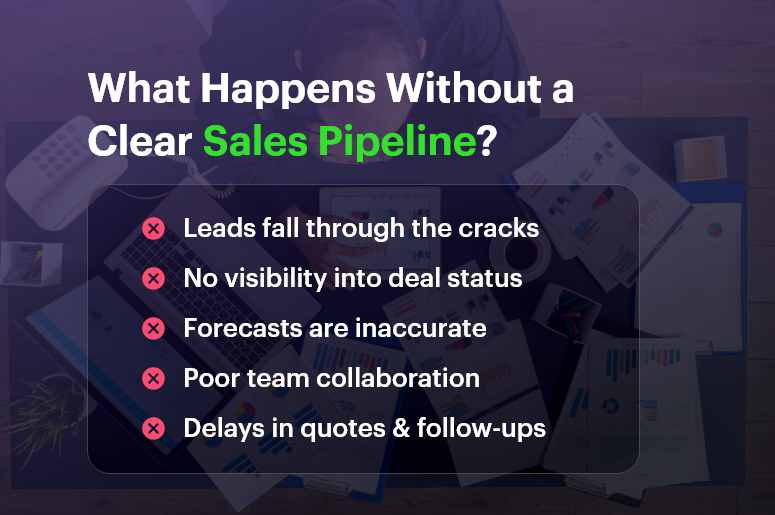
What Happens Without a Clear Sales Pipeline

Why the Sales Pipeline Matters More Than Ever

If you’re running a business in B2B services, manufacturing, IT, real estate, or any sales-driven industry, you know that growth comes down to closing deals consistently.

But here’s what often goes wrong:

  • Sales reps don’t have a clear process to move deals forward
  • Managers can’t forecast revenue accurately
  • Leads sit idle or drop off due to poor follow-up
  • No one knows which deals are “real” and which are stalled

This leads to missed targets, low win rates, and stress across the team.

A well-managed sales pipeline solves this. It brings visibility, accountability, and predictability to your sales process.

When properly structured, your pipeline gives you:

  • A step-by-step view of where every deal stands
  • Insight into conversion rates at each stage
  • The ability to forecast future revenue with confidence
  • A way to coach your team on what’s working — and what’s not

And when your sales pipeline is integrated with your CRM + ERP system like CRMLeaf, you can link deals directly to proposals, quotes, invoices, and even delivery schedules — making your entire business more efficient.

Best Practices & Actionable Tips

Let’s break down the core stages of a sales pipeline and the best practices to optimize each one.

Stage 1: Lead Qualification

What happens here:

Leads come in from marketing, events, referrals, or outbound efforts. The goal is to determine if they’re a good fit.

Best practices:

  • Use lead scoring to prioritize based on budget, authority, need, and timeline (BANT)
  • Automate lead capture via forms, landing pages, and integrations
  • Sync new leads to your CRM for immediate sales action

CRMLeaf Tip: Automate lead scoring and qualification workflows using CRMLeaf to save reps time and ensure no leads slip through the cracks.

Stage 2: Discovery & Needs Analysis

What happens here:

You’ve connected with the lead. Now it’s time to understand their pain points and goals.

Best practices:

  • Use a consistent discovery framework (e.g., SPIN, MEDDIC)
  • Log meeting notes directly in your CRM
  • Identify stakeholders and decision-making criteria early

CRMLeaf Tip: Use custom fields and call logs to track prospect insights and keep your team aligned on every opportunity.

Stage 3: Solution Presentation

What happens here:

You present your product/service and show how it meets the client’s needs.

Best practices:

  • Customize demos or proposals based on buyer goals
  • Address objections proactively
  • Offer multiple options or packages

CRMLeaf Tip: Use CRMLeaf’s proposal module to generate tailored quotes, attach brochures, and send via email with built-in tracking.

Stage 4: Quote & Negotiation

What happens here:

You’ve sent a quote, and the buyer is reviewing, negotiating, or seeking approvals.

Best practices:

  • Offer version-controlled quotes with detailed breakdowns
  • Set clear deadlines for decision-making
  • Loop in finance or legal teams early if needed

CRMLeaf Tip: Track every quote version and enable auto-approvals for standard deals, keeping things moving without manual follow-ups.

Stage 5: Deal Won/Lost

What happens here:

The customer makes a decision.

Best practices:

  • Mark the deal status in your CRM
  • Trigger automated onboarding or handover workflows
  • Analyze why deals were lost and improve accordingly

CRMLeaf Tip: CRMLeaf auto-updates deal stages and can trigger ERP workflows like invoice generation, delivery scheduling, or post-sale support tasks.

Pro Best Practice: Always Monitor the Pipeline Health

Why it matters: It’s not just about individual deals. Your pipeline should reflect overall team productivity, conversion trends, and revenue potential.

CRMLeaf Tip: Use built-in dashboards to track sales velocity, win rate, average deal size, and forecast value — updated in real time.

Customer Success

For example, TekNova Solutions, an IT service provider, struggled with pipeline visibility across its growing team. They had plenty of leads, but deals weren’t moving forward because reps were managing their pipelines in spreadsheets or emails.

After adopting CRMLeaf, TekNova:

  • Centralized their entire sales pipeline into a single dashboard
  • Reduced lead response time by 50%
  • Increased deal close rate by 35% within 90 days
  • Improved sales forecast accuracy for monthly planning

With real-time visibility, sales reps knew exactly where to focus and managers could spot bottlenecks instantly.

Key Takeaways & Closing

Your sales pipeline is more than just a list of deals — it’s the heartbeat of your revenue strategy. When managed correctly, it gives your team direction, clarity, and the confidence to grow.

By clearly defining pipeline stages, tracking progress, and using smart tools like CRMLeaf to automate workflows, you turn sales from a guessing game into a system.

Don’t let leads fall through the cracks or deals stall unnecessarily. Structure your pipeline. Track every stage. Win more business.

Win/Loss Analysis: How to Learn From Every Deal

Imagine losing a deal and never understanding why. That’s hundreds of missed opportunities slipping away — without insight. However, Win‑Loss Analysis transforms every deal into valuable customer feedback. Equally important, it helps you uncover why you won some deals and lost others. Consequently, you’ll sharpen your sales strategy, boost marketing positioning, and improve your pipeline performance.

In this updated guide, we’ll break down what Win‑Loss Analysis is, why it matters for growing businesses, and how to do it effectively. Additionally, you’ll discover real-world tactics and learn how CRMLeaf’s CRM + ERP platform streamlines the entire process — making analysis simple and impactful.

Why Win‑Loss Analysis Matters

First, understanding win/loss outcomes fuels smarter growth:

  • Improve sales effectiveness: Identify what sealed the deal — pricing, timing, product fit — and replicate it.
  • Enhance marketing positioning: Unearth weak messaging and improve brand alignment.
  • Align cross-functional teams: Fuse insights across sales, product, marketing, and finance, enabling cohesive execution.
  • Tighten revenue forecasting: Spot patterns of delay by competitor pressure or price sensitivity, and refine pipeline projections.

For instance:

  • SaaS providers can use win/loss data to prioritize future development sprints.
  • Professional services firms benefit from analyzing lost bids to optimize pricing and proposals.
  • Manufacturers rely on insights to tweak engagement tactics when deals stall.

However, many SMBs operate blindly — relying on gut feel. That’s why structured Win‑Loss Analysis, paired with strong analytics and timely feedback, consistently delivers ROI. It turns guesswork into strategic clarity.

Best Practices & Actionable Tips

Adopt these steps to embed Win‑Loss Analysis into your sales DNA — supported by CRMLeaf’s features:

1. Define Your Analysis Process

  • Set scope: Analyze all deals above a certain size, industry, or region.
  • Time interviews: Reach out within 1–2 weeks post-close to capture accurate reflections.
  • Assign responsibility: Use sales ops or product-marketing leads to avoid bias.

CRMLeaf Tip: Automatically generate follow-up tasks with deal tracking automation.

2. Ask the Right Questions

  • Start with deal context: What triggered the evaluation? Who influenced the decision?
  • Probe decision drivers: Was it pricing, features, timing, or vendor reputation?
  • Check the competitive landscape: Who else was in play? What gave them the edge?
  • Finish with post-decision care: What could we improve for next time?

3. Quantify & Categorize Insights

  • Tag insights in CRMLeaf — e.g., “Lost due to price,” “Won on feature X.”
  • Segment in dashboards by rep, region, industry, or product line.
  • Spot recurring themes — like lost deals due to a single competitor.

CRMLeaf handles this via built-in analytics.

4. Translate Insights into Action

  • Adjust sales collateral or pitch decks.
  • Feed product roadmap with consistent win/loss patterns.
  • Share findings during weekly standups to sharpen objection handling.
  • Capture next steps as tasks tied to each opportunity.

5. Close the Feedback Loop

  • Schedule quarterly reviews with sales, product, and finance to discuss trends.
  • Review improvements in pipeline health, conversion, or cycle length.
  • Iterate quickly on messaging, demos, pricing, or packaging.
  • Keep everyone engaged through shared dashboards.

Customer Success: StellarTech Solutions

StellarTech Solutions, a mid-sized SaaS company, piloted Win‑Loss Analysis across 25 opportunities in 90 days using CRMLeaf:

  • They implemented feedback surveys and tagged reasons for loss.
  • They aggregated data in dashboards to reveal trends.

Outcome:

  • 60% of losses stemmed from misunderstood features — leading to new demo scripts.
  • Deal close rates rose 12% next quarter; average deal size grew 8%.
  • Product teams gained clear data to guide sprint planning.
  • Overall, clearer pipelines and stronger sales confidence.

StellarTech credits CRMLeaf’s integrated CRM + ERP platform with fueling these improvements.

Key Takeaways

Win‑Loss Analysis powers smarter sales and sustainable growth. To embed it effectively:

  • Define a clear analysis process
  • Ask neutral, open-ended questions
  • Quantify and tag your insights
  • Execute improvements rigorously
  • Review trends and adapt regularly

With CRMLeaf’s unified CRM + ERP and analytics tools, your deal insights flow seamlessly into action. Most importantly, you build an adaptive, data-driven culture — free of siloed spreadsheets or guesswork.

FAQs

Q: What is Win‑Loss Analysis?
A: It’s a structured review of closed deals — both won and lost — to uncover insights that inform sales, marketing, and product strategy.

Q: How often should I conduct win/loss interviews?
A: Aim for every deal above a certain value — ideally within 1–2 weeks post-close to maximize accuracy.

Q: Can small teams benefit from Win‑Loss Analysis?
A: Absolutely. Even a handful of analyzed deals per quarter gives valuable patterns and clarity.

Q: How does CRMLeaf support this process?
A: CRMLeaf offers deal tracking, opportunity tagging, integrated dashboards, and automation — making the process scalable and transparent.