If you run a growing business on a tight budget, you probably juggle multiple tools: one for leads, another for invoices, a spreadsheet for payroll, and maybe a standalone project tool. Very quickly, that patchwork turns into chaos. That’s exactly where CRM ERP solutions help. They connect your customer data (CRM) with your operations and finance (ERP) so you can see the full picture: leads → deals → projects → invoices → payments → renewals — all in one place.
In this guide, you’ll explore 10 CRM ERP solutions for budget-conscious businesses, starting with CrmLeaf as #1, and then nine other strong contenders, including open-source and freemium options.
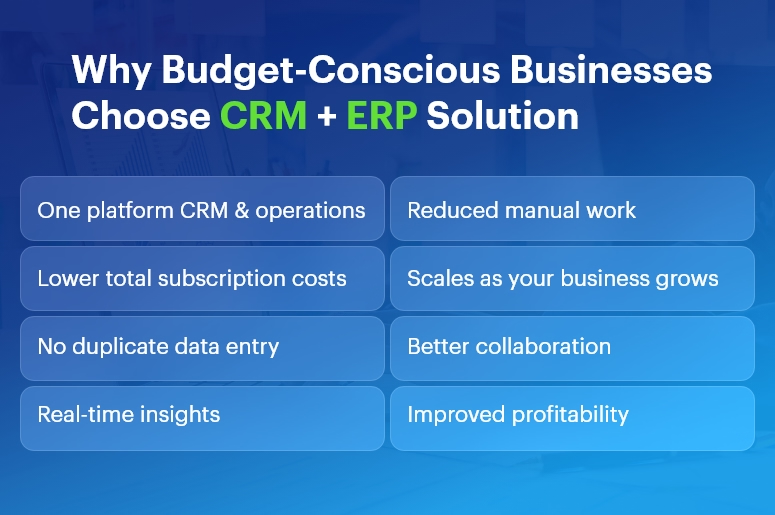
Why budget-conscious businesses need CRM ERP solutions
When margins are thin, every extra subscription hurts. An integrated platform lets you:
- Replace 4–5 tools with one connected system
- Reduce manual data entry and mistakes
- Get real-time visibility into cash flow, projects, and sales
- Automate repetitive tasks instead of hiring more admin staff
- Scale without constantly retooling your tech stack
Because of this, CRM ERP solutions often end up cheaper than stitching together multiple “cheaper” tools that don’t talk to each other.
How to evaluate CRM ERP solutions when money matters
Before you pick a tool, look at these factors:
- Total cost of ownership: Don’t just compare license prices. Also consider implementation, training, add-ons, and integration costs.
- Modules you actually need: You may not need advanced manufacturing on day one. Choose a system where you can start small and add modules later.
- Scalability: As your team grows, your CRM ERP solutions must handle more users, more data, and more automation — without a painful migration.
- Ease of use & adoption: The cheapest ERP is still expensive if your team refuses to use it. Look for a clean UI, good onboarding, and strong support.
- Customization & automation: Workflows, custom fields, approval rules, and integrations matter a lot when you want to save time instead of hiring more staff.
- Localization & compliance: If you operate in India or specific regions, you need local tax formats, multi-currency, payroll options, and statutory compliance.
Now let’s walk through 10 CRM ERP solutions that fit tight budgets — with CrmLeaf at the very top.
CrmLeaf
Best for: Small and midsize businesses that want CRM, HR, finance, projects, and operations in a single, budget-friendly platform.
Why CrmLeaf is #1 on this list
CrmLeaf is an all-in-one business management platform that brings together CRM, HRMS, finance, project management, payroll, inventory, ticketing, and even specialized Solar CRM in one unified system.
Instead of juggling separate tools for leads, HR, invoices, and operations, you log in once and see everything in a single workspace.
Key modules that matter for budget-conscious teams
Core CRM
- Lead and contact management
- Sales pipeline and deal tracking
- Follow-up reminders and tasks
- Quotations & estimates
ERP-style operations
- Project and task management
- Service ticketing and support
- Product & inventory lifecycle
- Purchase and vendor management
- Contract & asset management
Finance & billing
- Invoice management
- Payment tracking
- Bank accounts & financial institutions
- Expense management
HR & payroll
- Employee directory and profiles
- Attendance & leave management
- Payroll processing
- Recruitment & performance management
Pricing advantage
CrmLeaf offers multiple plans, starting with a Free Plan for a single user, and paid plans that scale with your team size. You get CRM, projects, HR, payroll, finance, and operations under one roof, which keeps your total cost of ownership low compared to buying individual tools.
Because of this, CrmLeaf stands out as one of the most budget-friendly CRM ERP solutions for SMBs that want serious functionality without enterprise-level pricing.
Why CrmLeaf works well as a CRM + ERP backbone
- You avoid double entry because sales, projects, HR, and finance all share the same data.
- You get real-time dashboards on sales, revenue, project status, and HR metrics.
- You can adopt modules gradually: start with CRM + invoicing, then add HRMS, payroll, inventory, and ticketing later.
- You benefit from domain-aware workflows (e.g., manufacturing, solar, and service industries).
If you want CRM ERP solutions that grow with you and keep costs under control, CrmLeaf is a very strong first choice.
Zoho One
Best for: Businesses that want a big ecosystem (45+ apps) with CRM, finance, HR, and operations at a per-user price.
Zoho One positions itself as an “Operating System for Business,” offering 45+ integrated apps covering CRM, finance, HR, helpdesk, marketing, and more.
Why it’s good for budgets
You pay a single subscription (with “All-Employee” or flexible user pricing models), and you get access to a wide range of tools: Zoho CRM, Books (accounting), Inventory, Projects, People (HR), Desk (support), and more.
This model turns Zoho One into one of the most popular CRM ERP solutions for teams that want breadth of functionality without buying separate products from different vendors.
Highlights
- Powerful CRM tightly integrated with email, campaigns, and telephony
- Finance apps for invoicing, expenses, and accounting
- HR tools for attendance, leave, and onboarding
- Built-in analytics and dashboards
- Strong marketplace and integrations
Zoho One can feel overwhelming at first, but if you standardize on it early, you get a lot of value per rupee or dollar spent.
Odoo
Best for: Teams that want open-source, modular CRM ERP solutions with strong customization capabilities.
Odoo is a suite of open-source business apps that cover CRM, eCommerce, accounting, inventory, point of sale, project management, manufacturing, and more.
Budget benefits
- Community Edition is open source and free to use, which can dramatically lower licensing costs if you have in-house or partner technical capabilities.
- Enterprise Edition adds more features, cloud hosting, and official support, which you can move to as you grow.
Why Odoo fits CRM + ERP in one
- CRM, sales, accounting, inventory, HR, and projects run in a unified database.
- You enable only the modules you need and add others later.
- The ecosystem of apps and partners helps you extend the system for specific industries.
Odoo suits companies that are comfortable with open-source ecosystems and want to shape their own CRM ERP solutions over time instead of buying a rigid off-the-shelf product.
ERPNext
Best for: SMEs that want a free, open-source ERP with full CRM, accounting, HR, and manufacturing capabilities.
ERPNext is a free and open-source ERP that includes modules for CRM, sales, accounting, inventory, HR, projects, website, e-commerce, POS, and manufacturing.
Budget angle
Because ERPNext is open source under the GPL license, you don’t pay per-user subscription fees. Instead, you may invest in hosting, implementation, and customization. For many budget-conscious companies, that trade-off is attractive.
Why it qualifies as a CRM + ERP solution
- Integrated CRM for leads, opportunities, and customers
- Core ERP modules for accounting, purchasing, warehouse, and manufacturing
- HR module with employee records and basic HR processes
- Project and task management within the same system
If you have access to technical expertise or a partner, ERPNext can become a powerful and affordable CRM ERP solution tailored exactly to your processes.
Bitrix24
Best for: Teams that want a generous free plan with CRM, collaboration, and light ERP capabilities.
Bitrix24 offers a free online workspace with CRM, tasks and projects, contact center, website builder, basic HR, and simple inventory features.
Budget-friendly strengths
- Free plan with unlimited users and core CRM features, ideal for startups and very small businesses.
- Paid plans still use a flat fee per organization, not strict per-user pricing, which can be cheaper at scale.
CRM + ERP angle
- While Bitrix24 positions itself primarily as a CRM and collaboration platform, its project management, basic HR, and inventory tools make it a viable lightweight ERP for small teams.
- This makes Bitrix24 one of the more accessible CRM ERP solutions if you need to start at zero cost and grow into paid tiers later.
Dolibarr
Best for: Small companies and freelancers who want a straightforward, open-source ERP + CRM without complexity.
Dolibarr is an open-source ERP & CRM designed for companies, foundations, and freelancers. It includes modules for CRM, invoicing, inventory, warehouse, orders, shipments, POS, bank accounts, and more.
Why budget-conscious businesses like Dolibarr
- Free to use under the GPL license; you host it yourself or use a low-cost cloud offering.
- You enable only the modules you need, which keeps the interface simple.
- It covers both CRM (contacts, opportunities) and ERP (invoicing, stock, POS, basic HR) in a single application.
Dolibarr is ideal when you want CRM ERP solutions that are simple, lightweight, and don’t lock you into a vendor’s ecosystem.
Microsoft Dynamics 365 Business Central
Best for: Small and midsize businesses that want a modern, cloud ERP with deep integration into the Microsoft ecosystem.
Dynamics 365 Business Central is an ERP solution for SMBs that unifies finance, sales, service, supply chain, and manufacturing.
Where CRM comes in
You can integrate Business Central with Dynamics 365 Sales for CRM capabilities, creating a strong, unified CRM ERP solution:
- Business Central handles accounting, inventory, purchasing, and manufacturing.
- Dynamics 365 Sales manages leads, opportunities, and customer interactions.
Budget considerations
- Licensing is not the cheapest on this list; however, for businesses already using Microsoft 365, the integration, security, and familiarity can offset costs.
- You can start with a lean setup (finance + sales) and expand modules as you grow.
If your tech stack is heavily Microsoft-based and you want a future-proof ERP backbone, Business Central offers a robust option.
Metasfresh
Best for: SMEs seeking an actively maintained open-source ERP with CRM and MRP features.
Metasfresh is an open-source ERP designed for small and midsize businesses, with functionalities covering ERP, CRM, accounting, and MRP.
Budget and functionality
- Free to use and modify under open-source licenses (GPLv2/GPLv3).
- Modular architecture with both web and desktop clients.
- Features for sales orders, procurement, inventory, and customer management.
Because of its open-source nature, Metasfresh can serve as a flexible CRM ERP solution if you’re ready to work with a partner or internal development team.
Compiere
Best for: Organizations that want a long-standing open-source ERP + CRM platform.
Compiere is an open-source ERP and CRM business solution for small and medium enterprises in distribution, retail, services, and manufacturing.
Why consider Compiere
- It combines ERP and CRM in a single solution with a flexible Active Data Dictionary architecture.
- You can adjust the information structures without heavy development, which helps when your processes evolve.
Although it’s older than some alternatives, Compiere still represents one of the earlier integrated CRM ERP solutions, especially for companies that appreciate its architecture and want something proven.
Zoho CRM + Zoho Finance Apps
Best for: Small teams that want to start with CRM and then add ERP-like finance and inventory step by step.
While Zoho One gives you the entire suite, you can also build a lean CRM ERP solution by combining:
- Zoho CRM for leads, deals, and contact management
- Zoho Books for accounting and invoicing
- Zoho Inventory for stock and order management
Zoho CRM itself is priced sensibly with transparent per-user plans and free trials.
This modular approach lets you:
- Start with Zoho CRM only
- Add Books and Inventory when you need tighter financial and stock control
- Eventually upgrade to Zoho One if you need HR, helpdesk, and more
For very budget-conscious businesses, this staged rollout can keep monthly costs low while still delivering the essentials of CRM ERP solutions.
How to choose the right CRM ERP solution for your business
Since every business is different, here’s a practical way to shortlist:
- List your must-have modules
- CRM: leads, deals, pipeline, email integration
- ERP: accounting, inventory, projects, HR, payroll, manufacturing, etc.
- Segment by budget model
- Need zero-license cost? Look at ERPNext, Dolibarr, Metasfresh, Compiere.
- Prefer SaaS with clear per-user pricing? Consider CrmLeaf, Zoho One, Zoho CRM stack, Bitrix24.
- Want deep Microsoft integration? Evaluate Dynamics 365 Business Central.
- Evaluate implementation effort
- If you want fast go-live with minimal IT, pick a SaaS like CrmLeaf or Zoho One.
- If you have strong technical resources, open-source tools can give you more control.
- Run a small pilot
- Start with one team (e.g., sales + finance).
- Test core workflows: lead → quote → order → invoice → payment.
- Validate reports and dashboards with real data.
- Plan the rollout in phases
- Phase 1: CRM + invoicing
- Phase 2: Projects + HR
- Phase 3: Inventory + advanced automation
By moving in phases, you control both risk and cost, which is crucial when you choose CRM ERP solutions under tight budgets.
Final thoughts: Start lean, grow smart
You don’t need the most expensive enterprise system to run a modern, data-driven business. Instead, you need:
- A unified view of customers, finances, projects, and operations
- A platform that fits your budget today and scales tomorrow
- A system your team actually enjoys using
Among all the options, CrmLeaf stands out as a strong #1 for budget-conscious teams because it combines CRM, HRMS, finance, payroll, projects, inventory, and support into one integrated, affordable platform — reducing both subscription sprawl and operational chaos.
Choose one of these CRM ERP solutions, start with your most painful processes, and then expand as you see ROI. That way, you protect your budget while building a scalable foundation for growth.