Why CRM for Pharma Sales Reps Is a Compliance Game-Changer

Compliance isn’t optional in pharma sales — it’s critical. One misstep in recording a healthcare professional (HCP) interaction can lead to major fines or reputational damage. As regulations tighten globally, CRM for pharma sales reps has become essential—not just for improving productivity, but for ensuring compliant communication at every step.

According to a Deloitte study, over 60% of life sciences companies invest in CRM systems specifically for compliance tracking and field force effectiveness.

In this blog, we’ll explore how CRM solutions tailored for pharma help reps manage field activities, document HCP interactions, and remain compliant — all while boosting sales outcomes.

Business Need & Importance

Why Compliance Is the Cornerstone of Pharma Sales

Pharmaceutical sales teams operate under strict scrutiny. From FDA and HIPAA in the U.S. to global codes like EFPIA, regulations demand that every interaction with doctors, hospitals, or pharmacists is tracked, transparent, and auditable.

Missing even a single compliance checkpoint — such as forgetting to log a visit, sharing off-label product info, or failing to record expenses properly — can lead to legal risks or corporate penalties.

For small and mid-sized pharma companies especially, this challenge is magnified by:

  • Decentralized data entry methods like Excel sheets, paper forms, or separate apps.
  • Limited oversight into on-field sales reps’ activities.
  • Growing complexity of multi-region compliance laws.

Industries That Depend on This

  • Pharmaceuticals & Life Sciences: Where HCP interactions and promotional activities must follow strict compliance documentation.
  • Medical Device Sales: Where reps often demonstrate products on-site and must log usage and feedback accurately.
  • Healthcare Software Providers: Where CRM must track demos, onboarding, and support interactions with hospitals and clinics.

A CRM for pharma sales reps isn’t just a sales tool — it’s a compliance framework in action.
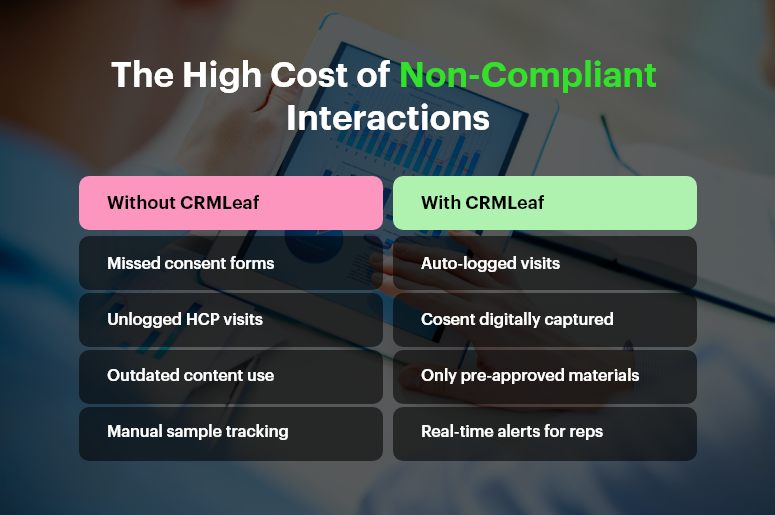
Attachment Details

The-High-Cost-of-Non-Compliant-Interactions

Best Practices & Actionable Tips

How to Ensure Compliant HCP Interactions Using a CRM

A modern CRM for pharma sales reps ensures every field activity is logged, monitored, and compliant. Here’s how to put it into practice:

🔹 Standardize HCP Interaction Logging

Ensure every call, visit, or digital touchpoint is recorded within the CRM. Reps can log visit outcomes, topics discussed, and follow-up actions in real time — reducing the risk of missed data or non-compliant exchanges.

🔹 Track Sample Distribution & Promotional Materials

Capture all product samples, brochures, and informational materials given to HCPs. CRMLeaf enables reps to select approved materials, log distribution details, and even attach digital acknowledgments — helping companies meet transparency regulations.

🔹 Set Access Controls Based on Role

Limit what reps can access and share based on compliance guidelines. Reps can only send approved documents, while managers have visibility into audit logs, ensuring materials align with regulatory boundaries.

🔹 Automate Expense Reporting with Audit Trails

Let reps record travel, meals, or sponsorship expenses with receipts attached. These entries feed into CRMLeaf’s backend reporting for finance and compliance teams — ensuring full traceability and audit readiness.

🔹 Enable GPS-Stamped Activity Logs

Use geo-tagging to verify field rep visits to clinics, pharmacies, or hospitals. This not only increases accountability but also prevents data tampering or post-entry manipulation.

🔹 Integrate CRM with Medical Databases

Link CRM to databases of HCPs, product libraries, and compliance rules. This ensures reps only interact with licensed professionals and distribute the correct drug information.

🔹 Enable Offline Access for Field Work

Reps in remote locations can log visits offline, and the CRM syncs once connected. No excuse for missed records or late data uploads — compliance stays intact even without constant internet access.

🔹 Trigger Compliance Alerts and Approvals

Set up real-time alerts for non-compliant activities. For example, flagging if a rep tries to schedule multiple visits to the same HCP in a restricted period or enters unsupported product claims.

🔹 Store Consent Records and Digital Signatures

Collect e-consent for samples, information sharing, or data usage. CRMLeaf’s digital consent logs serve as a legal backup in audits or disputes.

🔹 Link CRM with ERP for Expense and Logistics Control

With CRMLeaf’s CRM + ERP integration, expenses, inventory, and sample stock sync seamlessly. This enables end-to-end compliance tracking from budget to delivery.

Customer Success

For example, MedNova Biotech, a mid-sized pharma company with 50+ field reps, adopted CRMLeaf’s CRM for pharma sales reps to simplify their compliance workflows.

Before CRMLeaf, the team used spreadsheets and email logs to record visits — resulting in missed entries and compliance flags during audits.

After switching to CRMLeaf:

  • Compliance violations dropped by 70% within 6 months
  • Sample tracking improved accuracy by 85%
  • Audit preparation time was reduced from 5 days to just 1 day

CRMLeaf provided MedNova with a centralized platform to log HCP visits, control document sharing, and keep accurate expense records — all in one place.

Key Takeaways & Closing

A dedicated CRM for pharma sales reps goes far beyond contact management — it’s your frontline defense against non-compliance.
With CRMLeaf, your sales team can:

  • Document every HCP interaction in real time
  • Distribute approved materials only
  • Track samples, expenses, and visits with zero manual errors

In an industry where compliance and trust are everything, CRMLeaf helps your team sell confidently — without compromising regulations.

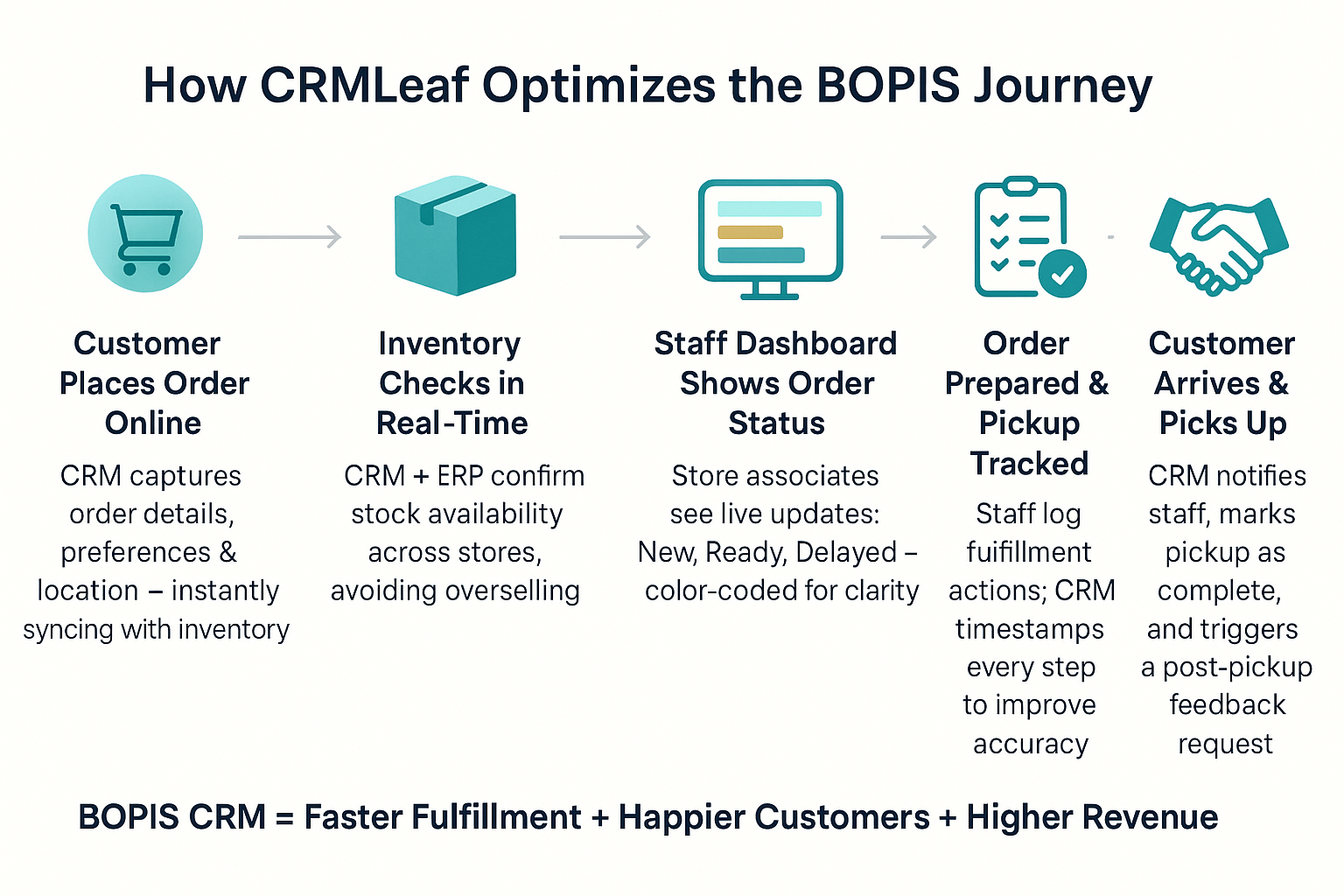
How Retailers Use BOPIS CRM – Buy Online, Pick Up In Store?

Today’s shoppers expect speed and convenience. In fact, over 68% of consumers have used BOPIS CRM at least once — and they’re demanding more from it. For retailers, this means managing online orders, real-time inventory, notifications, and store coordination — all at once.

But here’s the problem: disconnected systems create chaos. Stock mismatches. Missed notifications. Delayed pickups. And frustrated customers who may never return.

The solution? A BOPIS CRM system integrated with ERP that manages everything — from inventory to customer communication to fulfillment—in one place.

In this blog, you’ll learn:

  • Why BOPIS CRM is critical for retail success
  • The top best practices for efficient order fulfillment
  • How to use CRM+ERP to elevate the BOPIS experience
  • A real-world case study showcasing results

The Business Need: Why BOPIS Demands CRM Integration

Buy Online, Pick Up In Store isn’t a trend — it’s a customer expectation. Retailers who do it well win on convenience, speed, and loyalty. But to deliver that, you need real-time visibility, automation, and coordination.

Here’s where the cracks appear for businesses relying on spreadsheets or siloed software:

How Retailers Use CRM for BOPIS

Without a BOPIS CRM system:

  • Inventory can’t be trusted. What shows as “available” online may be sold out in-store.
  • Customer updates get missed. Manual emails or delayed alerts lead to confusion.
  • In-store chaos rises. Staff struggle to track orders, leading to long wait times and errors.

With a unified CRM + ERP platform:

  • Stock updates in real-time — no surprises.
  • Customer notifications are automated — from order confirmation to pickup reminder.
  • Staff have a dashboard showing every pending, ready, or overdue order.

This process matters for:

  • Apparel brands juggling size/variant availability across stores
  • Pharmacies handling prescriptions and retail orders
  • Home improvement stores catering to contractors needing quick pickups

Simply put, BOPIS CRM isn’t just about fulfillment — it’s about delivering a frictionless experience.

Best Practices to Optimize BOPIS with CRM

To succeed at BOPIS, you need to streamline every touchpoint — from the moment an order is placed to the second it’s handed over. Here’s how a CRM + ERP solution makes that possible.

1. Centralize Inventory Across All Channels

  • Sync all inventory data across eCommerce, physical stores, and warehouses.
  • Avoid selling products you can’t fulfill by ensuring inventory updates in real time.

With CRMLeaf’s ERP module, retailers see live stock levels, preventing overselling or duplicate reservations.

2. Automate Order Notifications and Pickup Alerts

  • Set up automatic SMS or email updates when the order is confirmed, ready for pickup, or about to expire.
  • Add personalized upsell messages in notifications. For example:

“Your camera is ready for pickup. Need a memory card too?”

CRMLeaf lets you customize these triggers and messages with no code.

3. Create a Dedicated BOPIS Dashboard for Staff

  • Give your in-store team a single dashboard to track which orders are incoming, ready, or delayed.
  • Color-coded statuses reduce confusion and speed up processing.

Team members can update statuses directly, and CRMLeaf logs every step.

4. Train Staff with CRM Logs and Analytics

  • Use CRM data to identify pickup bottlenecks and coach staff accordingly.
  • Monitor individual performance based on order handling time, pickup accuracy, and customer ratings.

CRMLeaf helps managers spot inefficiencies and reward top performers.

5. Measure What Matters

Track these essential BOPIS KPIs using CRM dashboards:

  • Pickup Time: Average duration from “ready” to “collected”
  • Order Fill Rate: % of orders fulfilled without errors
  • Customer Satisfaction Score (CSAT): Tied to BOPIS performance
  • Add-On Sales Conversion: Items added during or after the pickup process

CRMLeaf combines CRM + ERP data in real-time dashboards powered by Superset Analytics.

6. Plan Resources Based on Demand Patterns

  • Use CRM history to forecast busy pickup windows (weekends, lunch breaks).
  • Adjust staffing or store layout accordingly for smoother handovers.

With predictive resource planning, CRMLeaf helps you match staff to demand.

Case Study: BOPIS Done Right

Smith’s Hardware, a mid-sized home improvement chain, struggled with delayed pickups and mismatched inventory across 10 stores. They switched to CRMLeaf’s BOPIS CRM solution.

Here’s what happened in 3 months:

  • Pickup time dropped by 40%, reducing wait times and crowding.
  • Upsell revenue increased by 22%, driven by personalized alerts.
  • Customer satisfaction improved by 18%, as shown by post-pickup surveys.

They achieved this by:

  • Syncing inventory across stores and eCommerce
  • Automating all customer communication
  • Using CRM dashboards to track and improve staff performance

Key Takeaways

If you’re offering Buy Online, Pick Up In Store, don’t leave it to chance. A powerful BOPIS CRM platform like CRMLeaf helps you:

  • Streamline order fulfillment with real-time data
  • Delight customers with instant alerts and smooth pickups
  • Drive more revenue through upsells and faster service
  • Empower staff with dashboards and clear workflows

Efficiency and experience go hand-in-hand — and CRM is the glue.

Future-Proofing Brick-and-Mortar with CRM Insights

Think retail is going all digital? Think again. Despite the rise of eCommerce, 85% of global retail sales still happen in physical stores (source). But survival isn’t guaranteed. Shifting consumer behaviors, rising costs, and fragmented operations put traditional stores at risk. To stay competitive, brick-and-mortar businesses need digital intelligence — the kind that only CRM systems can deliver. And not just any CRM. You need connected CRM insights for brick-and-mortar success.

In this blog, you’ll learn how CRM + ERP tools help retail, hospitality, and service-based businesses adapt faster, operate smarter, and serve better. We’ll break down the risks, show you what to do, and share how CRMLeaf makes the transition seamless.

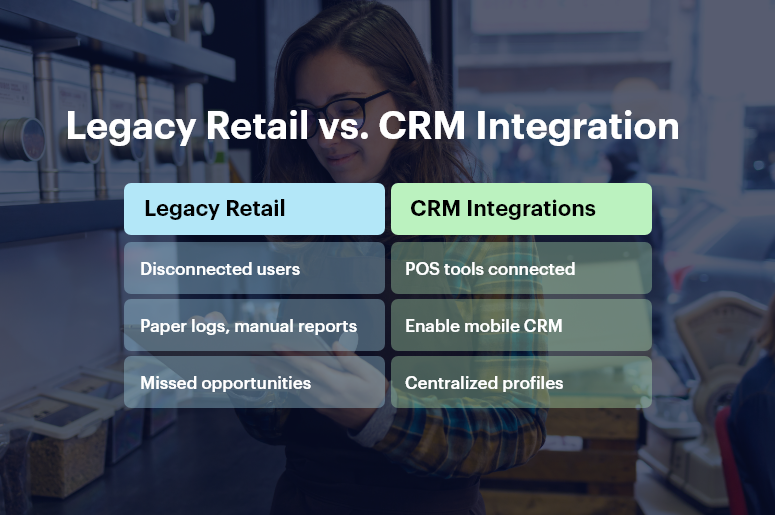
Legacy Retail vs. CRM Integration

Why CRM Insights for Brick-and-Mortar Matter More Than Ever

Digital transformation isn’t just for tech companies. Retailers, local service providers, restaurants, clinics, and franchise owners are now expected to:

  • Personalize every customer experience
  • Track inventory, orders, and service in real-time
  • Operate efficiently with smaller teams

But doing all this with disconnected tools, manual spreadsheets, or siloed teams simply doesn’t work.

Here’s why CRM insights for brick-and-mortar are mission-critical:

1. Shoppers Demand Personalization

Customers expect tailored experiences — from product recommendations to loyalty rewards. A CRM system centralizes data across POS, online, and mobile channels to build a unified customer view.

2. Inventory & Operations Must Be Agile

Supply chains are volatile. Stockouts and overstocks hurt profit. CRM + ERP helps monitor inventory across stores and warehouses, allowing real-time demand forecasting and procurement tracking.

3. Employee Productivity Impacts CX

Sales associates, front-desk staff, and service agents need fast access to customer preferences, previous purchases, and service history. CRM systems eliminate guesswork and improve in-store service quality.

4. Disconnected Tools Slow Growth

When your POS, marketing platform, and inventory software don’t talk, decisions suffer. CRM insights consolidate everything — from footfall data to sales metrics — on one dashboard.

Brick-and-mortar brands need more than foot traffic. They need foresight. That’s where CRM insights for brick-and-mortar drive real value.

Best Practices to Future-Proof with CRM + ERP

Here’s how to put CRM insights to work and modernize your physical business with confidence.

1. Centralize Customer Data Across Channels

Break silos by integrating sales, service, and marketing data in one place.

  • Create a unified customer profile that tracks preferences, visits, purchases, complaints, and feedback in one dashboard.
  • Use segmentation to personalize offers based on buying habits, location, and frequency — boosting conversion rates.
  • Enable in-store staff with mobile CRM tools so they can access real-time insights and offer better service instantly.

2. Streamline Inventory, Order, and Supply Chain Tracking

Move beyond reactive stock handling. Predict, plan, and restock smartly.

  • Set reorder thresholds with real-time stock visibility across stores and backrooms — reducing stockouts and waste.
  • Track supplier performance, order delays, and procurement costs within one ERP dashboard — saving time and money.
  • Sync online and offline channels to prevent double-selling and ensure consistent stock accuracy.

3. Leverage Footfall and Sales Data to Optimize Store Layouts

Data isn’t just for websites. Physical stores can optimize too.

  • Track in-store visit patterns, average dwell time, and popular product sections using CRM-linked analytics.
  • A/B test promotions, store layouts, and signage based on conversion metrics captured in the CRM.
  • Align staffing levels with footfall trends to ensure better service during peak hours without overspending during slow times.

4. Personalize Promotions and Loyalty Programs

Offer the right deal to the right customer at the right time.

  • Set up automated, behavior-triggered email or SMS offers based on in-store actions (like cart abandonment or seasonal purchases).
  • Reward loyalty points and send birthday/anniversary coupons directly from the CRM.
  • Track promo performance per store and segment to optimize ROI.

5. Integrate Staff Scheduling and HR into the CRM + ERP System

A productive team starts with smart staffing.

  • Build staff schedules based on traffic patterns and peak sales windows. Avoid overstaffing and under-staffing issues.
  • Track employee KPIs like conversion rates, upsell success, and service feedback using CRM dashboards.
  • Automate onboarding, attendance, and payroll integration for operational efficiency.

6. Use Predictive Analytics to Stay Ahead

Make decisions based on trends, not guesswork.

  • Forecast demand, sales trends, and foot traffic using historical CRM data combined with ERP analytics.
  • Identify customer churn risks and intervene early with personalized campaigns.
  • Optimize product placement, pricing, and promotions based on real-time CRM insights.

CRMLeaf’s AI-driven reports give real-time recommendations that improve both in-store and backend performance.

Real-World Impact

For example, a regional clothing store chain, used CRMLeaf’s CRM insights for brick-and-mortar to increase customer retention by 35% in six months.

Here’s how:

  • They centralized customer data from five locations into one CRM dashboard.
  • Automated loyalty campaigns drove repeat visits and higher basket values.
  • Inventory sync across stores cut out-of-stock issues by 50%.
  • In-store associates used tablets with CRMLeaf to upsell based on purchase history.

Result: Faster checkouts, happier customers, and a 22% increase in quarterly revenue.

Key Takeaways

  • Brick-and-mortar isn’t dying—it’s evolving.
  • CRM insights for brick-and-mortar help unify data, personalize customer service, and optimize operations.
  • CRM + ERP platforms like CRMLeaf give SMBs the tools to compete with larger chains by making smarter, faster decisions.

The future of retail, hospitality, and service businesses will belong to those who blend physical experiences with digital intelligence.

Predictive Trends: CRM & AI for Retail Demand Planning

Imagine this: You’ve stocked up for a hot-selling product, but sales flatline. Meanwhile, an unexpected trend leaves you out of stock for something else. Sound familiar? In today’s volatile retail landscape, demand shifts overnight. Consumer preferences change in real-time. And guesswork? It’s not good enough anymore. That’s why AI for retail demand planning is not just a competitive edge — it’s a necessity.

This blog dives into how CRM + ERP platforms with AI capabilities are transforming the way retailers forecast, plan, and grow — with smarter insights, real-time data, and less guesswork.

Why AI-Driven Retail Demand Planning Is Mission Critical

Modern retail lives on data. But data without intelligent forecasting leads to stockouts, excess inventory, missed revenue, and frustrated customers.

Let’s break down the business case for AI for retail demand planning — and why it matters now more than ever.

Retail Is Fast, Complex, and Personal

Whether you sell fashion, electronics, or groceries, the cycle has shrunk. Seasons change faster. Promotions influence short-term demand. And personalization matters more than ever.

  • Omnichannel behavior is unpredictable: Consumers may browse online, buy in-store, or abandon carts mid-purchase. AI helps forecast these hybrid journeys.
  • Promotional campaigns create spikes: Human planners often can’t predict flash-sale effects. AI spots these patterns and adjusts forecasts in real time.
  • Market trends shift rapidly: Social media can create demand overnight. AI tools detect emerging signals from external sources like news, trends, or events.

CRM + ERP Gives Context to Your Forecasts

A standalone forecasting tool is blind without context. CRMLeaf’s integrated CRM + ERP platform layers:

  • Sales history for pattern recognition
  • Customer segmentation to predict preferences
  • Inventory levels and supply chain data to sync demand with operations

This full-stack visibility helps planners make informed decisions, not educated guesses.

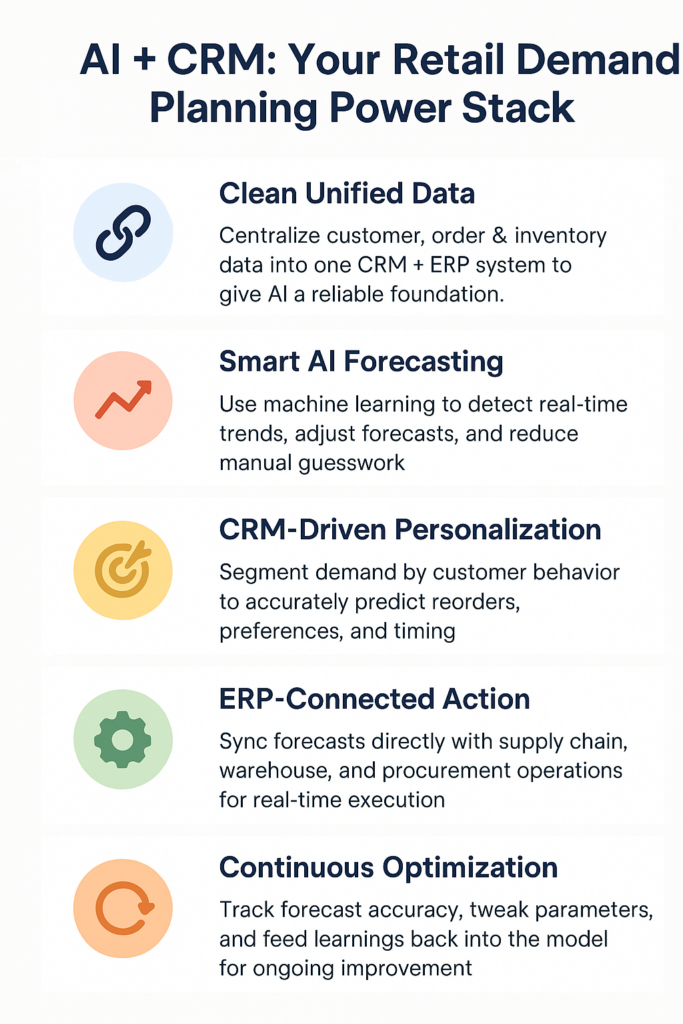
Predictive Trends: AI & CRM for Retail Demand Planning

Best Practices to Implement AI for Retail Demand Planning

Ready to embrace smarter planning? Let’s break down how to leverage AI with your CRM + ERP to make demand planning efficient, scalable, and predictive.

1. Start with Clean, Unified Data

Garbage in, garbage out. AI models only work when they’re trained on clean, consolidated data.

  • Centralize customer, order, and inventory data: Merge your systems into a single source of truth via your CRM + ERP.
  • Eliminate duplicates and data silos: Ensure every department — from sales to procurement — accesses the same, updated data sets.
  • Map historical trends: Feed 12–24 months of data into your system to help AI understand seasonality and past anomalies.

2. Use Predictive Algorithms That Learn and Adapt

Basic rules-based systems don’t cut it. You need AI that learns over time and reacts to changes.

  • Leverage machine learning to track micro-trends: Identify patterns like weekday sales spikes or post-promotion slumps.
  • Adjust forecasts automatically: Let AI recalculate demand forecasts based on real-time inputs like weather, holidays, or sudden traffic changes.
  • Handle anomalies intelligently: AI can detect and isolate outliers (like pandemic-level disruptions) to prevent skewed predictions.

3. Integrate CRM for Personalized Forecasting

Your CRM knows your customer better than any spreadsheet.

  • Segment demand by customer type: High-value customers may order differently than seasonal buyers. AI uses CRM data to tailor forecasts by segment.
  • Predict repeat purchases: Analyze lifecycle and frequency data to forecast when a customer is likely to reorder.
  • Automate marketing triggers: Use AI insights to trigger timely, personalized campaigns based on forecasted needs.

4. Link with ERP for End-to-End Visibility

Don’t just forecast — plan, allocate, and act using your ERP backend.

  • Plan procurement based on projected demand: Reduce overstock and understock by syncing forecasts directly with supply chain workflows.
  • Optimize warehouse operations: Route stock based on AI-driven location demand projections.
  • Improve financial planning: Forecast cash flow needs based on expected sales volume and seasonal peaks.

5. Monitor, Learn, Improve — Continuously

Predictive planning isn’t one and done. You must constantly fine-tune.

  • Track forecast accuracy: Use dashboards to compare predicted vs actual performance.
  • Adjust parameters: If promotional periods or product cycles change, tweak your model assumptions.
  • Review post-mortem insights: After a season ends, analyze what worked and what didn’t — and feed that back into the system.

Case Study: Smarter Forecasting Drives 30% Less Overstock

For example, ModaHome, a mid-sized home furnishing retailer, used CRMLeaf’s AI-powered demand planning module to overhaul their seasonal forecasting.

Before, they relied on spreadsheets and instinct — leading to 20–25% overstock after every sale. After implementing CRMLeaf:

  • Forecast accuracy improved by 42% in just one quarter
  • Inventory costs dropped by 30% due to better purchasing
  • Fulfillment time reduced by 15% with warehouse optimization

Their team can now focus on innovation instead of guesswork.

Key Takeaways

  • AI for retail demand planning isn’t futuristic — it’s here and delivering results.
  • Combined with CRM + ERP, AI delivers context-rich, real-time, and predictive forecasts that actually align with customer behavior.
  • Clean data, adaptive models, customer segmentation, and ERP integration form the core pillars of smarter planning.

With CRMLeaf, you can eliminate manual forecasting, reduce planning errors, and stay ahead in a dynamic retail world.

A Guide to Expense Fraud Detection in Enterprises

Picture this: one small fraudulent expense — say, $50 — snowballs into hundreds, eroding profits, trust, and compliance. According to the Association of Certified Fraud Examiners, businesses lose 5% of revenue annually to occupational fraud, much of it hiding in expense claims. That’s why strong expense fraud detection matters so much.

Moreover, when it goes unchecked, this stealthy abuse drains resources, undermines morale, and risks your reputation. In this post, you’ll discover how to identify red flags, implement proactive controls, and use CRMLeaf’s expense management tools to protect your organization— without slowing down reimbursements.

Why Expense Fraud Detection Is Vital

Expense fraud isn’t always grand theft — it often involves small, repetitive abuses:

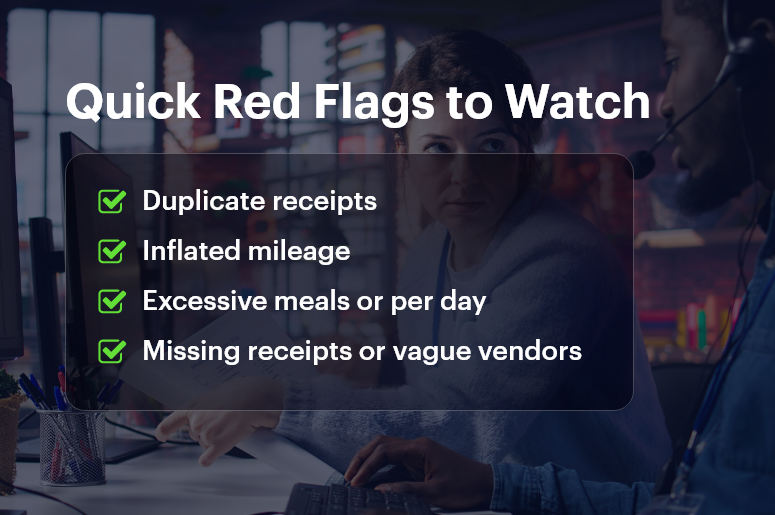
  • Tier-1 risks: personal items, duplicate receipts, mileage padding
  • Tier-2 problems: inflated meals, fake vendors, altered dates
  • Tier-3 threats: shell companies, per-diem tricks, ghost employees

Even small incidents add up. Consequently, these abuses:

  • Shrink profit margins
  • Drive up audit and compliance costs
  • Damage credibility — especially in finance-driven sectors like real estate or consulting

As companies grow, expense fraud detection becomes harder — especially when finance, HR, and accounting systems don’t connect. Hence, automated, data-driven fraud controls are essential. They reduce risk, preserve accountability, and ensure honest employees aren’t penalized by outdated, manual workflows.

That’s exactly where CRMLeaf’s CRM + ERP expense automation shines. It delivers real-time tracking, auto-flagging, and audit trails — allowing you to detect and prevent issues proactively.

Quick Red Flags to Watch

Best Practices for Expense Fraud Detection (With CRMLeaf)

Here’s a smart, structured approach to detecting and preventing fraud early — paired with relevant ways CRMLeaf simplifies each step.

Establish Clear, Enforced Policies

  • Define allowed expense categories, caps, and frequency rules (e.g., “$20 per meal”).
  • Display policy guidance directly on submission forms so nobody “forgets.”
  • CRMLeaf advantage: It embeds policies into the expense interface and auto-flags outliers at submission time, avoiding guesswork.

Automate Pre-Approval & Alerts

  • Require sign-off for large or unusual expenses (flights, gift cards).
  • Detects duplicate receipts, round-number patterns, or unknown vendors.
  • CRMLeaf advantage: It automates pre-approval workflows and sends immediate manager alerts—no delays or manual oversight needed.

Monitor Patterns & Anomalies

  • Use dashboards to spot unusual behavior (e.g., excessive mileage, frequent per-diems).
  • Filter claims by vendor, employee, or category to find trends.
  • CRMLeaf advantage: Its interactive reports let you drill into flagged claims instantly, surfacing inconsistencies fast.

Enforce Receipt and Data Completeness

  • Require required fields like date, vendor, amount, purpose to be complete.
  • Reject incomplete or vague submissions automatically.
  • CRMLeaf advantage: The app makes fields mandatory and enforces data rules using conditional logic.

Implement Tiered Approvals & Escalations

  • Auto-approve low-value claims, require lead sign-off for mid-range amounts, and escalate high-value items to finance heads.
  • Delay or override triggers escalate alerts.
  • CRMLeaf advantage: You can configure multi-level approval workflows and escalation triggers explicitly within ERP-linked workflows.

Conduct Periodic Audits & Sampling

  • Run quarterly audits on random or flagged expense batches.
  • Examine patterns like repeated receipts or round-number entries.
  • CRMLeaf advantage: Audit logs automatically capture entire activity timelines, comments, and approvers — ideal for compliance.

Foster Training & Transparency

  • Educate staff on approved expense types, common red flags, and how to comply.
  • Encourage employees to consult policies when in doubt.
  • CRMLeaf advantage: A built-in portal hosts expense policies, FAQs, and video tutorials—right where users work.

Customer Success Story: HorizonTech Solutions

HorizonTech — a high-growth consulting firm — noticed rising per-diem expenses, costing 2% in monthly overhead. After implementing CRMLeaf’s expense fraud detection, they:

  • Set up auto flags for duplicate receipts and meal caps
  • Required full receipts and mileage details
  • Scheduled monthly audits

Within one quarter:

  • Suspicious claims dropped by 75%
  • Savings amounted to $20K
  • Reimbursement times fell by 40%

As a result, their finance team now focuses on strategic budgeting, not chasing receipts. Employees enjoy faster, more transparent reimbursements, and policy compliance became effortless.

Key Takeaways: A Smart Expense Fraud Detection Strategy

Effective expense fraud detection isn’t about distrust — it’s about strong financial stewardship. To build a robust prevention system, follow these practical steps:

  • Define clear, enforced expense policies
  • Automate flags and pre-approvals
  • Monitor submission patterns and anomalies
  • Require full receipts and data integrity
  • Enforce tiered approvals with escalation
  • Run periodic audits
  • Train employees and encourage policy clarity

When you combine these practices with CRMLeaf’s CRM + ERP expense automation, you get:

  • Real-time monitoring
  • Seamless policy enforcement
  • Faster reimbursements
  • Audit-ready workflows

You’ll minimize risk while keeping employees happy and financial controls strong.

FAQs

Q: What is expense fraud detection?
A: It’s the proactive detection and prevention of false or inflated expense claims using automation, policy enforcement, and data monitoring.

Q: Why is expense fraud detection important?
A: Because even small frauds can add up to significant losses, hamper budgets, and hurt trust across your organization.

Q: How does automation help prevent expense fraud?
A: Automation applies rules at submission time, flags anomalies immediately, routes approvals properly, and creates digital audit trails.

Q: Can small businesses use these practices?
A: Absolutely. Even small teams can benefit from structured expense policies and automated workflows—without needing large finance teams.

Q: How do I get started with CRMLeaf expense management?
A: Define expense categories and thresholds, set up workflow templates, and then pilot them in CRMLeaf to see real-time results.

Cash Flow Visibility: How CRM Data Helps You Plan Ahead

Picture this: you’re hitting record sales — but still facing a cash crunch. Shockingly, 60% of SMBs report revenue without visibility, which leads you to cash flow visibility issues. Without it, you’re essentially flying blind, risking late payroll, deferred supplier payments, or halted investments.

Fortunately, this lack of insight won’t last forever. In this post, we’ll show you how CRM-driven sales forecasting, invoice integration, and financial planning can transform your bottom line. You’ll learn to leverage pipeline data, track unpaid invoices, and anticipate cash gaps — all while using CRMLeaf’s unified CRM + ERP platform. By the end, you’ll confidently plan ahead, align teams, and keep cash flowing smoothly.

Why Cash Flow Visibility Is Essential

Growing businesses often juggle multiple systems: one for sales, another for invoices, and still another for payroll. This fragmentation hides critical insights. Consequently:

  • Payroll & staffing depend on predictable inflows; sudden shortfalls disrupt operations.
  • Supplier payments get delayed, causing late fees or strained partnerships.
  • Growth decisions, like marketing spend or hiring, remain tentative without a clear runway.

This challenge spans industries:

  • Professional services face unpredictable billing cycles — billing delays don’t halt payroll.
  • Manufacturers pay for raw materials upfront but only invoice later.
  • Tech/SaaS firms often charge clients annually or quarterly but must still run payroll monthly.

Clearly, cash flow visibility is vital — not just for finance but for overall business resilience. With CRMLeaf’s CRM + ERP platform, you unify pipeline forecasting, invoicing, payments, and expense management. That gives you real-time clarity — no more manual spreadsheets.

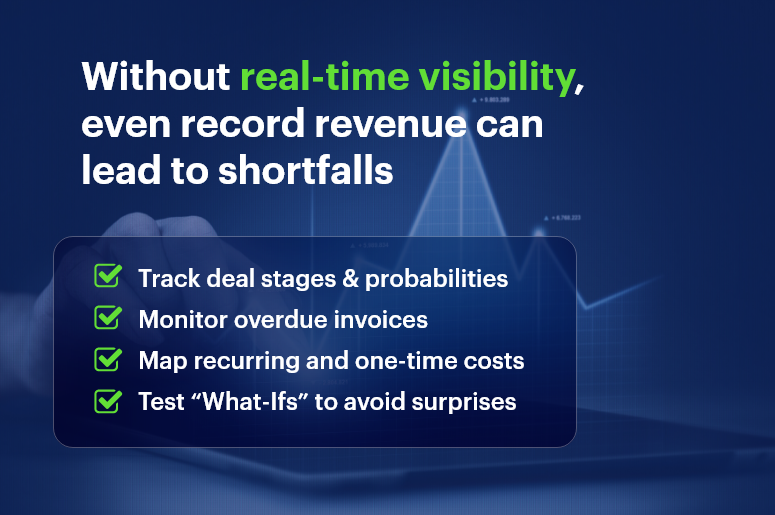
Without real-time visibility, even record revenue can lead to shortfalls

Best Practices for Improving Cash Flow Visibility

Here are actionable steps to enhance cash flow visibility, and how CRMLeaf can simplify each:

1. Track Pipeline & Sales Forecasts

  • Hold weekly opportunity reviews with probabilities and close dates.
  • Use automated weighted forecasting to translate pipeline stages into revenue estimates.
  • Sync these forecasts into your cash planning dashboard.

CRMLeaf advantage: Your pipeline forecast feeds directly into cash flow projections, giving you a real-time cost-to-cash view.

2. Integrate Invoicing & Payment Data

  • Automatically trigger invoices upon deal closure.
  • Monitor payment statuses: paid, pending, or overdue.
  • Project future inflows using payment terms like Net-30.

CRMLeaf advantage: Seamless invoice integration ensures accuracy and saves manual effort.

3. Forecast Cash Outflows: Expenses & Payroll

  • Log recurring costs like payroll, rent, and utilities.
  • Forecast upcoming expenses and align them with inflows.
  • Spot mismatches early before they affect liquidity.

CRMLeaf tip: Module integration lets you view expense records alongside pipeline, ensuring true visibility.

4. Run “What-If” Scenarios

  • Simulate late payments, project delays, or extra hires.
  • Adjust priorities based on cash impact.
  • Build contingency buffers.

CRMLeaf tool: “What-if” scenario planning lets you toggle variables and view new cash positions instantly.

5. Establish a Cash Forecasting Cadence

  • Hold weekly cash standups to highlight delays or variances.
  • Sync monthly with finance, sales, ops, and HR teams.
  • Use visual dashboards to track runway and reserve levels.

CRMLeaf dashboard: Intuitive visual indicators enable teams to spot and fix shortfalls immediately.

Customer Success: EverGrow Consulting

EverGrow Consulting struggled with unpredictable billing cycles. After integrating CRMLeaf:

  1. They tracked pipeline forecasts and invoices simultaneously.
  2. They logged payroll and expenses in one dashboard.
  3. They ran early detection scenarios for anticipated shortfalls.

Result: Cash runway extended from 2 weeks to 8 weeks. When a $50k delay surfaced, they adjusted milestones, delayed a hire, and avoided an overdraft. EverGrow credited CRMLeaf’s cash flow visibility for transforming financial planning and decision-making.

Key Takeaways

With strong cash flow visibility, you gain the foresight to plan strategy, hiring, and expenses before cash constraints emerge. By combining pipeline forecasting, invoice status tracking, and expense integration, you build a live cash picture that empowers all departments.

With CRMLeaf’s unified CRM + ERP solution, you get forecasting tools that are:

  • Accurate
  • Automated
  • Collaborative
  • Actionable

So stop flying blind. Get the cash clarity you need to grow.

FAQs

Q: What is cash flow visibility?
A: It’s the ability to track and forecast cash coming in and going out, in real-time — avoiding surprises.

Q: Why is pipeline forecasting important?
A: Because it turns stage-based sales data into actual cash projections, giving you early warning alerts.

Q: Can small teams implement these practices?
A: Absolutely. CRMLeaf’s scalable modules support teams of any size without complex setup.

Q: How do I start improving cash flow visibility?
A: Begin by syncing sales pipeline to cash dashboards, connect invoice data, and forecast expenses weekly.