From Inquiry to Signed — Mapping Your Sales Funnel

Every sale begins with a simple inquiry — a form fill, a demo request, or a phone call. But how does that inquiry turn into a signed contract?

That journey is the sales funnel — a visual map of how leads move from initial interest to final purchase. Mapping this funnel helps businesses understand where leads drop off, which touchpoints drive engagement, and how to optimize every step for higher conversions.

Without a mapped funnel, you’re flying blind. With one, you can measure, forecast, and scale your sales process systematically.

What Is a Sales Funnel?

A sales funnel represents the stages a potential customer goes through before making a purchase. It visualizes the buyer’s journey from awareness to decision, allowing sales and marketing teams to align strategies and messaging at each step.

Think of it as a roadmap:

  • Top of Funnel (ToFu): Generating awareness and inquiries.
  • Middle of Funnel (MoFu): Nurturing leads and building trust.
  • Bottom of Funnel (BoFu): Closing deals and driving retention.

By understanding each phase, businesses can craft targeted communication, automate follow-ups, and ensure no lead is lost along the way.
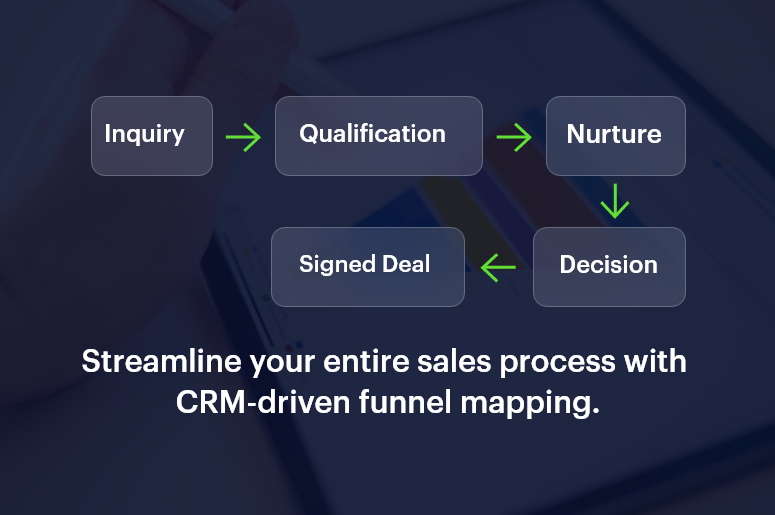
Streamline your entire sales process

The 5 Stages of a Sales Funnel

1. Awareness: Capturing the Inquiry

At this stage, potential customers discover your business through marketing channels like ads, SEO, social media, or referrals.

  • Goal: Generate awareness and attract interest.
  • Tools: Landing pages, lead magnets, webinars, and forms integrated with your CRM.
  • Tip: Use automation to capture every inquiry instantly — no manual entry, no missed leads.

2. Interest: Qualifying the Lead

Once leads enter your CRM, the next step is qualification — determining if they fit your ideal customer profile.

Key Actions:

  • Assign lead scores based on behavior and demographics.
  • Segment leads by source, region, or interest.
  • Trigger personalized emails or follow-ups.

A strong CRM sales funnel like CrmLeaf automates this process, ranking leads so your sales reps focus on the most promising prospects first.

3. Consideration: Nurturing the Relationship

Now it’s about education and trust-building. Prospects are comparing options, evaluating pricing, and researching competitors.

Strategies:

  • Send product demos or free trials.
  • Share case studies and testimonials.
  • Schedule personalized consultations.

Automation tools help deliver timely, relevant content that keeps your brand top of mind throughout the decision process.

4. Decision: The Closing Stage

This is where deals are won or lost. Sales reps should have full visibility into lead behavior, objections, and communication history.

Key Tactics:

  • Offer limited-time discounts or proposals.
  • Use CRM reminders for follow-ups.
  • Track proposal opens and contract views in real time.

With a mapped funnel, your team can identify what accelerates closure — such as faster response times or personalized demos — and replicate it consistently.

5. Action: Signed & Onboarded

Once the deal is signed, the funnel doesn’t end — it evolves into retention and referral stages.

Post-Sale Focus:

  • Automate onboarding sequences.
  • Gather feedback and reviews.
  • Offer loyalty rewards or upsell opportunities.

Mapping these final stages ensures repeat business and long-term customer relationships.

How CRM Automation Transforms Funnel Management

Manually tracking leads across funnel stages is error-prone and inefficient. That’s where CRM automation comes in.

Here’s how modern CRM systems streamline your funnel:
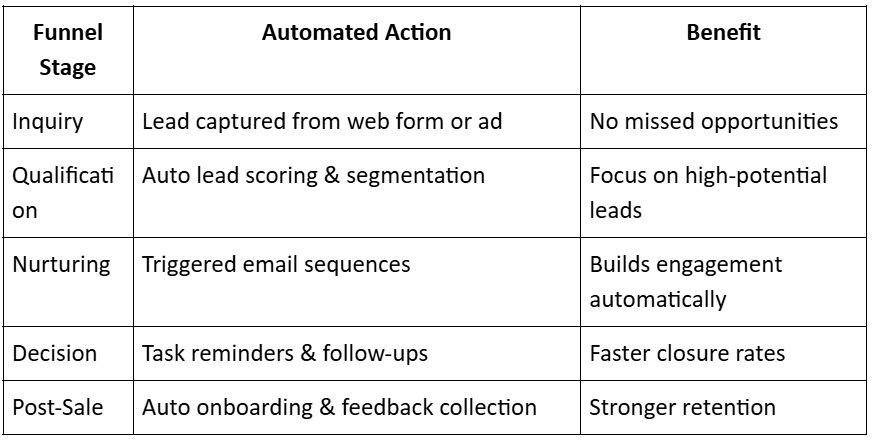
From-Inquiry-to-Signed

CrmLeaf, for instance, allows complete visibility into your funnel performance — from inquiry to invoice — in real time.

Key Metrics to Track in Your Sales Funnel

To make your funnel data-driven, monitor these essential KPIs:

  • Lead Conversion Rate: Percentage of inquiries that become customers.
  • Average Deal Velocity: Time taken for a lead to move from first contact to close.
  • Stage Drop-Off Rate: Points where leads disengage or exit.
  • Customer Acquisition Cost (CAC): Total spend per converted lead.
  • Lifetime Value (LTV): Total revenue per customer relationship.

These insights help refine strategies and predict future sales performance.

From Inquiry to Signed with CrmLeaf

Let’s say a construction firm uses CrmLeaf to manage its sales process.

  • A lead fills out a form for a “Project Cost Estimation Tool.
  • CrmLeaf instantly captures the inquiry, tags it as “Commercial Construction,” and assigns it to a regional sales rep.
  • The CRM triggers an automated thank-you email and schedules a follow-up call.
  • When the lead downloads a project case study, their score increases by 20 points.
  • The rep receives a real-time alert, conducts a demo, and closes the deal.

Result:

Response time drops from 1 day to 10 minutes. Conversion rate improves by 45% in a month.

Best Practices for Effective Sales Funnel Mapping

  • Visualize Every Stage: Use a CRM pipeline view to see lead progression clearly.
  • Define Exit Criteria: Know what qualifies a lead to move to the next stage.
  • Automate Repetitive Tasks: Free your sales team to focus on closing, not updating spreadsheets.
  • Align Marketing & Sales: Share funnel data to ensure consistent messaging.
  • Review Weekly: Analyze bottlenecks and refine the process continuously.

The Future: AI-Driven Sales Funnel Optimization

AI-powered CRMs are transforming funnel management by:

  • Predicting which leads will convert next.
  • Suggesting optimal follow-up times.
  • Automating pipeline prioritization.
  • Recommending personalized engagement tactics.

With predictive insights, sales teams no longer chase — they anticipate.

Conclusion: Map It, Measure It, Master It

Your sales funnel is more than a diagram — it’s the heartbeat of your business. When mapped correctly and supported by CRM automation, it delivers clarity, efficiency, and predictable growth.

From the first inquiry to the signed contract, every touchpoint matters.

The businesses that map, measure, and master their funnels are the ones that scale sustainably.

FAQs on Sales Funnel Mapping

1. What is sales funnel mapping?

It’s the process of visualizing and tracking each stage of your sales process, from lead generation to deal closure.

2. Why is sales funnel mapping important?

It helps identify bottlenecks, improve conversions, and align marketing and sales teams.

3. What tools are used for mapping?

CRMs like CrmLeaf provide visual funnel dashboards and automation workflows.

4. How often should I review my sales funnel?

Weekly or monthly — depending on deal volume and sales cycle length.

5. Can automation improve funnel conversion?

Yes. Automation ensures instant responses, reduces human error, and keeps leads engaged throughout their journey.

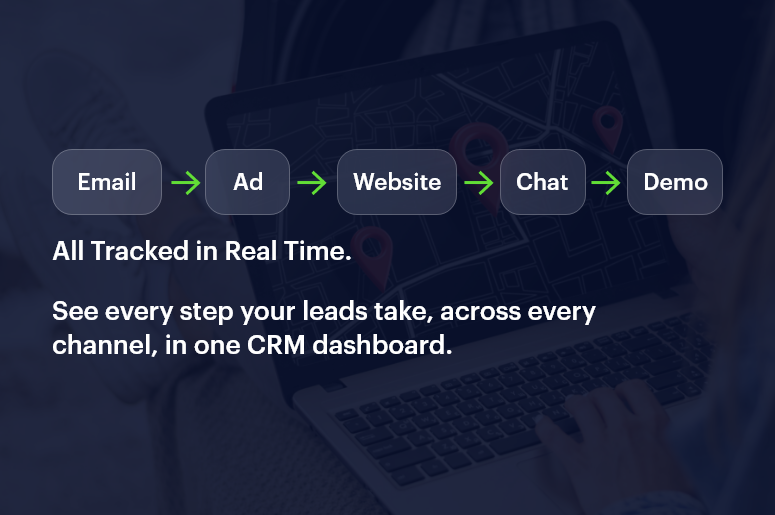
Tracking Lead Behavior Across Channels in Real Time

In today’s connected world, leads don’t follow a straight path from awareness to purchase. They interact with your business through emails, ads, websites, chatbots, and social media — sometimes all in the same day.

To truly understand and convert them, you need to track every interaction as it happens. That’s where real-time lead behavior tracking powered by your CRM comes in.

It enables your marketing and sales teams to see how each prospect behaves across channels — what they click, open, download, or ignore — and respond instantly with the right message, at the right moment.

In short, it turns data into timely, actionable intelligence.

Track lead behavior across channels in Real time

What Is Real-Time Lead Tracking?

Real-time lead tracking is the process of monitoring how leads engage with your brand across different platforms — such as email, social media, landing pages, live chat, and ads — as those interactions occur.

A modern CRM system like CrmLeaf collects and consolidates this data continuously, giving you a live view of each lead’s journey, including:

  • Pages visited
  • Links clicked
  • Forms submitted
  • Emails opened
  • Campaigns responded to
  • Devices and channels used

This data helps you build a complete behavioral profile — showing where each lead is in the funnel and what action they’re most likely to take next.

Why Real-Time Tracking Matters

In a digital-first sales environment, timing is everything. The faster you can understand and respond to a lead’s intent, the higher your conversion chances.

Here’s what real-time tracking enables your business to do:

1. React instantly to lead intent

If a lead views your pricing page, your CRM can trigger an automated email or alert a sales rep immediately.

2. Eliminate blind spots across channels

See the full journey — from Facebook ad click to email signup to product demo — in one dashboard.

3. Personalize engagement

Use behavior data to tailor follow-ups, recommendations, and offers for each lead.

4. Optimize marketing spend

Identify which channels generate high-intent leads and double down on what works.

5. Shorten the sales cycle

Equip sales teams with real-time insights so they can prioritize “ready to buy” leads without delay.

How Real-Time Lead Tracking Works

Here’s how it looks behind the scenes with a CRM like CrmLeaf:

1. Multi-Channel Data Collection

Your CRM integrates with all marketing channels — website analytics, ads, emails, chatbots, and forms. Each user action is captured and logged automatically.

Example:

  • A visitor clicks a LinkedIn ad → Visits your website → Downloads an ebook → Gets an automated email.

CrmLeaf records all of this in one unified timeline.

2. Behavior Scoring

Each interaction adds points to a lead’s behavior score.

For example:

  • +10 for opening an email
  • +20 for downloading a brochure
  • +30 for requesting a demo

Once the score reaches a certain threshold, the system flags the lead as “sales-ready.”

3. Real-Time Notifications

Your sales team receives instant alerts — “John Doe just viewed the pricing page twice.” They can act immediately while interest is still high.

4. AI Insights & Predictions

AI engines analyze historical data to predict which leads are most likely to convert — helping your team focus on the right prospects.

5. Cross-Channel Journey Mapping

All lead interactions — from ad clicks to support chats — are displayed in a visual timeline. This gives full visibility into what drives engagement and where leads drop off.

Channels You Should Be Tracking

1. Website

Monitor page views, downloads, and time spent on key sections like pricing or case studies.

2. Email Campaigns

Track opens, clicks, and replies to identify engaged prospects vs. inactive ones.

3. Social Media

Analyze how users interact with your posts, ads, or DMs across platforms like Facebook, LinkedIn, Instagram, and X (Twitter).

4. Paid Ads

Measure which ads, creatives, and keywords generate the most qualified leads.

5. Live Chat & Chatbots

Capture chat transcripts and engagement frequency to gauge interest levels.

6. Webinars & Events

Track registrations, attendance, and post-event engagement for targeted nurturing.

7. Mobile App Activity (if applicable)

Understand how customers use your app features and trigger retention workflows.

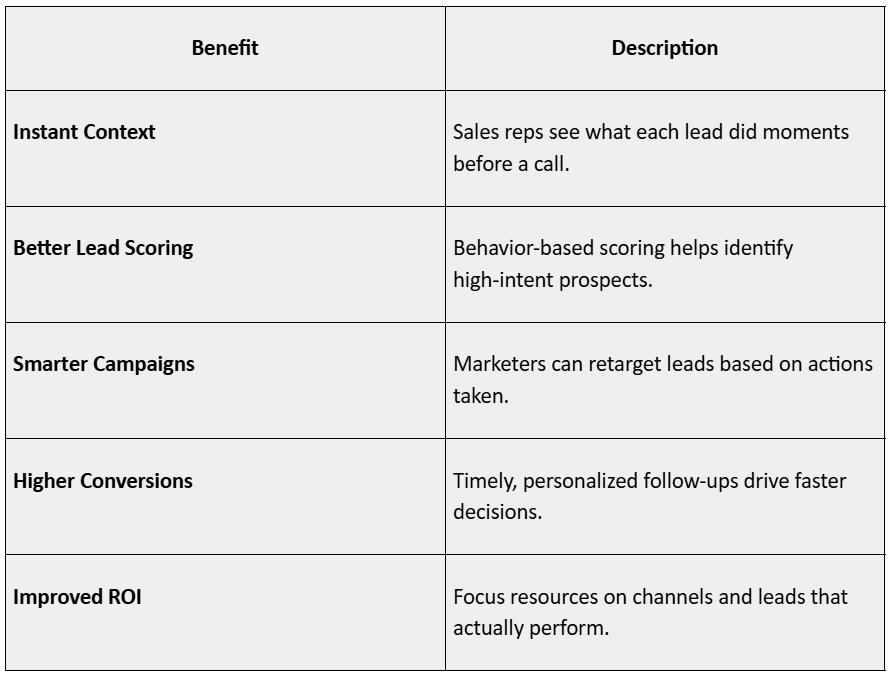
Benefits of Real-Time Lead Behavior Tracking

Benefits of Real Time Lead Behavior Tracking

How CrmLeaf Enables Real-Time Lead Tracking

Let’s say you run a campaign promoting CRM for Solar Project Management:

  • A user clicks your Facebook ad → lands on your website → downloads the product brochure.
  • CRMLeaf instantly logs the activity and adds +30 points to their behavior score.
  • The system sends a “Thanks for downloading” email automatically.
  • The lead later opens your pricing email and revisits the demo page (+40 points).
  • Their total score crosses 70 — CrmLeaf flags it as a hot lead.
  • The sales rep gets a real-time alert to follow up.

Result:

No delays, no missed opportunities — just instant alignment between marketing and sales.

Best Practices for Effective Real-Time Lead Tracking

1. Integrate All Your Channels

Make sure your CRM is connected to every data source — from social ads to live chat — for a complete behavioral view.

2. Set Up Trigger-Based Workflows

Use automation to respond to key behaviors (like visiting the pricing page or abandoning a form).

3. Define Scoring Rules Clearly

Customize your scoring system based on what actions indicate intent in your industry.

4. Use Alerts Strategically

Don’t overwhelm your team. Only send real-time alerts for meaningful actions (e.g., “Demo Requested” or “Pricing Page Viewed”).

5. Visualize the Customer Journey

Use CRM dashboards to see how leads move through touchpoints. It helps identify drop-offs and optimize engagement.

6. Combine Behavioral + Demographic Data

Behavior tells you what leads are doing; demographics tell you who they are. Combine both for precise targeting.

The Role of AI in Lead Behavior Analytics

AI and predictive analytics are taking real-time tracking to the next level. Modern CRMs like CrmLeaf can now:

  • Predict when a lead is most likely to convert
  • Recommend the best next action (call, email, or message)
  • Segment leads automatically based on activity patterns
  • Score and re-score leads dynamically as behavior changes

With AI, your CRM doesn’t just track — it learns, helping your team stay one step ahead of the lead’s journey.

Common Mistakes to Avoid

  • Tracking too much data without clear goals — Focus on actions tied to real buying intent.
  • Ignoring inactive leads — Even inactivity is data; use it to trigger re-engagement campaigns.
  • Not syncing tools in real time — Manual updates create blind spots.
  • No follow-up strategy — Tracking means little if you don’t act on insights.
  • Overlooking privacy and consent — Always comply with GDPR, DPDP Act, and data protection norms.

Conclusion: From Tracking to Transforming Sales

Every interaction — every click, open, or download — is a clue about what your leads want.

When you track this behavior across channels in real time, you transform your CRM into a predictive sales engine. Your teams can act faster, personalize better, and convert smarter — all while delivering a seamless customer experience.

With CrmLeaf’s real-time lead tracking, your marketing and sales teams stay in sync with what your leads are doing — not what they did yesterday. That’s the difference between guessing interest and closing deals.

FAQs

1. What is real-time lead tracking?

It’s the process of monitoring a lead’s behavior across channels (email, ads, website, etc.) as it happens.

2. Why is it important for sales teams?

It provides instant insights into buyer intent, helping reps reach out at the right time.

3. Which channels can be tracked?

Websites, emails, social media, ads, webinars, chatbots, and mobile apps.

4. Can small businesses use real-time tracking?

Yes — CRMs like CRMLeaf make it simple and affordable to automate insights.

5. How does lead scoring work with tracking?

Each behavior adds or subtracts points, indicating how close a lead is to conversion.

6. Is this the same as website analytics?

No — it’s deeper. Real-time CRM tracking follows individual lead journeys, not just traffic stats.

7. Can I automate follow-ups based on behavior?

Absolutely. You can trigger personalized messages, calls, or campaigns instantly.

8. How secure is behavioral data?

Data is encrypted and stored securely, following compliance regulations like GDPR or DPDP.

9. What metrics should I monitor?

Email clicks, ad responses, website visits, conversion pages, and re-engagement rates.

10. What’s the biggest benefit?

Real-time visibility — enabling faster decisions, better timing, and more closed deals.