Boost Efficiency with Sales and Operations Automation

In 2025, over 70% of growing businesses report revenue leakage, delayed decision-making, or customer dissatisfaction due to manual processes and disconnected systems. Sales teams chase leads in one tool, operations track execution in another, and finance reconciles everything in spreadsheets — often days or weeks later. As a result, leadership lacks real-time visibility, teams duplicate effort, and opportunities slip through the cracks. This is precisely where sales and operations automation becomes a strategic necessity rather than a technology upgrade. Automation connects people, processes, and data across the organization, ensuring work flows seamlessly from lead generation to delivery, billing, and reporting.

In this guide, you will learn the top automation processes that directly improve sales performance and operational efficiency, why they matter more than ever in 2025, and how a unified CRM platform like CrmLeaf enables end-to-end automation without complexity. By the end, you will have a practical framework to identify automation opportunities, avoid common mistakes, and drive measurable business outcomes.
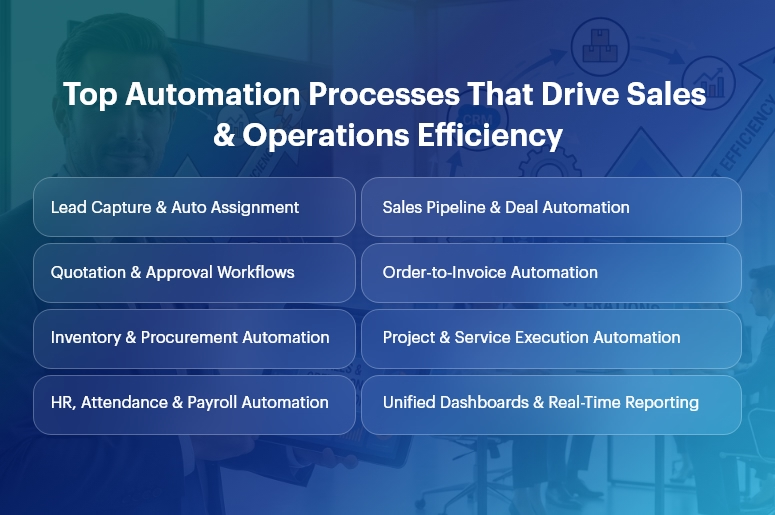
Top Automation Processes That Drive Sales & Operations Efficiency (1)

Business Need & Importance

Today’s small and mid-sized businesses operate in a high-pressure environment defined by shorter sales cycles, rising customer expectations, compliance demands, and margin sensitivity. However, many still rely on manual handoffs, spreadsheets, and siloed applications.

Why manual processes hurt growth

  • Delayed sales follow-ups and approvals reduce conversion rates and increase customer churn.
  • Disconnected operations and finance data lead to inaccurate forecasts and budget overruns.
  • Human-dependent workflows introduce errors, rework, and compliance risks.

This is why sales and operations automation has become mission-critical.

Industry examples

  • Manufacturing: Manual order processing and inventory updates cause production delays and excess stock. Automation synchronizes CRM orders with MRP, inventory, and invoicing.
  • Retail & Distribution: Disconnected sales, warehouse, and finance systems slow order fulfillment and distort margins. Automated workflows ensure real-time stock visibility and faster billing.
  • Professional Services: Project teams struggle with scope creep and delayed invoicing. Automation aligns sales commitments with project execution and revenue recognition.

Moreover, growing businesses can no longer afford spreadsheet-driven decision-making. As volumes scale, complexity increases exponentially. Sales and operations automation replaces guesswork with data-driven execution, ensuring speed, accuracy, and accountability across departments.

Best Practices, Frameworks & Actionable Tips

Core Automation Processes That Drive Impact

1. Lead-to-Opportunity Automation (CRM)

  • Automated lead capture, scoring, and routing ensure every inquiry is assigned instantly to the right salesperson based on rules, territory, or workload.
  • This eliminates response delays and improves conversion rates while giving managers pipeline transparency.

2. Sales Pipeline & Quotation Automation

  • Stage-based pipeline automation updates deal probability, expected revenue, and next actions automatically.
  • Integrated quotation workflows reduce pricing errors and speed up approvals using predefined discount and margin rules.

3. Order-to-Cash Automation

  • Once a deal closes, sales and operations automation triggers sales orders, delivery schedules, invoicing, and payment tracking automatically.
  • This removes manual handoffs between sales, operations, and finance, accelerating cash flow.

4. Inventory & Procurement Automation

  • Automated stock updates and reorder rules prevent stockouts and excess inventory.
  • Procurement workflows link demand forecasts with supplier orders, approvals, and GRNs.

5. Project & Service Delivery Automation

  • Sales commitments convert directly into projects, tasks, and resource plans.
  • Automated milestone tracking ensures timely delivery and accurate billing.

6. HR, Payroll & Attendance Automation

  • Employee onboarding, attendance, payroll, and compliance workflows run automatically.
  • This reduces administrative overhead and improves data accuracy across departments.

Implementation Best Practices

  • Start with high-impact, cross-functional workflows that involve multiple teams, such as lead-to-cash or order-to-invoice. These deliver faster ROI.
  • Standardize processes before automating. Automation amplifies efficiency — but it also amplifies inefficiencies if workflows are unclear.
  • Use role-based dashboards so sales, operations, and leadership see only what matters to them.
  • Automate approvals with guardrails, not bottlenecks. Define thresholds to balance speed and control.

Do’s and Don’ts

Do’s

  • Automate end-to-end, not in silos, to ensure continuity across CRM, ERP, HR, and finance.
  • Use real-time analytics to monitor performance and adjust workflows proactively.

Don’ts

  • Do not over-customize early, which increases maintenance and slows adoption.
  • Do not automate without change management — user adoption determines success.

Why Unified CRM Wins

Unlike point solutions, a unified CRM platform like CrmLeaf delivers true sales and operations automation by sharing a single data model across:

  • CRM: Leads, opportunities, and customer interactions
  • Projects & Manufacturing: Execution, delivery, and production planning
  • Inventory & Procurement: Stock, vendors, and logistics
  • HRMS & Payroll: Workforce and compliance
  • Finance: Invoicing, accounting, and reporting

This eliminates integrations, data duplication, and reconciliation delays—creating one source of truth.

Customer Success

For example, a mid-sized manufacturing company implemented sales and operations automation using CrmLeaf to address delayed order processing and poor forecast accuracy.

Their sales team struggled with manual quotations, while operations lacked visibility into confirmed demand.

Within 90 days, Apex automated lead-to-order workflows, synchronized CRM deals with production planning, and introduced real-time inventory updates.

As a result, they achieved 28% faster order fulfillment, 35% improvement in forecast accuracy, and 20% reduction in working capital tied to excess inventory.

More importantly, leadership gained unified dashboards spanning sales, operations, and finance — enabling faster, data-driven decisions and scalable growth.

Key Takeaways & Closing

Automation is no longer optional — it is the backbone of scalable growth. Businesses that embrace sales and operations automation gain speed, accuracy, and visibility across their entire value chain.

From lead management and order processing to delivery, payroll, and finance, automation removes friction and unlocks performance.

As competition intensifies in 2025, organizations that delay automation risk falling behind. Those that act now position themselves for sustainable, profitable growth powered by connected systems and real-time insights.

FAQs

1. What is sales and operations automation?

Sales and operations automation connects CRM, ERP, and business workflows to automate lead management, order processing, delivery, and reporting in real time.

2. How does sales and operations automation improve efficiency?

It eliminates manual handoffs, reduces errors, and accelerates workflows across sales, operations, and finance using shared data.

3. Is sales and operations automation only for large enterprises?

No. SMBs benefit even more, as automation helps them scale without adding operational overhead.

4. How long does it take to see ROI from sales and operations automation?

Most businesses see measurable improvements within 60–120 days when high-impact workflows are automated first.

5. Why choose a unified CRM for automation?

A unified platform ensures seamless sales and operations automation without integrations, data silos, or reconciliation delays.

6. Can automation adapt as my business grows?

Yes. Scalable platforms like CrmLeaf allow workflows, approvals, and analytics to evolve with your business needs.

7. Does automation replace human decision-making?

No. Sales and operations automation supports teams with real-time data, enabling faster and smarter decisions rather than replacing them.
Sales Automation: From Lead to Signed Contract

Salespeople are busiest when they’re doing what they do best: selling. But too often, they spend more time chasing leads, sending reminder emails, and updating spreadsheets than actually closing deals. Sound familiar?

That’s why we built CRMLeaf, a powerful sales automation software that helps you automate your sales process from the moment a lead shows interest to the moment they sign the contract—no more manual follow-ups.

What’s the Real Problem?

Let’s walk through a typical sales scenario:

  • A lead fills out a contact form on your website.
  • You send them a welcome email (maybe).
  • A few days go by — you forget to follow up.
  • You finally call, but they’ve already gone with a competitor.
  • You update your spreadsheet, feeling frustrated.

This manual process is slow, messy, and easy to forget. And you’re not alone; many teams lose leads just because they don’t follow up at the right time.

Here’s How CRMLeaf Helps You Automate Your Sales Process

Step 1: New Lead Comes In? CRMLeaf Jumps In First

Instead of checking your inbox or spreadsheets daily for new leads.

CRMLeaf automatically captures leads from your website, emails, or even Facebook ads. It’s a complete CRM for lead management with zero copy-pasting.

Step 2: Instant Auto-Reply

Instead of manually typing a welcome message every time.

With CRMLeaf, the lead receives a personalized automated follow-up email—“Hi John, thanks for reaching out! Let’s book a quick call.”

Step 3: Smart Follow-Ups — Even While You Sleep

Instead of setting reminders or forgetting to follow up.

With CRMLeaf, you create smart, timed workflows. Automated emails, calls, and SMS messages go out on Day 1, Day 3, and Day 7, fully automated and personalized.

This is true automated follow-up email functionality that works while you focus on closing.

Step 4: One-Click Proposals & Quotes

Instead of creating proposals manually in Word or Excel.

With CRMLeaf, generate one-click proposals with pricing, branding, and terms all pulled in automatically from your CRM data.

Step 5: Easy Digital Contracts

Instead of printing, signing, scanning, and emailing documents.

With CRMLeaf, send a digital contract for signing that your client can complete right from their mobile or desktop — fast, easy, and secure.

Step 6: Stay in the Loop with Dashboards

Instead of: Guessing where leads or deals are stuck.

With CRMLeaf, use a clear sales pipeline dashboard to view every deal stage, hot leads, team performance, and real-time status updates.

Extra Features That Add Real Value

  • CRM with Calendar Integration: Syncs with Google & Outlook to never miss a meeting or follow-up.
  • Lead Scoring CRM: Focus your time on high-potential leads.
  • Auto-reminders for clients: Gentle nudges for pending actions like signing or replying.
  • Document Storage: Proposals, contracts, and communication all in one place.
  • Mobile CRM App: Manage your entire sales process from anywhere.

What You Gain with CRMLeaf

  • Faster response times
  • More deals closed, in less time
  • Better customer experience
  • Less admin work for your team
  • More time spent selling, not updating spreadsheets

Real Talk: What You Truly Gain

  • More time for selling
  • More closed deals
  • Less stress and manual work

Final Thoughts

Sales automation isn’t just a buzzword; it’s the key to building a high-performing, scalable sales team. Whether you’re a solo entrepreneur or managing a fast-growing team, CRMLeaf helps you stay organized, responsive, and in control.

“Say goodbye to follow-up anxiety, missed leads, and paperwork. It’s time to stop juggling tasks and start automating.

Try CRMLeaf today and let your sales process run on autopilot from first hello to signed contract.

100 Days with CRMLeaf: A Story of Transformation, Growth, and Success

It all started with a simple, yet frustrating moment…

Damn, missed another lead again!

That one sentence made us stop and think.

We had too many leads coming from different sources — WhatsApp, website, references — but no proper system to manage them. Customer service was delayed. Sales follow-ups were missed. Excel sheets were confusing. And team coordination was messy.

We knew our business was growing, but managing it was becoming stressful.

That’s when we found CRMLeaf — a simple and smart CRM software made for all businesses.

The Struggles Before CRMLeaf

Like most businesses, we were working hard and focusing on our customers. But we were facing some big challenges:

  • Leads everywhere: scattered across WhatsApp, emails, and Excel sheets.
  • Missed follow-up: Sales reps didn’t have time to follow up on every lead.
  • Service delays: AMC renewals and service calls were being forgotten.
  • No team coordination: everyone was working in their own way, and communication was messy.
  • Manual reports: It took hours to generate reports, and they were often outdated.

We knew we needed a better system to help us manage this growth.

Why We Chose CRMLeaf

We observed many CRM systems, but most were either too complicated or too expensive. CRMLeaf stood out because it was simple, affordable, and had all the features we needed. We decided to give it a try with one goal in mind:

Serve our customers better and grow without stress.

The Big Change: 100 Days with CRMLeaf

After using 100 Days with CRMLeaf, here’s what we saw change:

All Leads in One Place

No more searching through WhatsApp, Excel, or emails. CRMLeaf collects all leads from different sources automatically and assigns them to the right team member. This makes sure no lead is missed.

No More Missed Follow-Ups

We now get automatic reminders for follow-ups. Every lead gets timely attention, and sales conversions have improved significantly.

Better Service and AMC Tracking

Service requests and AMC renewals used to be forgotten. Now, everything is tracked in one place, and our service team is always on top of things. Customers get timely support, and they appreciate it.

Instant and Easy Reports

Before CRMLeaf, it took us hours to prepare reports. Now, with just a click, we get real-time dashboards showing our sales, service, and customer feedback.

Better Team Coordination

Our sales, service, and support teams were once working in silos. Now, everyone uses CRMLeaf, so everyone knows what’s happening. No more confusion, and no more repeated questions to customers.

100 Days with CRMLeaf

What Our Customers Say

One of our oldest customers said something that made us proud:

Earlier, I had to follow up multiple times. Now, your team reaches out before I even ask. It feels much more professional.

That’s the power of CRMLeaf — it helps businesses work smarter, and customers feel the difference.

100 Days, Big Results

  • 87% of our customers gave positive feedback.
  • Lead conversion improved by 40%.
  • Service response time doubled.
  • We have had no missed follow-ups after the first month.
  • Our teams are working faster and happier.

Built for Growing Businesses Like Ours

CRMLeaf isn’t just for big companies. It works for businesses of all sizes, one or many heads. Whether you’re in manufacturing, services, retail, or tech, CRMLeaf adapts to your needs. It supports remote teams and different languages and is easy to use, even for field staff.

What We Learned

  • CRM is not just for large companies. Even small and mid-sized businesses benefit from it.
  • The right CRM = Better teamwork + Better customer service + More growth.

Ready for the Next 100 Days?

We started with some doubts, but now, CRMLeaf is at the heart of our daily operations. It has helped us grow with less stress, better organization, and happier customers. To the CRMLeaf team, thank you for creating a solution that works. To our team, we appreciate how quickly you adapted to the change, and to our customers, your trust in us is our biggest success. Here’s to the next 100 days with CRMLeaf — let’s grow together!

How CRM Transforms Business Success: From Leads to Lifetime Customers

Managing relationships manually or using outdated spreadsheets leads to lost opportunities, poor customer service, and inefficiency.

That’s where Customer Relationship Management (CRM) software comes in.

CRM isn’t just a tool—it’s a strategic asset that helps businesses convert leads, nurture relationships, and build lasting customer loyalty.

Whether you’re a startup or a large enterprise, CRM ensures every interaction with a customer is meaningful and drives growth.

In this blog, we’ll explore how CRM transforms business success, from lead generation to customer retention.

1. Capturing and Managing Leads Efficiently

Problem: Many businesses struggle with scattered lead data and missed follow-ups, leading to lost potential customers.

How CRM Helps:

  • Centralized Lead Database: Stores all lead information in one place, making it easily accessible.
  • Automated Lead Capture: Integrates with websites, social media, and email to capture leads automatically.
  • Lead Scoring & Qualification: Helps prioritize high-potential leads based on behavior and engagement.
  • Automated Follow-Ups: Ensures timely engagement with leads through email sequences and reminders.

With CRM, businesses can track every lead from the first interaction, ensuring no opportunity is wasted.

2. Streamlining Sales Processes for Higher Conversions

Problem: Sales teams often waste time on unqualified leads, inconsistent follow-ups, and a lack of coordination.

How CRM Helps:

  • Sales Pipeline Management: Tracks leads through different sales stages, helping sales reps close deals faster.
  • Task Automation: Schedules meetings, follow-ups, and reminders automatically.
  • Data-Driven Insights: Provides reports on customer behavior, sales performance, and bottlenecks.
  • Integration with Communication Channels: Connects with email, phone, and chat tools to ensure seamless interactions.

CRM Transforms increases sales efficiency by giving teams the tools and insights they need to close more deals.

3. Enhancing Customer Service & Support

Problem: Poor customer service leads to frustration, negative reviews, and lost business.

How CRM Helps:

  • 360-Degree Customer View: Keeps track of past interactions, preferences, and issues for personalized service.
  • Ticket Management & Support Automation: Assigns and tracks customer queries efficiently.
  • Live Chat & AI Bots: Provides instant responses and support for common issues.
  • Customer Feedback & Surveys: Gathers insights to improve service quality.

With CRM trans, businesses can offer exceptional customer experiences that keep clients satisfied and loyal.

4. Boosting Customer Engagement & Retention

Problem: Businesses often focus on acquiring new customers but neglect existing ones.

How CRM Helps:

  • Personalized Marketing Campaigns: Sends tailored emails, offers, and recommendations based on customer behavior.
  • Loyalty Programs & Discounts: Reward repeat customers to strengthen relationships.
  • Proactive Customer Engagement: Uses data to anticipate customer needs and offer solutions before they ask.
  • Customer Segmentation: Divides customers into categories based on demographics, purchase history, and engagement level.

By leveraging CRM, businesses turn one-time buyers into loyal brand advocates.

5. Data-Driven Decision Making for Business Growth

Problem: Many businesses make decisions based on guesswork rather than real data.

How CRM Helps:

  • Real-Time Analytics & Reports: Tracks sales trends, customer behavior, and marketing performance.
  • Predictive Insights: Uses AI to forecast customer needs and sales opportunities.
  • Performance Metrics: Measures team productivity and customer satisfaction.
  • Customizable Dashboards: Provides easy-to-understand visual reports for quick decision-making.

CRM empowers businesses with actionable insights to optimize strategies and drive sustainable growth.

Conclusion: CRM as the Backbone of Business Success

From capturing leads to nurturing lifelong customer relationships, CRM Transforms is an essential tool for modern businesses.

It enhances efficiency and personalized interactions and drives business growth with data-driven insights.

If you want to scale your business and build lasting customer relationships, investing in a powerful CRM solution like CRMLeaf is a game-changer.